
內容簡介
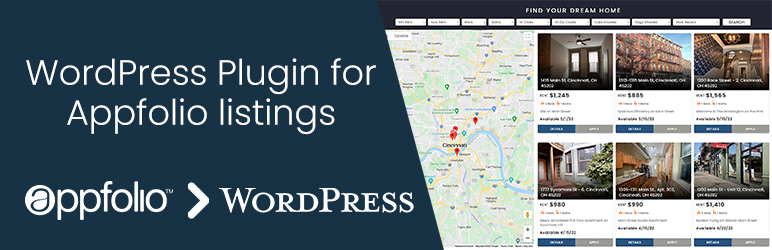
「Listings for Appfolio」是一款輕量級的物業列表外掛,允許您使用簡碼從 Appfolio 帳戶將您的物業列在WordPress 站點上。
顯示 appfolio 物業的舊 iframe 方法不允許站點擁有人自定義列表的樣式。此外掛將使您可以自由更改列表頁面。
您所有的 appfolio 物業都會以交互方式顯示,並且您可以輕松使用 CSS 自定義它們。列表頁面還可以選擇顯示 Google 地圖。您還可以獲得來自 appfolio 物業列表頁面的所有篩選器。
免費版演示
專業版演示(附有自訂面板)
簡碼:[apfl_listings]
將其放在您想要顯示列表的位置。建議使用全寬頁面以獲得更好的樣式。
注意:此外掛取決於「allow_url_fopen」從 Appfolio 物業列表頁面獲取內容。請在您的 php.ini 文件中添加「allow_url_fopen = 1」或聯繫您的主機商為您啟用它。
您需要在外掛設置中輸入類似於此的 Appfolio 帳戶頁面 URL - https://example.appfolio.com
可選擇在外掛設置中輸入 Google 地圖 JS API 金鑰,以啟用顯示列表的 Google 地圖。
如果您有任何反饋或新功能請求,請通過創建支持票證讓我知道,我會盡快增加/改進。
查看我們的其他外掛 - Listings for Buildium
功能
提供 Appfolio 屬性的易於設置的外掛。
iframe替代方法,可讓您對佈局和樣式進行任何自定義。
提高了 SEO。
無需手動添加列表項目。
無需手動同步 Appfolio 帳戶的列表。
篩選器可用於搜索特定屬性列表。
顯示列表的 Google 地圖會隨篩選結果更新。
互動式 3 列設計列表。
單個物業列表在同一頁面打開。
易於使用的簡碼。
互動圖庫列出物業圖像。
新增「安排查看」按鈕。
專業版功能
WordPress 後端的自定義選項。
支持從多個 Appfolio 帳戶載入列表。
支持從不同群組載入列表。例如商業|住宅。
租賃詳細信息頁面的單獨頁面/佈局。
幻燈片和輪播。
圖庫中的視頻支持。
在不同頁面上顯示住宅、商業或所有列表。
隱藏/顯示篩選器、按鈕、價格、可用性、標題、地址等。
更換臥室和浴室標籤的圖示。
1列和2列設計選項。
圖庫彈出窗口/燈箱顯示全尺寸圖像。
切換不同的搜索篩選器選項。
外掛標籤
開發者團隊
原文外掛簡介
The Listings for Appfolio WordPress plugin is a tool designed to integrate Appfolio property management services with WordPress websites. It helps property managers and real estate professionals seamlessly display their property listings on their WordPress site by pulling data directly from their Appfolio account using a shortcode.
😍 Appfolio + WordPress Integration made Simple
The old iframe method of displaying appfolio listings does not allow site owners to customize the styling of the listings. This plugin will give you freedom to make any changes to the listings page.
All your appfolio listings will be shown in an interactive way which you can customize using CSS easily. Listings page have an optional google map as well. You will also get all the filters from your appfolio listings page.
📣 Check the Demo Here
Eagle Template Demo
Hawk Template Demo (PRO)
Listings Slider (PRO)
Carousel Layout (PRO)
🗝️ Key Features of the Plugin
Automatic Listing Sync:
The plugin fetches 6 property listings from AppFolio in real time. PRO version gets all your listings.
Updates to properties in AppFolio (e.g. availability or pricing) are automatically reflected on the website.
Schedule-a-Showing & Apply-Now buttons linked directly to your Appfolio account.
SEO improvement of site content with latest property listings.
Interactive Listings Design:
iFrame alternative method which allows you to do any customization on the layout and styling.
Offers multiple layout options, including pre-built Templates.
Detailed single property view.
Interactive gallery to list the property images.
Customizable to match the theme and branding of your WordPress website.
Mobile-Friendly Design:
The plugin ensures all listings are mobile-responsive, offering a seamless user experience on all devices.
Interactive 3 columns design for Desktop and Single column for Mobile.
Search and Filter Options:
Includes filter features, such as beds, baths, and price range.
Helps users find relevant properties quickly and efficiently.
Easy Installation and Setup:
Simple configuration process with minimal technical knowledge required.
🚀 Advanced features of PRO version
Advance Search:
Display All Listings without any limitations.
Includes advanced search and filter features, such as location, price range, property type, and more.
Google Map showing the listings that update with the filtered results.
Hawk Template:
Modern designed property listings with Search & Filters at top, Google Map on Left side and Listings on right side.
1 column and 2 columns design options.
Customization Options:
Create a layout style that fits your website’s design.
Design Banner with heading & subheading text, font-size, font-weight, font-color, line-height, text-alignment, background color, space around it. You can even add an image background.
Filters option to enable/disable like- Min Rent, Max Rent, Beds, Baths, Cities, ZIP, Desired Move in date, Sorting.
Set default sort order by Most Recent, Rent Low-High, Rent High-Low etc.
Search bar can be enabled/disabled, and design your search button. Option to add Search-By-Address in the filters box.
Pagination can be enabled and set number of listings per page.
Customizable & enable/disable content like Rent Price, Availability, Listings Title, Address, Beds, Baths. Replaceable icons for bedroom and bathroom labels.
Design Buttons like Details, Apply, Schedule with show/hide options, Text color, text hover color, button background color, button hover background color.
Option to use large images.
Set default Map Zoom.
Custom Apply Link can be used.
If you need more design desires we have an option to add your custom CSS code.
Slider & Carousel:
The Slider and Carousel shortcodes allow you to effortlessly create beautiful listing galleries.
Options to set the number of slides and use Recent Listings.
Group Listings:
Support for loading listings from different groups. E.g Commercial | Residential.
Display Residential, Commercial or all listings on different pages.
Listings Gallery:
Video content support in Single Listing Gallery.
Gallery popup/lightbox showing full size images.
Single Listing Design:
Separate page/layout for Rental details page.
Display Residential, Commercial or all listings on different pages.
Options to Show/Hide Rent Price & Listing Title. Change its text color and html tag. Also you can hide “Per Month” text after the price.
Customizable Buttons for Contact, Apply, Schedule Showing.
Custom Contact-Us button Link.
🚀 How it works:
Install Plugin: Download and Install Listings For Appfolio WordPress Plugin.
Plugin Settings: You will need to enter your appfolio account page URL in the plugin settings that looks like this – https://example.appfolio.com
Use Shortcode: Create a page and use a shortcode block. Insert shortcode and save the page.
Shortcode: [apfl_listings]
A full-width page is recommended for better styling.
It’s done.
Documentation | Change Log | Contact Support | Get PRO Version
If you have any feedback or new feature request, please let us know by creating a support ticket and we will add/improve it as soon as possible.
📣 Other Listings Plugins
Listings for Buildium
Listings for RentVine
Listings for ShowMojo
Listings for PropertyWare
Listings for RentManager
Listings for TenantTurner