
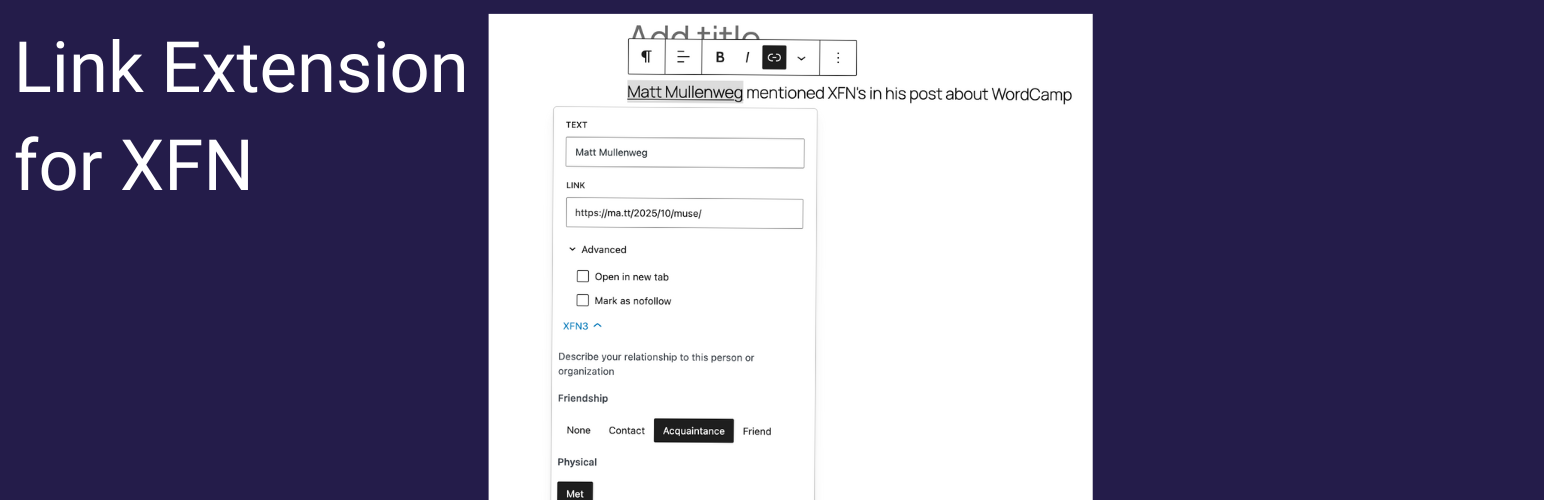
內容簡介
總結:此 XFN 關係鏈接擴展外掛將 XFN(XHTML 朋友網絡)關係選項無縫集成到 WordPress 原生的鏈接介面中。該外掛通過直觀的可折疊接口,增強了每個支持鏈接的塊,包括段落、按鈕、導航、列表等等,具有全面的關係標記功能。
問題與答案:
1. 這個外掛主要功能是什麼?
答:將 XFN 關係選項無縫集成到 WordPress 的原生鏈接介面中,增強支持鏈接的每個塊的關係標記功能。
2. XFN 是用來做什麼的?
答:XFN 是一種使用超鏈接來表示人際關係的簡單方法。通過添加 XFN 關係到您的鏈接中,您可以指示您與連結到的人和組織的聯繫方式,從而創建更具語義和意義的網絡。
3. 這個外掛實現了哪個 XFN 1.1 規範的所有關係類別?
答:友誼關係、身體關係、專業關係、地理關係、家庭關係、浪漫關係、身份關係。
4. 外掛提供了哪兩個方便的位置來控制 XFN?
答:鏈接高級面板(常時啟用)和檢查器控制(可選)。
5. 外掛如何與 WordPress 進行無縫整合?
答:外掛延伸了現有的鏈接介面,不影響您的工作流程,與段落、按鈕、導航、列表、嵌入等所有支持鏈接的塊相容,保留現有的 rel 屬性,並無需配置,立即在啟動後就可使用。
外掛標籤
開發者團隊
原文外掛簡介
The XFN Relationship Link Extension seamlessly integrates XFN (XHTML Friends Network) relationship options into WordPress’s native link interface. This plugin enhances every block that supports links—including Paragraph, Button, Navigation, List, and more—with comprehensive relationship tagging capabilities through an intuitive collapsible interface.
XFN is a simple way to represent human relationships using hyperlinks. By adding XFN relationships to your links, you can indicate how you’re connected to the people and organizations you link to, creating a more semantic and meaningful web.
Key Features
Complete XFN 1.1 Specification Support
This plugin implements the full XFN 1.1 specification with all relationship categories:
Friendship relationships: contact, acquaintance, friend
Physical relationships: met (have you met this person?)
Professional relationships: co-worker, colleague
Geographical relationships: co-resident, neighbor
Family relationships: child, parent, sibling, spouse, kin
Romantic relationships: muse, crush, date, sweetheart
Identity relationships: me (link to yourself)
Dual Interface Integration with Collapsible Design
The plugin provides XFN controls in two convenient locations, both featuring a clean collapsible interface:
Link Advanced Panel (Always enabled): Collapsible XFN section in link popovers for inline links – works immediately after installation
Inspector Controls (Optional): Panel in the block sidebar for Button, Image, Navigation, and Embed blocks – enable in Settings → Link Extension for XFN
Seamless Integration with WordPress
The plugin extends the existing link interfaces without disrupting your workflow:
Works with Paragraph, Button, Navigation, List, Embed, and all other link-supporting blocks
Compatible with both Post Editor and Site Editor
Preserves existing rel attributes (nofollow, noopener, noreferrer)
No configuration required – works immediately after activation
Clean collapsible interface matches WordPress design patterns
Advanced User Interface with Collapsible Sections
The relationship selection interface is designed for optimal usability with modern collapsible design:
Collapsible XFN sections: Clean toggle buttons with expand/collapse animation
Visual relationship pills: Color-coded indicators show active relationships at a glance
Count badges: Quickly see how many relationships are active without expanding
Intelligent grouping: Related options are logically organized by category within sections
Button groups: Modern toggle-style buttons for easy relationship selection
Mutual exclusivity: Button groups prevent conflicting relationships (e.g., can’t be both “friend” and “acquaintance”)
Multi-selection support: Checkbox-style groups allow multiple compatible relationships
Real-time validation: Prevents invalid relationship combinations
Smooth animations: Fluid expand/collapse transitions
How to Add XFN Relationships to Links
Quick Start
After installation, XFN options are immediately available for inline links (links within paragraphs, headings, lists).
To use XFN with Button, Image, Navigation, and Embed blocks, go to Settings → Link Extension for XFN and enable Inspector Controls.
Method 1: Using Link Advanced Panel (Always Available)
Create or edit an inline link in any block (Paragraph, List, etc.)
In the link popover, click “Advanced” to expand additional options
Find the “XFN” collapsible section and click to expand
Select relationships using the organized button groups
See your active relationships in the summary pills
Click “Apply” to save your XFN relationships
Method 2: Using Inspector Controls (Enable in Settings)
Go to Settings → Link Extension for XFN and enable Inspector Controls
Select a Button, Image, Navigation, or Embed block
Look in the right sidebar – “XFN Relationships” panel opens by default
Select relationships using radio buttons and checkboxes organized by category
Relationships save automatically as you select them
View active relationships in the summary section with color-coded pills
Understanding XFN Relationship Categories
Friendship Relationships (Choose One)
These are mutually exclusive – you can only select one friendship level per person:
contact: Someone you know how to get in touch with
acquaintance: Someone you’ve met but don’t know well
friend: Someone you consider a friend
Physical Meeting
met: Check this if you’ve met this person face-to-face
Professional Relationships (Multiple Allowed)
co-worker: Someone you work with at the same company
colleague: Someone in your professional field or industry
Geographical Relationships (Choose One)
co-resident: Someone who lives in the same residence
neighbor: Someone who lives nearby
Family Relationships (Choose One)
child: Your child
parent: Your parent
sibling: Your brother or sister
spouse: Your husband, wife, or domestic partner
kin: Other family relation
Romantic Relationships (Multiple Allowed)
muse: Someone who inspires you
crush: Someone you have romantic feelings for
date: Someone you’re dating
sweetheart: Someone you have a romantic relationship with
Identity
me: A link to your own content or profiles
Integration with Popular Blocks
Button Block
Use the Inspector Controls for quick relationship assignment. The XFN Relationships panel opens by default, letting you select relationships that save automatically.
Navigation Block
Enhance your site navigation with relationship context using the Inspector Controls. Mark links to your social profiles, partner sites, or affiliated organizations with the organized collapsible interface.
Embed Block
Add semantic meaning to embedded content from YouTube, Twitter, and other platforms. Use the Inspector Controls to indicate relationships with embedded content creators, marking videos from colleagues, friends, or your own channels. Perfect for blogrolls, resource pages, and content aggregation.
Paragraph Block (Inline Links)
For inline links within paragraph content, use the collapsible XFN section in the link popover’s Advanced area to add relationship context without overwhelming the interface.
List Block
Build relationship-rich link lists using the Link Advanced Panel for inline links or Inspector Controls for block-level links. The collapsible sections make it easy to manage multiple relationships across list items.
Cover Block and Media & Text Block
Add relationship context to overlay links and media-associated links using the Link Advanced Panel for inline links or Inspector Controls for block-level elements.
Technical Implementation
Source Code & Build Tools
This plugin uses build tools to compile and optimize code for production.
All uncompiled, human-readable source code is included in the plugin’s src/ directory and is publicly available on GitHub.
Source files (uncompiled):
* JavaScript: src/index.js (main plugin logic)
* Styles: src/editor.scss (editor styles)
* Additional: src/view.js, src/edit.js, src/save.js
Compiled files (production):
* JavaScript: build/index.js, build/view.js
* Styles: build/index.css, build/index-rtl.css
Build tools:
* Build system: WordPress Scripts (webpack-based)
* Required: Node.js 14+ and npm
* Build command: npm run build
* Development mode: npm start (watches for file changes)
How to rebuild from source:
1. Clone or download from GitHub: https://github.com/courtneyr-dev/xfn-link-extension
2. Install dependencies: npm install
3. Build production files: npm run build
4. Output will be in the build/ directory
GitHub repository (complete source): https://github.com/courtneyr-dev/xfn-link-extension
Rel Attribute Management
The plugin intelligently manages the HTML rel attribute:
Combines XFN relationships with existing rel values
Preserves SEO-important attributes like nofollow
Maintains security attributes like noopener and noreferrer
Uses space-separated format per HTML specification
Validates relationship combinations to prevent conflicts
Data Persistence
Relationships are stored in the standard HTML rel attribute
No custom database tables or meta fields required
Compatible with all WordPress import/export tools
Relationships survive theme changes and plugin deactivation
Performance Optimized
Lightweight JavaScript bundle under 12KB gzipped
Lazy-loaded collapsible sections only when accessed
No impact on frontend performance
Uses WordPress core components for consistency
Smooth animations without performance penalties
Migration from Other XFN Plugins
If you’re migrating from another XFN plugin:
Classic Editor plugins: Existing XFN data in post meta will be preserved
Custom rel attributes: Any existing rel values are maintained
Manual XFN: Manually entered XFN relationships in rel attributes work immediately
Troubleshooting
XFN options don’t appear in floating toolbar
Check block type: Only blocks that are entirely links (Button, Navigation Link, etc.) show the XFN toolbar button
Verify WordPress version: Requires WordPress 6.4 or later
Clear browser cache: Try refreshing the page or clearing browser cache
Check for block selection: Ensure the block is properly selected
XFN section won’t expand in link popover
Check Advanced section: XFN options appear when you click “Advanced” in the link popover, then look for the “XFN” toggle
Try clicking the toggle: The XFN section requires an additional click to expand
Verify in block editor: Plugin only works with Gutenberg blocks, not Classic Editor
Check browser console: Look for JavaScript errors that might prevent interaction
Collapsible sections not animating smoothly
Check browser compatibility: Ensure you’re using a modern, supported browser
Verify CSS loading: Check that plugin stylesheets are loading properly
Test in incognito mode: Rule out browser extension interference
Disable other plugins: Test for plugin conflicts by temporarily disabling other plugins
Count badges not updating
Try refreshing: Sometimes a page refresh resolves display issues
Check JavaScript console: Look for errors that might prevent updates
Test relationship changes: Make sure you’re actually changing relationships
Verify plugin activation: Ensure the plugin is properly activated
Relationships not saving properly
Check browser console: Look for JavaScript errors that might prevent saving
Verify user permissions: Ensure you have permission to edit the content
Test with default theme: Temporarily switch to a default WordPress theme
Disable other plugins: Test for plugin conflicts by temporarily disabling other plugins
Keyboard navigation issues with collapsible sections
Test tab order: Use Tab key to navigate to toggle buttons
Try space/enter: Space or Enter should expand/collapse sections
Use arrow keys: Arrow keys work within expanded button groups
Check browser settings: Ensure keyboard navigation is enabled in browser settings
Screen reader compatibility with collapsible interface
Test with multiple screen readers: NVDA, JAWS, and VoiceOver are all supported
Check expansion announcements: Section state changes should be announced
Verify ARIA states: All collapsible elements should have proper ARIA attributes
Update screen reader: Ensure you’re using a current version of your screen reader














