全新外掛
安裝啟用
—
尚無評分
1498 天前
最後更新
—
問題解決
WordPress 4.5.0+ v1.0.0 上架:2020-09-25
內容簡介
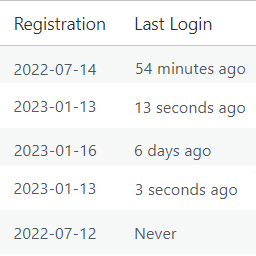
這是一個輕量級的外掛程式,可讓您按照最後一次登錄時間/日期查看活躍用戶。無需配置,只需啟用「最後登錄時間」即可使用!這會將一個自定義列添加到 WordPress 用戶列表中,名為「最後登錄時間」,並帶有與該用戶相連結的時間戳。
功能:
顯示用戶最後登錄您的網站的時間。
在 WordPress 用戶列表中按最後登錄時間戳(升序/降序)排序用戶。
任意部分
簡要的 Markdown 範例
外掛標籤
開發者團隊
📦 歷史版本下載
原文外掛簡介
A lightweight plugin that allows you to see active users according to their last login time/date. No need to configure, simply activate the Last Login Time and you’re ready to go! This adds a custom column to your WordPress users list of “Last Login” and a timestamp linked to that user.
Feature:
Show when last a user has logged into your site.
Sorts users according to the last login timestamp (Ascending/Descending) in the WordPress user list.
Arbitrary section
A brief Markdown Example