外掛標籤
開發者團隊
原文外掛簡介
Tables your visitors can actually use: a price list they can search, a product list they can sort and filter, a pricing table that looks right on a phone. LAFU Tables puts them on any WordPress site, made in an editor that works like a spreadsheet.
Every row of the current page is written into the page itself. The table shows the moment the page opens, search engines can read it, and searching, sorting, filters and paging keep working even when JavaScript is off. With JavaScript on, the same controls update the table in place without reloading the page.
Completely free. No account, no fee, no upsell screens.
Why sites choose LAFU Tables
Light pages. Pages without a table load nothing from LAFU Tables. A page with a table adds one small script and one stylesheet, no jQuery.
Big tables stay quick. Sorting and filters use their own database index, so a table with 100,000 rows still answers in a blink.
Edit like a spreadsheet. Type in place, move with Tab and the arrow keys, paste straight from Excel, drag rows and columns, undo, and every change saves by itself.
Looks like your site. Tables take your theme’s fonts and colours, in light and dark, and you pick the look with one click.
Clear on every screen. On a phone, rows turn into cards, or columns fold away behind a button, or the table scrolls sideways. You choose, per table.
Tables
Unlimited tables, rows and columns.
Column types: text, long text, number, date, HTML, link or button, image and choice.
Search, column sorting, column filters, paging and rows per page.
Forgiving search: accents do not matter, and a search with no results offers a close match for a typo.
Footer totals, row groups, rows that open a page, captions and descriptions.
Images open large in a lightbox, and a Print button prints this page or every row, without the rest of the page. Each loads only on a table that uses it.
22 ready templates: price lists, opening hours, schedules, team directory, product lists, pricing and comparison tables.
A short welcome on first use: pick a template, paste from a spreadsheet or import a file, pick a look, and get the shortcode.
Folders to keep many tables in order, and a choice of which user roles may manage tables.
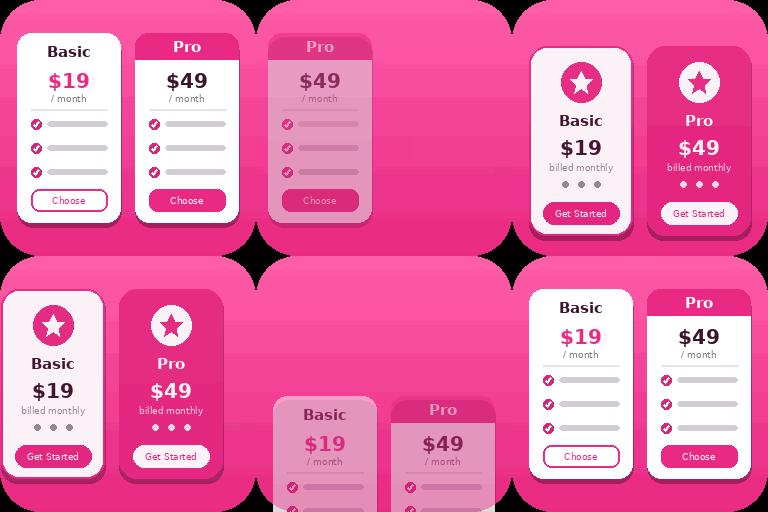
Pricing and comparison tables
A drag and drop builder for layout tables: merge and split cells, cell colours, a highlighted column.
Elements in cells: text, button, icon, star rating, list, HTML and shortcode.
Plan cards stack neatly on phones; comparison tables keep their row labels in view.
Styles
Five looks: Clean, Minimal, Grid, Bold header and Soft cards.
Your accent colour, stripes, hover, lines between rows or around every cell, compact rows, sticky header and a fixed first column.
Colour scheme from your theme, from the visitor’s device, or always light or dark.
Hide columns per screen size, with six sizes from phone to wide screen.
Everywhere you build
A block with a live preview.
The [lafu_tables] shortcode, with options to show part of a table on any page.
An Elementor widget, loaded only when Elementor is active.
Polylang and WPML: table texts are translated, or each language shows its own table. Loaded only when one of them is active.
Import and export
CSV, JSON and Excel (.xlsx) files in and out.
Import from TablePress, Ninja Tables and wpDataTables.
Built right
Measured with our own benchmark (part of our test suite, not shipped) on a 4-core test server in October 2026: with 100,000 rows, new rows showed 97 ms after a sort click and 86 ms after a filter pick in a real browser, and the server answered a search in under 50 ms at 100,000 and at 1,000,000 rows.
A page with a table makes the same five database queries at 1,000 rows and at 1,000,000 rows.
The script on a table page is under 4 KB and the stylesheet about 7 KB, both gzip.
Our test suite checks the table with JavaScript off, runs axe accessibility checks in a real browser on tables in light and dark and on every admin screen (no violations), measures layout shift (under 0.05) at phone and desktop width while searching, sorting and paging, and checks permissions on every REST route.
Private and draft tables are never shown to visitors, and only columns you mark as public are ever sent.
Translated into 20 languages, including Arabic and Persian, written right to left.
Privacy tools: WordPress’s personal data export and erase cover LAFU Tables, and it suggests text for your privacy policy.
For developers
Shortcode: [lafu_tables id="12"]. Options: per_page, limit, skip, columns="name,price", sort="price", sort="-price" or sort="brand,-price", sorting="0", search="no" or a starting search, filter (all words must match; OR, -word and “quoted phrases” work), filter_column with {gt}10, {lt}10, ~10:20 and dates such as ~{date-7}:{date}, get_filter="brand" (takes the filter from ?brand= in the address), filter_selects="Brand=Kivi", hide_default_filter, style, hide_header, logged_in_only, info="Page {CP} of {TP}".
[lafu_tables_info id="12" field="total_rows"] and [lafu_tables_cell id="12" row_id="5" column="price"] show table details and single values anywhere.
Hooks: lafu_tables_sources, lafu_tables_column_types, lafu_tables_importers, lafu_tables_modules, lafu_tables_query_args, lafu_tables_query_result, lafu_tables_cell_html, lafu_tables_cell_allowed_html, lafu_tables_row_attrs, lafu_tables_toolbar, lafu_tables_after_table, lafu_tables_table_settings_schema, lafu_tables_allowed_html, lafu_tables_admin_tabs, lafu_tables_new_table_choices, lafu_tables_view, lafu_tables_display_table, lafu_tables_translate_text, lafu_tables_translatable_texts, and the actions lafu_tables_table_created, lafu_tables_table_updated, lafu_tables_table_deleted and lafu_tables_table_changed.
WP-CLI: wp lafu-tables tables. Subcommands: tables, modules list|on|off, doctor --repair, reindex
REST API under lafu-tables/v1.
Source code: the admin screens are written in readable JSX in admin/src and bundled, not minified, into admin/build/ltable-admin.js with esbuild. To rebuild, run this in the admin folder: npx [email protected] src/index.jsx --bundle --format=iife --target=es2019 --jsx-factory=wp.element.createElement --jsx-fragment=wp.element.Fragment --legal-comments=inline --charset=utf8 --banner:js="/*! LAFU Tables admin. Source in admin/src. GPL-2.0-or-later. */" --outfile=build/ltable-admin.js. The block (blocks/table/index.js) and the visitor script (assets/front/view.js) are plain JavaScript with no build step.
LAFU Tables Pro
Everything above is free and stays free. For sites that want more, the separate LAFU Tables Pro add-on adds:
WooCommerce product tables with quantities, variations and add to cart
Live sources: posts and custom post types, Google Sheets, CSV and JSON links, with scheduled sync
16 ready designs for tables, such as a menu, a price list, a report or dark neon, plus your own saved designs
Conditional formatting and formula columns
Filter builder: dropdowns, checkboxes and ranges, in the toolbar or a panel
Editing on the site for the roles you choose
Charts from a table
Download buttons for visitors: CSV, JSON and Excel
More layout elements: image, ribbon, progress bar and more
Credits
The icons in the admin screens and in layout tables are from Lucide (ISC licence, https://lucide.dev), drawn into the plugin as inline SVG. No fonts are bundled: tables use your theme’s fonts, and nothing is loaded from other servers.