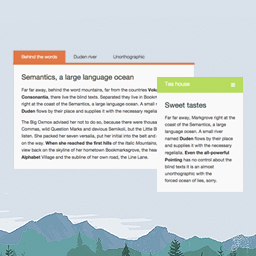
內容簡介
這個外掛可以在你的 WordPress 網站中添加多個令人驚艷的響應式選項卡滑動。這是使用自訂文章實現的。
使用方法:
以下是詳細的使用手冊:
安裝外掛程式(安裝方法在“安裝”部分中)。
在 WordPress 儀表板中找到名為“Tabs”的自訂文章,並單擊其子選單:新增。同時,您也可以新增分類。
使用短碼在 WordPress 網站的任何地方顯示所有選項卡。
[tab-slider]
4. 這個外掛支援 5 種樣式。若要更改樣式,請添加短碼屬性“style”,值為: one、two、three、four 或 five。例如:
[tab-slider style="three"]
或者
[tab-slider style = "five"]
提示:預設值為
[tab-slider style = "one"]
5. 如果您想在您的網站上添加多個選項卡滑動,請確保為每組選項卡滑動提供唯一的 ID。例如:
[tab-slider style="two" id="1"]
[tab-slider style="two" id="2"]
[tab-slider style="two" id="3"]
因此,您可以添加任意多個選項卡滑動。
6. 如果您想在不同的選項卡滑動中顯示不同的選項卡(即不同的內容),請確保為每組選項卡滑動提供唯一的 ID,並為它們設置分類。例如:
[tab-slider style="two" id="1" category="fish"]
[tab-slider style="two" id="2" category="flower"]
[tab-slider style="two" id="2" category="wordpress"]
外掛標籤
開發者團隊
原文外掛簡介
This plugin enables you to add multiple awesome responsive tabbed sliders in your WordPress site. This uses custom posts.
Usage:
Here’s a step by step user manual:
Install the plugin. (Find the instructions in the “Installation” section.)
Find the custom post “Tabs” in your WordPress dashboard and click on it’s submenu: Add New. You can add category as well.
Use the shortcode to show all your tabs anywhere in your WordPress site.
[tab-slider]
4. This plugin supports 5 styles. To change style, add shortcode attribute “style” and the value will be: one, two, three, four or five. Example:
[tab-slider style="three"]
or
[tab-slider style="five"]
Note: Default is
[tab-slider style="one"]
5. If you want to add multiple tab-sliders in your site, make sure you provide unique IDs to each set of tab-sliders. Example:
[tab-slider style="two" id="1"]
[tab-slider style="two" id="2"]
[tab-slider style="two" id="3"]
and thus you can add as many tab-sliders as you want.
6. If you want to show different tabs (i.e. different contents) in different tab-sliders, make sure you provide unique IDs to each set of tab-sliders and set categories to them. Example:
[tab-slider style="two" id="1" category="fish"]
[tab-slider style="two" id="2" category="flower"]
[tab-slider style="two" id="2" category="wordpress"]