
內容簡介
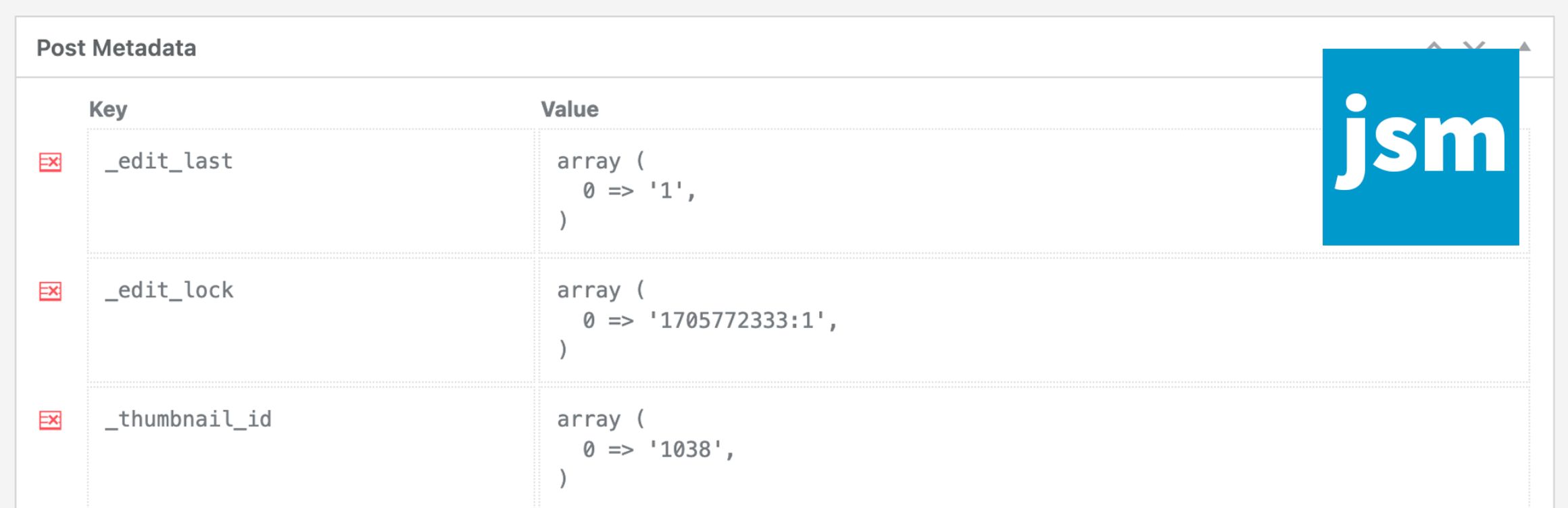
JSM Show Post Metadata 外掛可在文章編輯頁面底部顯示文章的元資料,包括自定義欄位名稱及其未序列化的值,方便使用者查看和管理文章的元數據。
【主要功能】
• 顯示文章元資料於編輯頁面底部
• 支援自定義欄位名稱顯示
• 無需額外設定,安裝後即可使用
外掛標籤
開發者團隊
原文外掛簡介
The JSM Show Post Metadata plugin displays post (ie. posts, pages, and custom post types) meta keys (aka custom field names) and unserialized values in a metabox at the bottom of the post editing page.
Note that if you’re using WooCommerce HPOS (High-Performance Order Storage), available since WooCommerce v8.2, then your WooCommerce orders are NOT post objects and you should use the JSM Show Order Metadata plugin instead.
There are no plugin settings – simply install and activate the plugin.
Available Filters for Developers
Filter the post meta shown in the metabox:
'jsmspm_metabox_table_metadata' ( array $metadata, $post_obj )
Array of regular expressions to exclude meta keys:
'jsmspm_metabox_table_exclude_keys' ( array $exclude_keys, $post_obj )
Capability required to show post meta:
'jsmspm_show_metabox_capability' ( 'manage_options', $post_obj )
Show post meta for a post type (defaults to true):
'jsmspm_show_metabox_post_type' ( true, $post_type )
Capability required to delete post meta:
'jsmspm_delete_meta_capability' ( 'manage_options', $post_obj )
Icon for the delete post meta button:
'jsmspm_delete_meta_icon_class' ( 'dashicons dashicons-table-row-delete' )
Related Plugins
JSM Show Comment Metadata
JSM Show Order Metadata for WooCommerce HPOS
JSM Show Post Metadata
JSM Show Term Metadata
JSM Show User Metadata
JSM Show Registered Shortcodes














