內容簡介
### 網站檔案虛擬化解決方案
- 可透過 WordPress 控制台直接建立和管理 robots.txt、XML 網站地圖、ads.txt、security.txt、RSS feeds 和 JSON 檔案,無需使用 FTP 存取。
- 這些檔案可以在任何路徑深度創建(例如:yoursite.com/robots.txt、yoursite.com/.well-known/security.txt、yoursite.com/api/data.json),並且行為方式與實際檔案相同,但存儲在數據庫中,無需 FTP 存取。
#### 常見問題及解決方案:
1. **問題:** 傳統上管理 robots.txt、ads.txt、security.txt、XML 網站地圖、.well-known 檔案等通常需要 FTP 存取、正確的檔案權限以及手動創建目錄。對於管理託管或多個網站,這將成為一個維護惡夢。
**解決方案:** Virtual Files 通過將所有內容存儲在 WordPress 數據庫中,以服務內容方式,就像檔案實際存在於您伺服器上的任何路徑一樣,消除了這些問題。無需 FTP、伺服器存取、目錄創建、權限問題。
2. **熱門使用案例:**
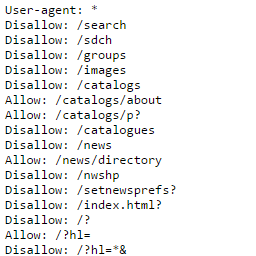
- **SEO 優化**:即時創建和編輯 robots.txt 以控制爬蟲存取、無需第三方插件即可提供 XML 網站地圖、測試不同配置而無需上傳檔案。
- **獲利和安全**:添加 ads.txt 或 app-ads.txt 以符合 Google AdSense 規定、發佈 security.txt 檔案定義安全政策、透過適當的 ads.txt 管理批准庫存並增加收入。
- **開發人員和 API**:主持 .well-known/security.txt、.well-known/apple-app-site-association、創建巢狀 API 端點(api/v1/data.json、api/config.json)、在任何路徑提供配置檔案供無頭式 WordPress 設置使用,無需創建實體目錄。
- **管理託管**:適用於 FTP 受限的 WP Engine、Kinsta、Flywheel,無需聯繫支援進行簡單的檔案更改、從 WordPress 控台完全控制。
- **安全與效能**:企業級安全:所有內容消毒。
外掛標籤
開發者團隊
② 後台搜尋「IntentDeep Virtual Files – AI-Ready: Robots.txt, Security.txt, Ads.txt, LLMS.txt」→ 直接安裝(推薦)
原文外掛簡介
Virtual Files lets you create and manage robots.txt, ads.txt, app-ads.txt, security.txt, llms.txt, RSS feeds, and JSON files directly from your WordPress dashboard. These files can be created at any path depth (yoursite.com/robots.txt, yoursite.com/.well-known/security.txt, yoursite.com/llms.txt, yoursite.com/api/data.json) and behave just like physical files, but are stored in your database—no FTP access required.
🤖 AI-Ready Content Generation
Connect your own AI models to generate, improve, and analyze virtual file content. Use ChatGPT, Claude, Gemini, Grok, Qwen, GLM, and 30+ other AI models. Simply add your API key and create perfect robots.txt, proper ads.txt files, compliant security.txt, AI-friendly llms.txt, and more—all with AI assistance. Attach posts, pages, or products as context for more relevant generation.
The Problem
Managing robots.txt, ads.txt, app-ads.txt, security.txt, llms.txt, .well-known files, and other server files traditionally requires FTP access, correct file permissions, and manual directory creation. For managed hosting or multiple sites, this becomes a maintenance nightmare.
The Solution
Virtual Files eliminates these hassles by storing everything in your WordPress database while serving content as if files physically exist at any path on your server. No FTP, no server access, no directory creation, no permission headaches.
With AI-ready integration, you can now connect your favorite AI models to:
– Generate new files from natural language descriptions
– Improve existing content with AI suggestions
– Analyze files for errors, security risks, and optimization opportunities
🔥 Top Use Cases
SEO & AI Optimization
– Create and edit your robots.txt instantly to control crawler access
– Generate llms.txt to guide AI crawlers (ChatGPT, Claude, Perplexity)
– Test different configurations without file uploads
– Control how AI tools index and cite your content
Monetization & Security
– Add your ads.txt or app-ads.txt for Google AdSense compliance
– Publish a security.txt file to define your security policy (RFC 9116 standard)
– Approve inventory and boost revenue with proper ads.txt management
Developers & API
– Host .well-known/security.txt, .well-known/apple-app-site-association
– Create nested API endpoints (api/v1/data.json, api/config.json)
– Serve static configuration files at any path for headless WordPress setups
– No need to create physical directories – paths are virtual
Managed Hosting
– Perfect for WP Engine, Kinsta, Flywheel where FTP is limited
– No need to contact support for simple file changes
– Complete control from WordPress dashboard
Security & Performance
Enterprise-Grade Security:
– All content sanitized to prevent XSS attacks
– PHP code execution protection
– Nonce verification on all operations
– Role-based permission checks
– Database-backed redundancy (included in WordPress backups)
Zero File Permission Issues:
No chmod, no chown, no permission denied errors. Everything managed through WordPress capabilities.
Performance Optimized:
– Smart caching (Pro) for up to 10x faster delivery
– Minimal database queries
– Automatic cache invalidation on updates
– No file system overhead
🤖 AI-Powered Features
Connect 30+ AI Models
– ChatGPT (GPT-5.2, GPT-5 Mini, GPT-4o)
– Claude (Claude Opus 4.6, Claude Sonnet 4.6, Claude Haiku 4.6)
– Gemini (Gemini 3.1 Pro Preview, Gemini 3 Flash Preview, Gemini 2.5 Flash)
– DeepSeek (DeepSeek-V3, DeepSeek-R1)
– Grok, Qwen, GLM, Kimi, and 30+ more
– Connect via OpenAI, OpenRouter, Anthropic, or Google APIs – add your keys and pay providers directly
– Switch between models anytime
– No markup on AI costs
AI Content Generation
– Generate: Create new files from natural language prompts
– Improve: Enhance existing content with AI suggestions and fixes
– Analyze: Get detailed explanations of your code, identify errors, and receive optimization suggestions
– Context-Aware: Attach up to 3 posts, pages, or products as context for more relevant generation
– Streaming Responses: Watch AI generate content in real-time
– Quick Prompts: Pre-built templates for common files (robots.txt, ads.txt, security.txt, llms.txt, JSON-LD)
– History: All AI generations saved automatically with one-click restore
AI Use Cases
– Generate proper robots.txt with custom rules and directives
– Build valid ads.txt or app-ads.txt files for AdSense compliance
– Generate security.txt following RFC 9116 standard
– Create llms.txt for AI crawler instructions (latest AI SEO trend)
– Build .well-known/* files for standards compliance
– Create app-ads.txt files for mobile app monetization
– Build JSON-LD schema markup for SEO
– Generate RSS feeds and custom XML configurations
– Fix syntax errors in existing code
– Analyze code for security vulnerabilities
– Get AI suggestions for content optimization
Free Version Features
✅ Basic File Types
Create virtual files with these extensions:
– TXT – Plain text files (robots.txt, ads.txt, security.txt, llms.txt)
– MD – Markdown documents
– JSON – API endpoints and data files
✅ Smart File Management
– Intuitive admin interface for creating and editing files
– Filter by extension for easy file organization
– File status control (Active/Inactive)
– Support for any path depth (root, subdirectories, .well-known)
– Real-time file preview
– Automatic MIME type detection
– Clean URLs (yoursite.com/path/to/file.txt)
✅ SEO-Ready
– Perfect for robots.txt management
– Custom ads.txt and app-ads.txt support
– .well-known directory support (security.txt, etc.)
– Direct URL access for search engines
– No redirect or rewrite delays
✅ Developer-Friendly
– Simple text editor for quick edits
– Character encoding support (UTF-8)
– Direct content serving (no overhead)
– WordPress REST API compatible
✅ Performance Optimized
– Lightweight database storage
– Minimal server resources
– Fast content delivery
– No file permission issues
✅ Free Version Limits
– Up to 5 active files (inactive files don’t count)
– Upgrade to Pro for unlimited files
Pro Version – Unlock Advanced Features
🤖 AI-Ready Content Generation
– Connect 30+ AI models: ChatGPT, Claude, Gemini, Grok, Qwen, GLM, and more
– Generate, improve, and analyze content with AI
– Attach posts, pages, or products as context
– Real-time streaming responses
– Quick prompt templates for common files
– AI generation history with restore functionality
– BYOK: Bring Your Own API Key – you pay providers directly, no markup
🚀 Premium File Types
Expand beyond basics with:
– XML – RSS feeds, custom XML files, and structured data
– CSV – Data exports and imports
– YAML – Configuration files (.yml and .yaml both supported)
– RSS – Custom RSS feeds
– LOG – Log file serving
💻 Advanced Code Editor
– Syntax highlighting for all file types
– Line numbers for easy navigation
– Multiple themes (light/dark modes)
– Auto-close brackets and smart indentation
– Line wrapping for better readability
– Comment toggle with keyboard shortcuts
⚡ Performance Caching
– Smart file caching with configurable TTL
– Cache warm-up for all active files
– Automatic cache invalidation on updates
– Cache statistics dashboard
– Up to 10x faster file delivery
📊 Analytics & Insights
– Access tracking for each file
– View counts and statistics
– Last accessed timestamps
– File size monitoring
– Performance metrics
📦 Import/Export
– Backup all files as JSON
– Bulk import from backup files
– Duplicate detection prevents conflicts
– Migration-ready for site transfers
– Version control friendly
🔄 Unlimited Files
– No file limits (Free version: 5 active files max)
– Create unlimited virtual files
🎨 Enhanced UI/UX
– Modern, clean interface
– File status indicators
– Quick copy URL buttons
– One-click file activation
– Accessibility ready
Free vs Pro Comparison
Free Version Includes:
✅ TXT, MD, JSON file types
✅ Up to 5 active virtual files
✅ Simple text editor
✅ Any path depth support (.well-known, subdirectories)
✅ Active/Inactive status control
✅ Database-driven file storage
Pro Version Adds:
🤖 AI-ready content generation (Generate, Improve, Analyze)
🤖 Connect 30+ AI models: ChatGPT, Claude, Gemini, Grok, Qwen, GLM, and more
🤖 Bring Your Own API Key – full control, no markup on costs
🤖 Context-aware generation with post/page attachment
🤖 Real-time streaming AI responses
🚀 Unlimited virtual files (no 5-file limit)
🚀 Premium file types: XML, CSV, YAML (.yml/.yaml), RSS, LOG
🚀 Advanced code editor with syntax highlighting
🚀 Smart file caching (up to 10x faster delivery)
🚀 Analytics dashboard with access tracking
🚀 Import/Export functionality for backups
🚀 Priority email support
Upgrade to Pro | 7-Day Trial Available
What Makes Virtual Files Different?
No File System Access Required
Manage everything from your WordPress dashboard. No FTP, no server access, no permission headaches.
Virtual Directories – No Physical Folders
Create files at any path (.well-known/security.txt, api/data.json) without creating physical directories. Paths are virtual and work instantly.
Database-Driven Reliability
Your files are backed up with your database. No lost files due to server issues or migrations.
Version Control Friendly
Files live in database, not Git repos. Keep your repository clean and focused on code.
Instant Updates
Change content and it’s live immediately. No file uploads, no caching delays (with proper cache invalidation).
Try Pro Risk-Free
7-Day Trial. Experience advanced features before committing.
Upgrade to Pro | Documentation | Support
Troubleshooting
Virtual file returns 404
Go to Settings → Permalinks and click “Save Changes” to flush rewrite rules
Verify file status is set to “Active” in Virtual Files dashboard
Check that no physical file exists with the same name
Ensure permalinks are enabled (required for virtual routing)
Changes don’t appear immediately
Clear site cache (if using WP Rocket, W3 Total Cache, etc.)
Clear browser cache (Ctrl+F5 or Cmd+Shift+R)
Pro users: Check cache TTL settings in Virtual Files → Settings
Verify file is set to “Active” status
Conflicts with existing physical files
Virtual files take precedence over physical files with the same name. To serve physical files instead:
– Set virtual file status to “Inactive”, OR
– Delete the virtual file from the dashboard
Privacy Policy
Virtual Files does not collect, store, or transmit any personal data. All file content is stored locally in your WordPress database.
AI Features: When using AI-powered features (Generate, Improve, Analyze), your prompts and any attached context are sent to the AI provider you’ve configured in settings. Virtual Files does not store or analyze this data beyond what’s necessary for the generation. Each AI provider has its own privacy policy and data handling practices that you should review.
The Pro version may connect to our licensing server only for license validation.
Support
Need help? Have suggestions?
Free Support: WordPress.org Forums
Pro Support: Priority Support
Documentation: Knowledge Base
Feature Requests: Contact