內容簡介
總結:Init Ad Engine讓您可以將各種廣告格式輕鬆地插入WordPress網站,無需編寫任何程式碼。
1. 什麼是Init Ad Engine外掛的主要功能?
- 將各種廣告格式插入WordPress網站,無需編寫程式碼。
2. 這個外掛具有哪些特點?
- 具有彈性和性能,具有分隔不同設備類型的標籤式管理介面。
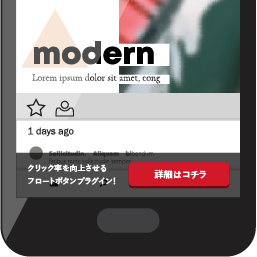
- 支援多種廣告格式,如彈出視窗、固定工具欄、浮動廣告、彈出窗、內容前後等。
- 可選擇當未提供圖像時使用其他HTML/JS代碼。
3. 提供了哪些廣告位置?
- 桌面(PC):Billboard、Balloon Left/Right、Float Left/Right、Catfish Top/Bottom、Popup Center、Before/After Content
- 行動裝置:Mini Billboard、Sticky Top/Bottom、Popup Center、Before/After Content
- 特殊位置:Popunder(首次點擊後在新分頁打開)、全局頁眉/頁腳代碼插入
4. 開發者可以如何操控此外掛?
- 透過不同濾鏡(function)進行控制,如控制廣告片段是否透過wp_kses進行留白,允許修改廣告片段的標記和屬性的白名單,以及全局關閉所有廣告插入等。
5. 安全注意事項有哪些?
- 在外掛設置中輸入的廣告片段被視為用戶提供的內容。
- 所有片段在渲染時均透過wp_kses進行逃逸,具有受限的標記和屬性白名單。
- 開發者可以通過init_plugin_suite_ad_engine_use_kses濾鏡來禁用逃逸,如果他們明確信任輸入。
- 可通過init_plugin_suite_ad_engine_disable_all_ads濾鏡全局禁用所有廣告插入。
- 只有具有manage_options功能的管理員可以配置或修改全局廣告設置。
6. 這個外掛的授權是什麼?
- 本外掛根據GPLv2或更新版本許可。
- 您可以在相同許可下自由使用、修改和分發它。
外掛標籤
開發者團隊
② 後台搜尋「Init Ad Engine – Flexible, Multi-Format, Secure」→ 直接安裝(推薦)
原文外掛簡介
Init Ad Engine lets you insert various ad formats into your WordPress site with zero coding required.
Built for flexibility and performance:
– Tabbed admin UI with clear separation by device type
– All styles are inline or embedded – no external CSS files
– Multiple ad formats supported: popups, sticky bars, floating ads, popunder, before/after content
– Optional fallback HTML/JS code when no image is provided
Available ad positions:
Desktop (PC):
Billboard, Balloon Left/Right, Float Left/Right, Catfish Top/Bottom, Popup Center, Before/After Content
Mobile:
Mini Billboard, Sticky Top/Bottom, Popup Center, Before/After Content
Special:
Popunder (opens new tab on first click), Global header/footer code injection
This plugin is part of the Init Plugin Suite — a collection of minimalist, fast, and developer-focused tools for WordPress.
GitHub repository: https://github.com/brokensmile2103/init-ad-engine
Features
20+ configurable ad positions
Popunder with cooldown and click threshold
Exit-intent or delay-based popup behavior
Global
Fallback HTML/JS ad code per position
Minimalist inline CSS for fast load
Responsive support for all device types
Clean admin UI with media uploader
Affiliate Gate with flexible display logic (always-on, expire-after-click, random %, every X pages)
Filters for Developers
init_plugin_suite_ad_engine_use_kses
Control whether ad snippets are escaped via wp_kses. Default: true.
init_plugin_suite_ad_engine_allowed_tags
Extend or modify the allow-list of permitted tags/attributes for ad snippets.
init_plugin_suite_ad_engine_disable_all_ads
Disable all ad injections globally. Default: false.
init_ad_engine_should_enqueue_affiliate_gate
Control whether the Affiliate Gate scripts should be enqueued.
Security Notes
Ad snippets entered in the plugin settings are considered user-provided content.
By default, all snippets are escaped at render time using wp_kses with a restricted allow-list of tags and attributes.
Developers can disable escaping via the init_plugin_suite_ad_engine_use_kses filter if they explicitly trust their input.
All ad injections can be globally disabled via the init_plugin_suite_ad_engine_disable_all_ads filter.
Only administrators with the manage_options capability can configure or modify global ad settings.
License
This plugin is licensed under the GPLv2 or later.
You are free to use, modify, and distribute it under the same license.