內容簡介
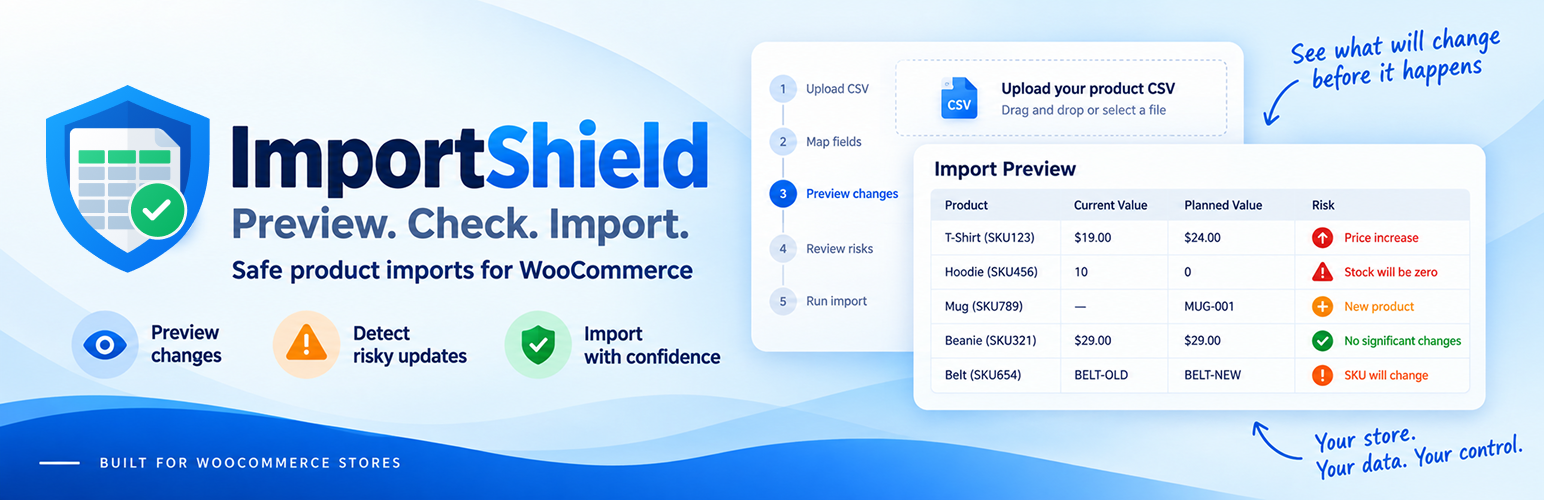
ImportShield 是一款專為 WooCommerce 設計的外掛,提供 CSV 匯入預覽與風險檢查功能,讓使用者在匯入產品前,能夠檢視預期的變更,避免意外的價格、庫存及產品數據變動。
【主要功能】
• 預覽產品變更,檢視 CSV 行的影響
• 偵測意外的價格變動,避免損失
• 檢查庫存更新,提供警告提示
• 辨識 SKU 問題,避免重複或衝突
• 檢視產品內容和設定的變更
• 集中管理受影響的產品,簡化檢查流程
外掛標籤
開發者團隊
② 後台搜尋「ImportShield – WooCommerce CSV Import Preview & Risk Checker」→ 直接安裝(推薦)
原文外掛簡介
See what your WooCommerce product CSV is expected to change before you start the import.
ImportShield adds a CSV import preview and risk checker to help you spot unexpected price, stock, SKU and product-data changes before they reach your catalog. Keep uploading and mapping files in the built-in WooCommerce importer — ImportShield adds a review step before WooCommerce imports the products.
Compare current and planned values for supported fields, review detected risks, and decide whether to proceed or go back to correct the CSV or mapping. Analysis does not change your products.
Features: review changes before they reach your catalog
Preview product changes. See which CSV rows are expected to create or update products, which are skipped, and which have conflicts. Compare current and planned values for supported fields.
Catch unexpected prices. Spot large regular-price increases or decreases, existing regular prices being cleared or set to zero, and risky sale-price values before importing.
Check stock updates. Review planned quantity and availability changes, with warnings when positive stock becomes zero or an in-stock product becomes out of stock.
Find SKU problems. Identify duplicate SKUs within the CSV, changes to existing SKUs, and conflicting product ID/SKU matches so you can check which products the file targets.
Review changes to product content and settings. See supported changes to names, descriptions, categories, tags, brands, images, visibility, tax, shipping, sale and purchasing settings, with risks highlighted where detected.
Focus on affected products. Open affected rows from grouped issues, filter analyzed changes, and spot flagged bulk price or stock changes without inspecting every row in isolation.
Keep your familiar importer. Review the file after column mapping, then choose whether to let the standard WooCommerce product import run.
A price update worth checking first
You are preparing a supplier CSV to update existing products. Several regular-price cells contain zero instead of the intended prices.
ImportShield flags existing positive regular prices that would become zero and shows the affected rows before the import starts. You can go back and correct the file before those prices reach your store.
Use the same review for bulk stock updates, supplier files and other WooCommerce CSV imports where checking the planned changes matters.
How the WooCommerce CSV import preview fits your workflow
CSV → Column mapping → ImportShield review → Standard WooCommerce importer
Upload and map as usual. Open Products → Import, upload your CSV and map its columns.
Review before importing. Check grouped risks and compare current and planned product values.
Decide what to do. Go back to correct the CSV or mapping, or select Continue to import. Detected issues require an extra confirmation.
Let WooCommerce import. WooCommerce performs the actual product import using your selected mapping and import settings.
Supported scope
ImportShield works with the built-in WooCommerce product CSV importer. It provides field-level analysis for simple products, variable products, and variations when a supported mapped field applies to that product type.
Supported fields cover product identification, prices, stock, content and visibility, categories, tags and brands, images and linked products, tax and shipping data, and product measurements. Mapped fields outside the analysis scope remain available to WooCommerce and are identified as not analyzed where applicable.
Parent and Attribute relationships for variable products and variations are not analyzed. Changes between product types, grouped products, external products, and other unsupported product types are left to the standard WooCommerce importer.
Important limitations
ImportShield does not perform the actual import or replace the WooCommerce importer.
The preflight does not modify the CSV or product catalog.
ImportShield does not provide rollback, automatic repair, or a guarantee that every possible problem will be detected.
Unsupported fields and product structures may be handled by WooCommerce without field-level ImportShield analysis.
Images that require downloading cannot be fully resolved during the read-only analysis; affected rows are reported for review.
Detected business risks require explicit confirmation rather than automatically blocking the import. A technical failure that prevents reliable analysis blocks the protected flow before the import starts.
Optional usage analytics are disabled by default. ImportShield works normally without analytics, and telemetry delivery never changes a preflight or import result.
External services
When an authorized administrator explicitly enables usage analytics, ImportShield sends server-side HTTPS requests to PostHog after selected preflight, risk, confirmation, cancellation, failure, and successful native-import lifecycle points. PostHog receives event names; coarse row, change, affected-row, and duration buckets; aggregate risk counts, severities, and stable rule keys; the ImportShield, WordPress, WooCommerce, and PHP versions where applicable; locale; and random installation and flow identifiers. Person-profile processing is disabled for every event.
ImportShield does not intentionally send CSV contents or filenames, product names, SKUs, product IDs, prices, stock values, descriptions, categories, tags, images, customer or order data, the site URL/domain, account details, filesystem paths, database content, approval/security tokens, SQL, stack traces, or arbitrary error text. As with any direct network request, network providers and PostHog may process connection metadata such as the originating IP address.
Analytics can be enabled or disabled at ImportShield → Settings. Disabling stops future telemetry and deletes the local random installation ID; enabling it again creates a new ID. Deactivation preserves this choice. Uninstall removes the analytics options with ImportShield’s other owned state.
This service is provided by PostHog:
Service information: https://posthog.com/
Privacy policy: https://posthog.com/privacy
Terms: https://posthog.com/terms
Privacy
ImportShield registers suggested privacy-policy text through WordPress’s standard privacy-policy guide. No analytics request is sent before explicit opt-in.