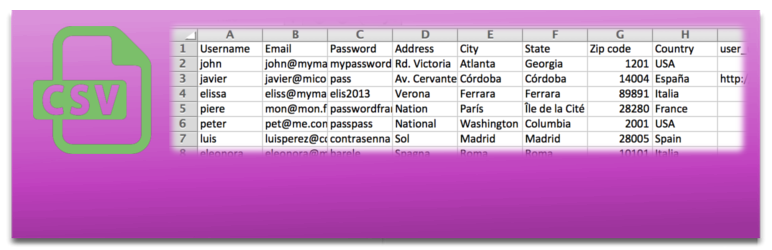
內容簡介
此外掛可讓使用者輕鬆地從 CSV 檔案匯入、匯出及遷移 WordPress 使用者和 WooCommerce 客戶。無論是批量創建或更新數千名使用者,還是定期自動匯入,都能快速完成,並支援多種自訂欄位和角色。
【主要功能】
• 從 CSV 檔案匯入使用者或客戶
• 批量創建或更新數千名使用者
• 匯出使用者或客戶至 CSV 檔案
• 支援自訂欄位和角色匯入
• 自動發送郵件給新使用者
• 定期自動匯入使用者
外掛標籤
開發者團隊
② 後台搜尋「Import and export users and customers」→ 直接安裝(推薦)
📦 歷史版本下載
原文外掛簡介
Try it out on your free dummy site: Click here => https://demo.tastewp.com/import-users-from-csv-with-meta
Import, export and migrate WordPress users and WooCommerce customers from a CSV file. Bulk-create or update thousands of users in seconds, schedule automatic recurring imports from a local file or URL, and carry over roles, passwords and any custom meta field. Works with WooCommerce, BuddyPress, Advanced Custom Fields, Paid Membership Pro, WooCommerce Memberships, WooCommerce Subscriptions and many more.
Import CSV file with users directly to your WordPress or customers into WooCommerce
Import thousands of users or customers in only some seconds
Export users or customers to a CSV file, filtering by role or registered date
You can also import meta-data like data from WooCommerce customers
You can assign roles while importing.
Send a mail to every new user, this mails can be saved as templates and are fully customizable, before sending you can test it
You can also update users if the user is already in your WordPress
Create a cron task to import users periodically
Edit the metadata (you will be able to edit the metadata imported using metakeys directly in the profile of each user)
Extend the plugin using the hooks we provide
Compatible with WPML read the documentation to see how you can translate the front-end import and export users page and send translated email notifications to users
Moreover this plugin is compatible with many other plugins to be able to import and include them data, subscriptions, memberships, etc. Take a look:
WooCommerce: to import the customer data
WooCommerce Memberships: to import memberships
WooCommerce Subscriptions: to create subscriptions associated with users while they are being imported
BuddyPress: to import custom BuddyPress avatars, fields, groups and roles
Advanced Custom Fields: to import data to the fields you define there
Paid Membership Pro: to import memberships, included compatibility with PMPro version 3
Indeed Ultimate Membership Pro: to import memberships
Paid Member Subscriptions: to import memberships
Allow Multiple Accounts: plugin will allow the same rules importing than this plugin
Groups: to assign users to groups while importing
New User Approve: you can import users and approbe/wait for approve them
Users Group: to assign users to groups while importing
WP LMS Course: to enroll users in the courses while importing
WP Members: to import memberships
WP Users Group: to assign users to groups while importing
WooCommerce Membership by RightPress: to create memberships while users are being imported
WP Private Content Plus: To import and export the groups to which users are assigned
If you have some problem or doubt:
Read our documentation
Ask anything in support forum, we try to give the best support
Common use cases
Migrate users from one WordPress site to another
Bulk create or update WooCommerce customers from a spreadsheet
Sync users automatically from an external CRM or ERP via CSV
Onboard members to a membership site (Paid Membership Pro, WooCommerce Memberships)
Periodically import subscribers or students from an external list
Import users from the frontend using a shortcode
Usage
Once the plugin is installed you can use it. Go to Tools menu and there, there will be a section called Insert users from CSV. Just choose your CSV file and go!
CSV generation
You can generate CSV file with all users inside it, using a standar spreadsheet software like: Microsoft Excel, LibreOffice Calc, OpenOffice Calc or Gnumeric.
You have to create the file filled with information (or take it from another database) and you will only have to choose CSV file when you “Save as…” the file. As example, a CSV file is included with the plugin.
Some considerations
Plugin will automatically detect:
Charset and set it to UTF-8 to prevent problems with non-ASCII characters.
It also will auto detect line-ending to prevent problems with different OS.
Finally, it will detect the delimiter being used in CSV file
Other plugins by Codection
RedSys Gateway for WooCommerce Pro (premium)
Ceca Gateway for WooCommerce Pro (premium)
RedSys Gateway for Contact Form 7 (premium)
Ceca Gateway for Contact Form 7 (premium)
RedSys & Bizum Gateway for Gravity Forms (premium)
RedSys & Bizum Gateway for WPForms (premium)
RedSys & Bizum for GiveWP (premium)
RedSys Link Generator (premium)
RedSys & Bizum Gateway for EDD Pro (premium)
RedSys Gateway for WP Booking Calendar Pro (premium)
Clean Login (free)
Products Restricted Users for WooCommerce (free)
First payment date for WooCommerce Subscriptions (free)
Payment Schedule for WooCommerce Subscriptions (premium)