內容簡介
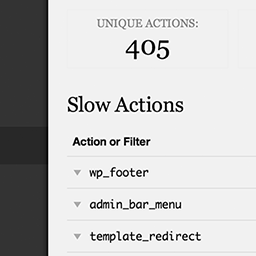
總結: HookTrace是一個開發者觀察工具,記錄並視覺化 WordPress 鉤子、過濾器、以及外掛初始化在單個頁面請求中的運行順序。
問題與答案:
1. HookTrace這個外掛專為哪些環境而設計?
- 只針對開發和暫存環境。
2. HookTrace可以幫助開發者理解哪些方面?
- 被激發的鉤子、激發順序是什麼、每個鉤子上執行的回撥函數、回撥函數的優先順序和執行時間、以及插件、主題或核心位置的來源。
3. HookTrace的主要功能有哪些?
- 記錄在每個頁面請求期間觸發的所有鉤子,包括類型和源信息。
- 當選擇一個鉤子時,顯示詳細的回撥函數信息,包括優先級、執行順序、持續時間、文件路徑和來源。
- 現代化的模態界面,具有搜索和篩選功能。
- 零性能影響 - 僅在內存中存儲,不寫入數據庫。
- 提供MU-plugin引導的早期啟動支持,從一開始捕獲鉤子。
4. HookTrace的使用要求是什麼?
- WP_DEBUG必須在wp-config.php中設為true。
- 用戶必須擁有manage_options功能(管理員)。
- PHP版本必須為8.0或更高。
5. HookTrace的安全功能有哪些?
- 當WP_DEBUG為false時自動禁用。
- 不運行於非管理員用戶。
- 從不修改WordPress的行為。
- 僅觀察性 - 不會對代碼執行進行更改。
外掛標籤
開發者團隊
② 後台搜尋「HookTrace – Trace Hooks with Precision」→ 直接安裝(推薦)
原文外掛簡介
HookTrace is a developer observability tool that records and visualizes the runtime execution order of WordPress hooks, filters, and plugin initialization for a single page request.
For Developers Only
This plugin is designed exclusively for development and staging environments. It helps developers understand:
Which hooks fired, in what order
Which callbacks executed on each hook
Callback priority and execution time
Source plugin, theme, or core location
Exact file and line number
Plugin and theme load timeline
Key Features:
Hook List Tracking – Records all hooks that fire during a page request with type and source information
Detailed Callback Inspection – When a hook is selected, displays comprehensive callback information including priority, execution order, duration, file path, and source
Modern Modal UI – Beautiful, searchable interface with filtering capabilities
Zero Performance Impact – In-memory storage only, no database writes
Early Boot Support – MU-plugin bootstrap captures hooks from the very beginning
Requirements:
WP_DEBUG must be set to true in wp-config.php
User must have manage_options capability (administrator)
PHP 8.0 or higher
Safety Features:
Automatically disables when WP_DEBUG is false
Never runs for non-admin users
Never modifies WordPress behavior
Observational only – no code execution changes