內容簡介
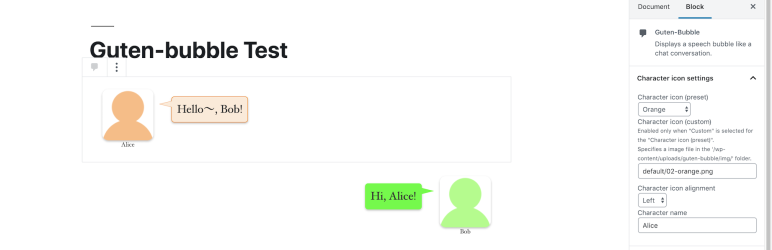
Guten-bubble 可以建立類似聊天對話的對話框。
功能
使用 WordPress 5.0 或更新版本的 Gutenberg 編輯器中提供的 Guten-bubble 區塊即可輕鬆創建對話框。
從 24 種色彩主題中選擇說話泡泡的顏色。
從 WordPress 媒體庫匯入圖像文件,即可將其用作圖示。讓我們使用手上的圖示圖像製作有趣的文章!
在區塊編輯器中的使用方式
在您想要添加對話框的位置添加 Guten-bubble 區塊。
在區塊中的對話框(“在此輸入帶有襯線字體的文本…”佔位符所在的部分)中輸入提示的文字,選擇角色圖示並在屬性查看器中設定對話框。
外掛標籤
開發者團隊
原文外掛簡介
Guten-bubble can create a speech bubble display like a chat conversation.
Features
It’s easy to create speech bubble using Guten-bubble block for Gutenberg editor in WordPress 5.0 or later.
Pick from 24 color themes for speech bubble.
You can use it as an icon image by importing image files from WordPress’s media library. Let’s make interesting articles by using icon image on hand!
How to use in block editor
Add a Guten-bubble block where you want to add a speech bubble.
Enter serif in the balloon in the block ( the part where ‘Enter serif here …’ placeholder is displayed ), select character icon and set the balloon in the inspector.