
內容簡介
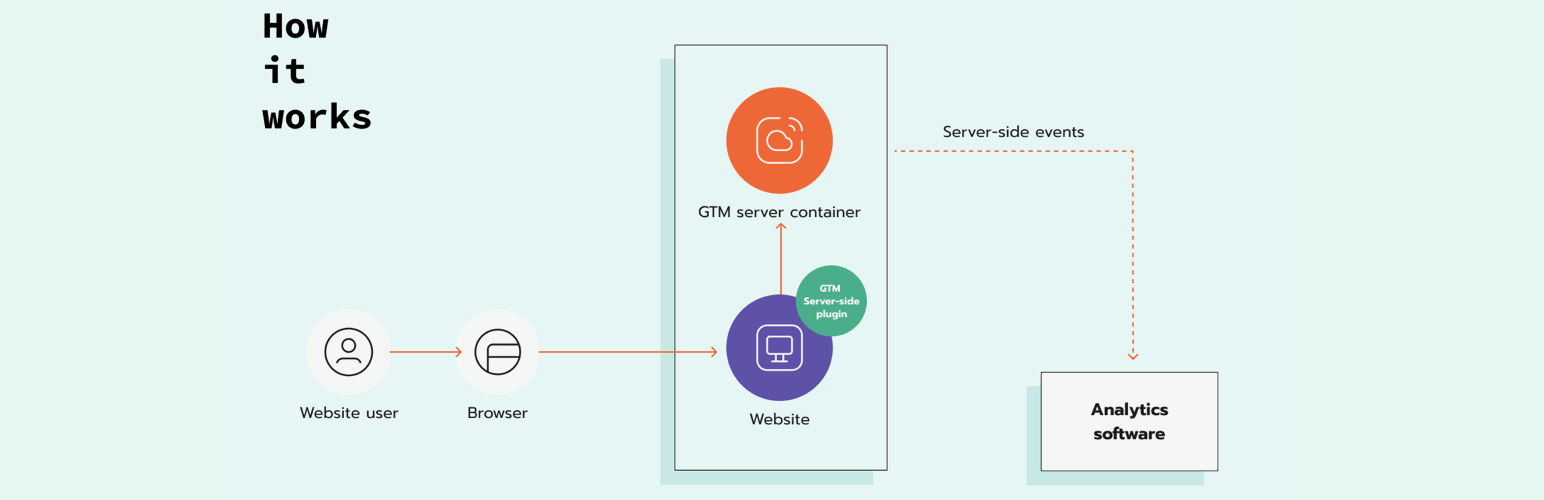
Stape Conversion Tracking 外掛提供簡便的伺服器端追蹤解決方案,讓使用者能夠輕鬆地在 WordPress 網站上實作 Google Tag Manager (GTM) 的追蹤功能,並優化網站性能。
【主要功能】
• 在每個網站頁面添加 Google Tag Manager 腳本
• 與其他 WP 外掛兼容,輕鬆插入 GTM 腳本
• 自訂載入器,讓追蹤功能對廣告攔截器隱形
• 無需 JS 函式庫即可將事件發送至 GTM 伺服器端
• 添加電子商務數據層事件
• 發送 webhook
外掛標籤
開發者團隊
📦 歷史版本下載
原文外掛簡介
If you are looking for the easiest way to implement server-side tracking on your WordPress website, the GTM Server Side plugin by stape.io is the best solution. It helps to easily modify the gtm script with the tagging server URL, adds a custom loader, and sends data layer events and webhooks.
GTM Server Side plugin by stape.io features:
Add web Google Tag Manager script on every website page.
Work with any other WP plugin that inserts gtm script on the website.
Adds custom loader, which makes Google Tag Manager and Google Analytics tracking invisible to ad blockers and other tracking prevention mechanisms.
Sends events to GTM server side without any JS library and optimizes page speed.
Adds e-commerce Data Layer events.
Adds user data to Data Layer events.
Sends webhooks.
Benefits of GTM Server Side plugin by stape.io:
Increase cookies lifetime when using a custom domain for server Google Tag Manager container.
Increases the accuracy of tracking when the custom loader is enabled.
Simplifies the process of adding GTM script on the website and delivering e-commerce and user data.