內容簡介
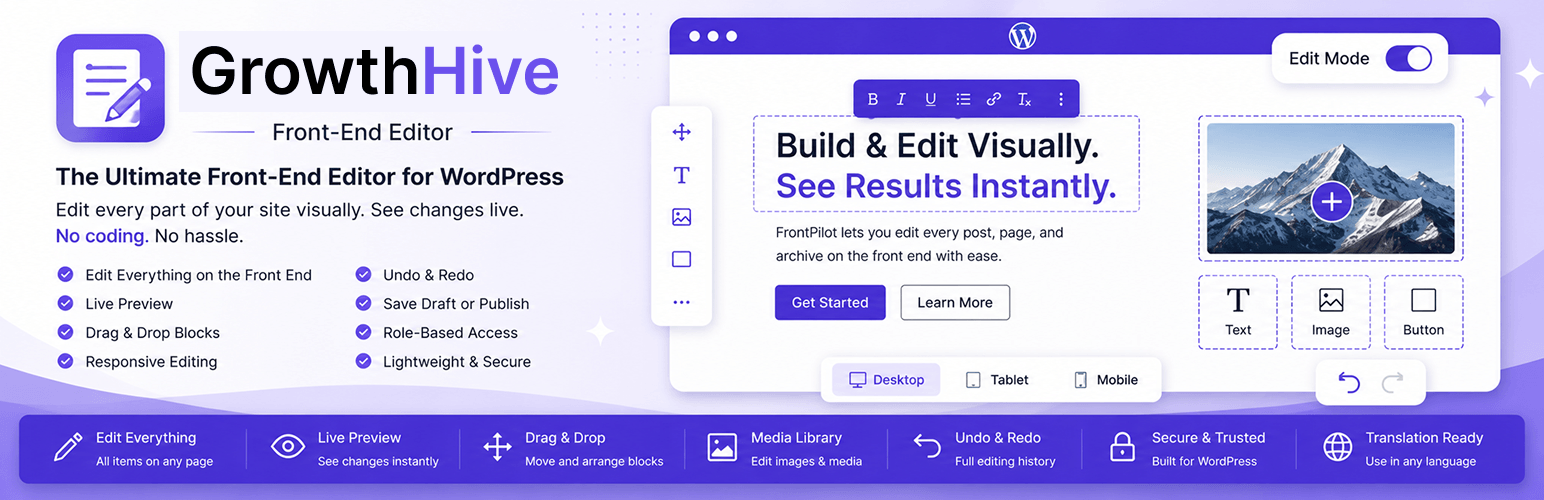
GrowthHive – Front Editor 讓使用者能在 WordPress 網站的前端直接編輯內容,無需進入 wp-admin。用戶可以透過簡潔的浮動工具列進行即時編輯,並且輕鬆保存或發佈變更。
【主要功能】
• 前端編輯所有文章與頁面項目
• 浮動「編輯模式」切換開關
• 即時預覽與編輯
• 拖放內容區塊
• 編輯媒體與圖片
• 角色基礎的存取控制
外掛標籤
開發者團隊
原文外掛簡介
GrowthHive brings content editing to the front end of your WordPress site. Instead of switching to wp-admin and the block or Classic editor, eligible users can click “Edit with GrowthHive” right on the page and start editing in place, with a clean floating toolbar, live preview, and one-click save or publish.
Key Features
Edit every post and page item on the front end — not just a single item’s content, but every eligible post/page rendered on the current page (singular views, archives, home, and search listings).
A floating “Edit Mode” toggle switch turns inline editing on or off across the whole page at once.
Inline text editing with a clean floating toolbar.
Live preview while editing.
Drag & drop content blocks.
Edit images and media through the native WordPress media library.
Responsive editing preview (Desktop, Tablet, Mobile).
Undo & Redo history.
Save Draft or Publish instantly.
Role-based access control.
Keyboard shortcuts (Ctrl+S save, Ctrl+Z undo, Ctrl+Y redo).
Lightweight, no jQuery dependency.
Works alongside Classic Editor and Gutenberg.
Compatible with most WordPress themes.
Fully translation-ready.
Built with security in mind: nonce verification, capability checks, and complete sanitization/escaping.
Admin Settings
A modern, tabbed settings dashboard with toggle switches and chip selectors — no cluttered checkbox tables.
Enable or disable the front-end editor globally.
Choose which post types are editable.
Choose which user roles may use the editor.
Choose whether every item on a page is editable, or only a single queried item.
Choose whether the Edit Mode toggle starts on or off.
Customize the floating toolbar buttons.
Configure keyboard shortcuts.
Reset all settings to their defaults with one click.
Developer Friendly
GrowthHive is built with namespaced, PSR-4 autoloaded, object-oriented PHP, follows the WordPress Coding Standards, and exposes both a REST API and an admin-ajax fallback for saving content.