內容簡介
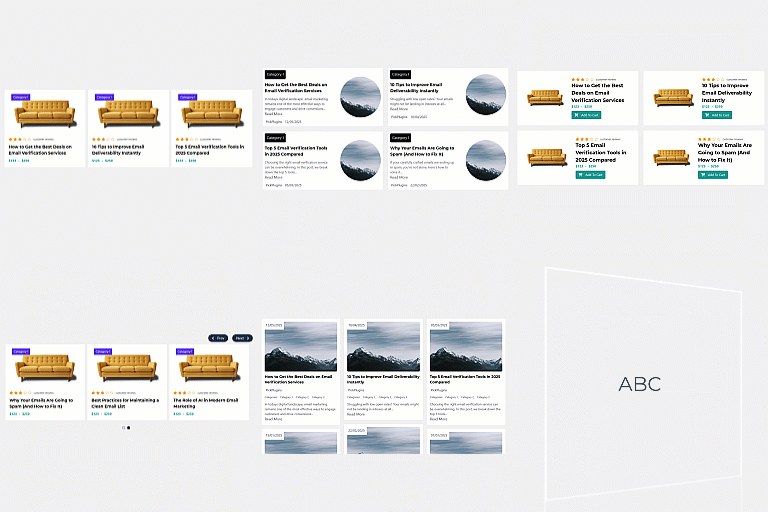
Gridify Plus 是一款免費的 WordPress 圖庫外掛,能夠建立響應式的照片圖庫、影像圖庫、影片圖庫和相冊,並為 Elementor 增加文章網格和 WooCommerce 產品網格。使用者可以透過區塊、短碼或 Elementor 小工具輕鬆放置圖庫。
【主要功能】
• 四種圖庫佈局:網格、磚石、對齊行和滑動
• 響應式燈箱:鍵盤和滑動導航、標題和縮圖
• 可篩選的圖庫:依標籤篩選圖片
• 密碼保護的圖庫:適用於客戶和私人活動
• WooCommerce 產品網格:顯示價格、評分和加入購物車按鈕
• 支援懶加載和響應式圖片大小
外掛標籤
開發者團隊
② 後台搜尋「Gridify Plus – Photo Gallery, Image Gallery, Post Grid & Product Grid」→ 直接安裝(推薦)
原文外掛簡介
Gridify Plus is a free WordPress gallery plugin. It builds responsive photo galleries, image galleries, video galleries and albums, and adds a post grid and a WooCommerce product grid for Elementor. You can place a gallery with a block, a shortcode or an Elementor widget.
Galleries are built on their own screen in the dashboard, with a live preview for desktop, tablet and mobile. Elementor is not required for galleries and albums.
What you can build
A photo gallery or portfolio gallery in a grid, masonry, justified or slider layout.
A video gallery that plays YouTube, Vimeo, MP4 and WebM in the lightbox.
A filterable gallery that visitors narrow down by tag.
A photo album page, where each cover opens a gallery.
A client proofing gallery with a password and a watermark.
A blog post grid with categories, excerpts and “Load more”.
A WooCommerce product grid or product slider with price, rating and add to cart.
Image gallery and photo gallery features
Four gallery layouts: Grid, Masonry, Justified rows and Slider (carousel). Six one-click styles give you a starting point.
Responsive lightbox: keyboard and swipe navigation, captions, thumbnails, a slideshow, a counter, a shareable link to each image, and optional share buttons.
Video gallery: add a YouTube, Vimeo or video-file link to an image and it plays in the lightbox. Nothing is loaded from YouTube or Vimeo until a visitor opens the video.
Filterable gallery: group images with Gallery tags and show a filter bar above the gallery.
Albums: show several galleries as covers. Choosing a cover opens that gallery in place.
Load more: a button, or “load as you scroll”, for large galleries.
Password-protected galleries for clients and private events.
Text watermark on gallery images. Your original files are never changed.
Captions and hover effects, with a separate column count for desktop, tablet and mobile.
Lazy loading and responsive image sizes, so a large gallery does not slow the page down.
Three ways to add a gallery
Block: add the Gridify Plus Gallery block in the block editor (Gutenberg).
Shortcode: [gridify_gallery id="123"] for a gallery, [gridify_album id="123"] for an album. Shortcodes work in any theme and any page builder.
Elementor: use the Saved Gallery widget, or build a gallery in the panel with the Image Gallery widget.
Elementor widgets
Image Gallery: every gallery feature above, set up in the Elementor panel.
Saved Gallery: place a gallery you built on the Gridify Plus screen.
Post Grid: blog posts by category and order, with optional date, excerpt, author and category.
Product Grid (needs WooCommerce): featured, on-sale, best-selling, top-rated or recent products, or hand-picked categories and tags. Cards can show price, rating, sale badge, add to cart, and a second image on hover.
Post Grid and Product Grid offer Grid, Masonry and Slider layouts, a category filter bar, hover effects, and three kinds of pagination: page numbers, an AJAX Load more button, or infinite scroll.
Who it is for
Photographers who need portfolio, wedding and client proofing galleries.
Designers, artists and agencies who show their work in a portfolio.
Bloggers and publishers who want a post grid on a home page or archive.
Shop owners who want a WooCommerce product grid or product slider on any Elementor page.
Fast, accessible and private
Lightweight: plain CSS and small scripts, with no jQuery on the front end. Files load only on pages that use them.
Accessible: visible keyboard focus, screen-reader labels and announcements, and reduced-motion support.
RTL ready: right-to-left layouts throughout.
Translation ready: every text can be translated.
Works without JavaScript: galleries, albums and sliders stay usable.
Private: no tracking and no third-party scripts. YouTube and Vimeo are contacted only when a visitor opens a video.
WooCommerce HPOS: declares compatibility with High-Performance Order Storage.
Requirements
Galleries, albums, the shortcodes and the block work on any WordPress site, with any theme.
The widgets need Elementor. The free version is enough.
Product Grid also needs WooCommerce.
Watermarks need the GD image library with FreeType, which most hosts provide.