內容簡介
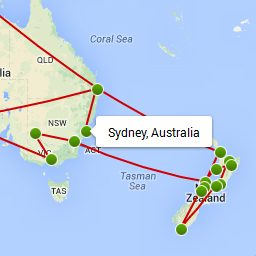
Geopost 是一個基於 Google Maps 的 WordPress 外掛程式,讓您為每篇文章指定地點,並生成一個包含已分配地點的每篇文章標記的嵌入地圖。點擊這些標記將連結至相對應的文章。地圖可以使用短碼[geopost]插入到任何文章或頁面中。要為文章設置地點,請在文章的管理頁面中的Geopost 箱中輸入搜尋字串,然後按下「搜索」。如果識別出一個地點,將會出現一個地圖供您確認結果。在編輯器窗口地圖中點擊標記圖示會旋轉不同顏色的圖示。
外掛標籤
開發者團隊
原文外掛簡介
Geopost is a WordPress plugin based on Google Maps that let’s you specify a location for each post and generate an embedded map containing a marker for each post that has been assigned a location. Clicking on these markers will link you to the corresponding post. The map can be inserted into any post or page using the shortcode [geopost]. To set the location for a post, enter a search string in the Geopost metabox in the post’s admin page and press ‘Search’. If a location is recognized, a map will appear for you to confirm the result. Clicking on the marker icon in the editor window map rotates through different color icons.