
內容簡介
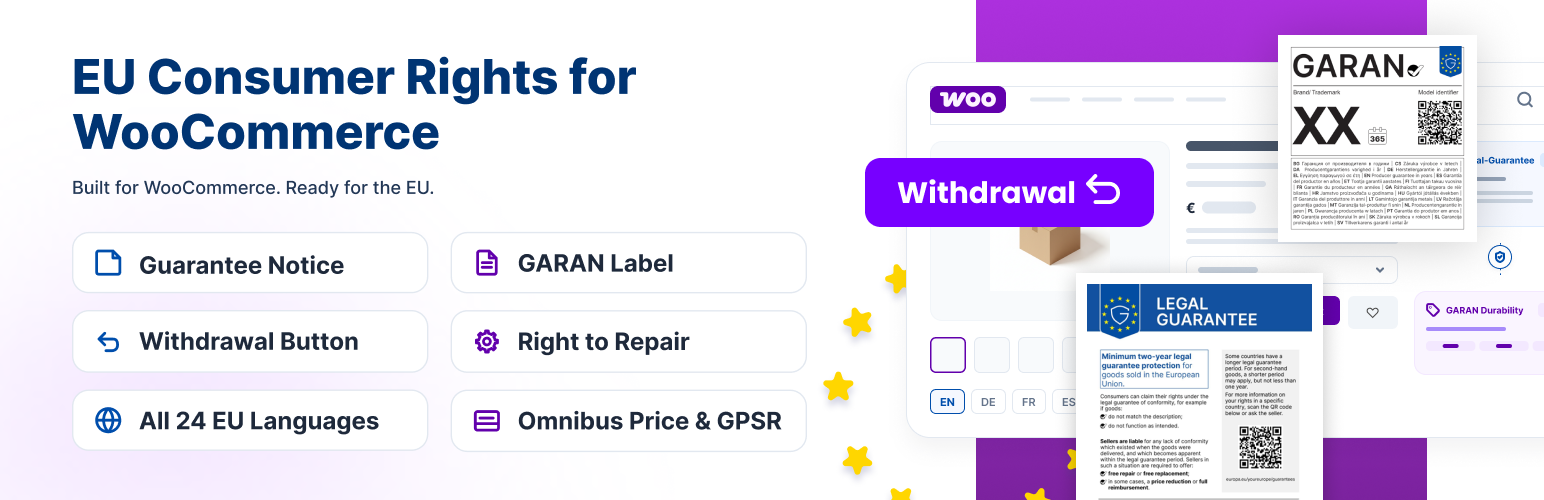
EU Consumer Rights for WooCommerce 外掛旨在協助 WooCommerce 商店自動顯示符合歐盟法律的保證通知與耐用性標籤,確保商家遵循 EU 2025/1960 規範,增強消費者信任。
【主要功能】
• 自動在每個產品頁面顯示法律保證通知
• 顯示 GARAN 耐用性標籤於結帳與訂單確認郵件
• 支援 24 種歐盟語言的官方圖形顯示
• 無需付費,完全免費使用
• 不提供法律建議,合規性由商家自行判斷
外掛標籤
開發者團隊
② 後台搜尋「EU Consumer Rights for WooCommerce – Guarantee Notice, GARAN Label, Withdrawal Button, Right to Repair, Omnibus Price & GPSR」→ 直接安裝(推薦)
原文外掛簡介
Regulation (EU) 2025/1960 introduces a harmonised legal-guarantee notice and a durability label (GARAN) for goods sold to consumers in the EU. EU Legal-Guarantee Notice & GARAN Durability Label for WooCommerce adds both official graphics to your WooCommerce store — automatically on every product page, at checkout, and in order confirmation emails — in the official language of your choice, out of all 24 EU languages.
From 27 September 2026, every trader selling goods to consumers in the EU must display the harmonised notice on the legal guarantee of conformity, and must also show the GARAN durability label wherever the producer offers a free, whole-product durability guarantee of more than two years. Both designs are fixed by Commission Implementing Regulation (EU) 2025/1960 — the notice in Annex I, the label in Annex II.
Shops know these under their own national names. In Germany and Austria it is the notice on the gesetzliche Gewährleistung, and the label covers a gewerbliche Haltbarkeitsgarantie. In France it is the notice on the garantie légale de conformité, with the label for a garantie commerciale de durabilité. In Spain, the garantía legal de conformidad and the garantía comercial de durabilidad. In Italy, the garanzia legale di conformità and the garanzia commerciale di durabilità. In the Netherlands and Belgium, the wettelijke garantie and the commerciële duurzaamheidsgarantie. One Regulation and one set of official artworks sits behind all of them, and this plugin ships every language edition.
Everything below is 100% free. There is no Pro version, no license key, and no locked feature.
This plugin is a display helper. It shows the official harmonised graphics as intended by the Regulation. It does not provide legal advice and does not guarantee that your store is legally compliant — whether and how the rules apply to your business is for you (and, if needed, your legal advisor) to determine.
EU Legal-Guarantee Notice & GARAN Durability Label for WooCommerce is an independent WooCommerce plugin and is not affiliated with or endorsed by the European Union or the European Commission.
Features
EU Legal-Guarantee Notice (Annex I)
The official harmonised legal-guarantee notice, in all 24 EU languages, rendered from the Commission’s own artwork — not a re-creation.
Automatic placement on every WooCommerce product page, at 7 selectable positions (before the summary, under the product image, after the title, after the price, after the short description, after Add to cart, or near the tabs).
Three display modes: Popup (compact row that opens the full notice in a dialog), Full (the complete graphic shown inline) or Nested (a compact trigger that expands the full graphic in place).
Three trigger row styles — Minimal, Classic (teal “View” button), or Custom (plain clickable text with a shield icon) — each with your own trigger text (default “Your legal guarantee rights”, translated) and adjustable text size.
Adjustable maximum notice width, so the graphic sits comfortably in any theme.
Optional header notice: a “Your legal guarantee rights” link automatically added to your site’s navigation menu (desktop, tablet and mobile), with a hover preview and click-to-open modal — falls back to a standalone banner if no menu can be found.
Shows automatically on the Checkout page, under the “Checkout” heading — works with both the classic shortcode checkout and the WooCommerce block-based checkout.
Optional inclusion in WooCommerce order confirmation emails (processing, on-hold, completed, and customer invoice), in both HTML and plain-text format, customer-facing only (never the admin’s own copy) — choose between a full embedded graphic, a compact text line with a link, or the graphic sent as a real file attachment.
Click-to-open notice with a direct link to the matching Your Europe legal-guarantee information page for your selected language.
Manual placement anywhere via the [eu_guarantee_notice] shortcode or the “EU Guarantee Notice” Gutenberg block.
Works without WooCommerce: on any WordPress site selling goods, place the notice and the label with the shortcodes or blocks.
On Polylang and WPML sites, “Automatic” language follows the language each visitor is reading, with nothing to set up.
Optional “Powered by GARAN Labs” credit line.
GARAN Durability Label (Annex II)
Appears automatically for any product with a manufacturer guarantee of 3 years or more, configured in a dedicated “EU Guarantee” product data tab (duration in whole years, Brand/Trademark, Model identifier) — with inline help text on the eligibility threshold and a live label preview as you type.
Text-fit check: brand, model and duration are measured against the official label’s fixed layout, using the label’s own font. Anything too wide is flagged live in the editor and on save — and compressed on the label so it never runs into the QR code or the next field.
Variable product support: each variation can override the GARAN label from its own panel on the Variations tab (show/hide, duration, Brand/Trademark, Model identifier), with its own live preview — any field left blank uses the parent product’s value. On the product page the label switches as the shopper picks a variation, and cart, checkout, and order emails show each ordered variation’s own label.
Artwork-fit safeguards so long Brand/Trademark or Model text never breaks the label design: a 40-character cap enforced both in the editor (with a live counter) and on save, plus automatic font-shrinking with ellipsis truncation when the compact label graphic is rendered for order emails.
Rendered from vector SVG artwork, so it stays sharp at any size, with a site-wide adjustable badge width.
Same three display modes (Popup / Full / Nested) and the same 7 position choices as the notice, set independently per widget.
Shown at checkout (classic and block checkout) and on the classic Cart page, under each qualifying item’s thumbnail, with its own separate, smaller badge-width setting. Items carrying an identical label share one, instead of repeating it.
Optional inclusion in order confirmation emails (HTML and plain-text, customer-facing only), per qualifying product — a compact text line with a link, the full label graphic embedded directly (rendered server-side with the bundled font and template, no ImageMagick/librsvg required), or sent as a real file attachment.
Manual placement via the [eu_garan] shortcode (optionally overriding years/brand/model explicitly, e.g. [eu_garan years="5" brand="Acme" model="AC-1200"], which skips the eligibility check) or the “GARAN Label” Gutenberg block, with its own live preview in the editor.
Links through to the official Your Europe commercial-durability-guarantee information page.
Site-wide enable/disable toggle independent of per-product settings.
Vendor GARAN label image upload: if a manufacturer or vendor already supplies you with a ready-made GARAN durability label image for a product, upload it on the dedicated “Vendor GARAN Labels” admin page (under EU Guarantee & GARAN) — it then replaces the generated label everywhere it would normally show for that product: product page, checkout, cart, shortcode/block, and order-confirmation emails (link, embedded, and attachment formats alike). Qualifies the product on its own, with no need to also fill in its Duration/Brand/Model fields — a required “Duration (years)” field on the same page fills in the compact preview badge’s number.
The product’s EU Guarantee tab keeps the two guarantees apart: Legal guarantee (seller — by law) with an optional per-product legal guarantee period, and GARAN label — commercial durability guarantee (manufacturer) with the manufacturer’s duration, brand and model. The manufacturer’s duration never changes the legal guarantee period.
EU Order Withdrawal Button (Directive (EU) 2023/2673) — requires WooCommerce
A withdrawal form page (“Withdraw from contract”) is created as a draft with the [eggl_wd_order_withdrawal_request_form] shortcode — publish it to switch the withdrawal feature on.
Optional withdrawal button in the footer (shop pages only, or every page), and an optional “Withdraw from contract” link in the header menu (desktop and mobile, classic and block themes). Place the button anywhere else with [eggl_wd_order_withdrawal_button]. The button wording can be changed under Withdrawals → Settings → Button text.
My account integration: a “Withdraw” button next to each order that can still be withdrawn, in My account → Orders and on the order’s own page.
Partial withdrawals: customers choose which items (and how many) to withdraw. Guests get a “Choose items” link in their confirmation email once their email matches the order.
Guest validation levels (none, order number or email, order must exist, order and email must match), plus built-in spam protection (honeypot field, submit-time check, IP limits).
Configurable withdrawal period (days from completion), non-refundable product types (virtual by default), mandatory form fields, and an optional “additional information” field.
Five emails: request received (customer), new request (admin), request confirmed, request rejected with reason (customer), and request deleted (admin) — all editable under WooCommerce → Settings → Emails.
Manage requests under EU Guarantee & GARAN → Withdrawals → Requests: confirm, reject or delete individually or in bulk, search, filter by status, preview. Requests also show on the WooCommerce order screen, with “Pending withdrawal” and “Withdrawn” order statuses.
Refunds on a confirmed withdrawal are linked to it automatically; withdrawn quantities are shown to the customer on their order.
Privacy tools: withdrawal data is included in WordPress personal-data export and erasure.
Independent of the standalone “EU Order Withdrawal Button for WooCommerce” plugin: it keeps its own requests, statuses, emails and settings, so both can be active at once. Theme template overrides go in woocommerce/eggl-withdrawal/.
Price History & EU Omnibus Lowest Price (Directive (EU) 2019/2161) — requires WooCommerce
Price recording: every price change on simple products and variations is saved automatically, including changes made through the REST API and product importers. Recording starts as soon as the plugin is active.
Lowest price: show the lowest price from the last 30 days next to products on sale, with your own wording ({lowest_price} placeholder), as the Omnibus Directive requires for announced price reductions.
Price history chart: an optional bar chart on the product page, with its own colours, width, title, date range and minimum number of prices before it appears. It can be hidden per product.
Anchor price (Croatian price rules): store a reference price and its date per product or variation and show it next to the current price; if you don’t enter one, it can be filled in from the recorded history.
Digital price list (Croatian price rules): publish current prices as a CSV at a public URL (default /price-list/) and via the REST API (/wp-json/eggl-price-history/v1/price-list), regenerated daily, with older versions kept for 30 days.
Price Compliance Manager: edit anchor prices for many products on one screen, or export and import them as CSV, with filters and SKU matching.
Product Price History tab: each product (and variation) lists its recorded prices, newest first, with the price, currency and the date and time it was recorded. Tick Hide to leave an entry out of the chart and the lowest-price calculation (for example a pricing mistake fixed within minutes); hidden entries are shown struck through. Recorded prices can’t be edited or deleted here, as they are the record behind the lowest price. The chart can also be hidden per product.
Settings under EU Guarantee & GARAN → Price History; bulk editing under EU Guarantee & GARAN → Price Compliance Manager.
Independent of the standalone “Product Price History for WooCommerce” plugin: it keeps its own price history table, settings and product data, so both can be active at once. History recorded by the standalone plugin is not imported.
Based on “Product Price History for WooCommerce” by Devnet (GPLv2 or later).
GPSR Product Safety Information (Regulation (EU) 2023/988), CE & UKCA — requires WooCommerce
A Product Safety (GPSR) tab in the WooCommerce Product data panel, with its own switch per section.
Manufacturer and responsible person (EU/UK) contact details: name, postal address, phone, email and website.
Warnings & safety information text.
Product documents from the Media Library (PDF, JPG or PNG): certificates of analysis and conformity, declaration of conformity, instructions for use, user manual, safety data sheet, installation instructions, troubleshooting guide and other documents.
Shown to shoppers in a “Product safety” tab on the product page, only for products where it is switched on and filled in.
Settings under EU Guarantee & GARAN → Product Safety (GPSR): switch the whole feature on or off (product data is kept), and choose whether its product data is deleted when the plugin is deleted.
Independent of the standalone “Euverify- GPSR, CE & UKCA for WooCommerce” plugin: it keeps its own product data, so both can be active at once. Data entered in the standalone plugin is not imported. Based on that plugin by euverify.com (GPLv3 or later).
Right to Repair — Defect Claims (Directive (EU) 2024/1799) — requires WooCommerce
Defect claim form: a “Report a defect” page (created as a draft with the [eggl_repair_claim_form] shortcode — publish it to switch the form on). Customers pick the defective item(s) and quantity, describe the defect, optionally add photos, and choose repair or replacement — with the notice that choosing repair extends the legal guarantee by 12 months.
Guests and customers: logged-in customers choose the order from an Order dropdown and its claim form opens right below; guests find their order with order number + email. Contact details (email, first name, last name, phone) are pre-filled from the order. A “Report a defect” button appears in My account → Orders next to every order with items still under the legal guarantee, and the order page lists its claims and any guarantee extensions.
Only what is still covered: physical items within the legal guarantee period can be claimed; virtual and downloadable items are left out, and an item with an open claim can’t be claimed twice.
Orders that can be claimed: choose the order statuses (any status in your store, including custom ones such as “Delivered”) under Right to Repair → Settings. Completed is the default, as the legal guarantee covers goods the customer has received.
Legal guarantee period: a store default (2 years from delivery, adjustable for countries that give more), and an optional period per product or variation in its EU Guarantee tab — for example 12 months for used goods where the law allows it. The period is saved on each order line at purchase, so later product changes don’t affect what customers bought.
12-month extension, automatically: mark a claim “Repaired” and each repaired item’s legal guarantee is extended by 12 months (adjustable upwards), saved on the order item, noted on the order and shown to the customer. Repeated repairs add up, and an extended item can be claimed for again until its new end date.
Claims management under EU Guarantee & GARAN → Right to Repair: open/all/per-status views, search, claim details with photos, statuses Received, In progress, Repaired, Replaced, Refunded or price reduced and Rejected (a reason is required and sent to the customer), a history of every change, bulk actions, and a “Defect claims” box on the order screen.
Three emails, editable under WooCommerce → …
