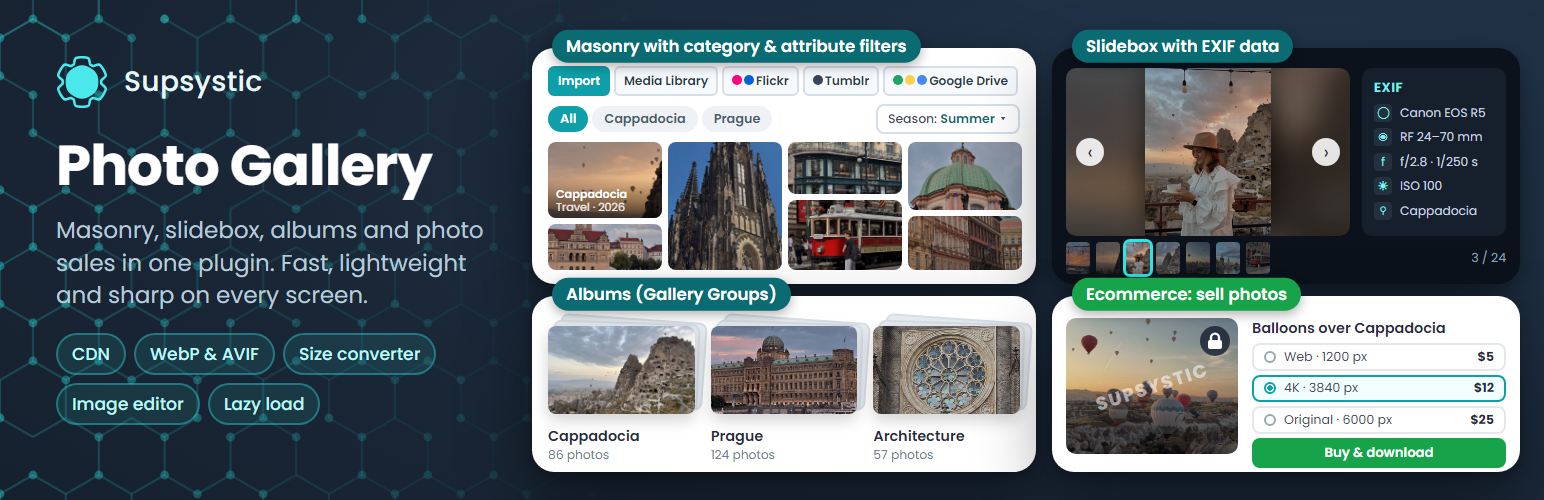
內容簡介
Photo Gallery by Supsystic 是一款 WordPress 外掛,專為建立響應式照片畫廊、圖像畫廊及相簿而設計,並內建燈箱功能。用戶可輕鬆從媒體庫批量添加圖片,調整順序並選擇佈局,無需編碼即可發佈畫廊。
【主要功能】
• 支援無限畫廊及圖片
• 多種畫廊佈局選擇
• 批量添加圖片及拖放排序
• 響應式燈箱顯示全尺寸圖片
• 相簿功能可整合多個畫廊
• 兼容 Gutenberg、Elementor 及短碼
外掛標籤
開發者團隊
② 後台搜尋「Photo Gallery by Supsystic – Image Gallery, Masonry, Albums & Lightbox」→ 直接安裝(推薦)
📦 歷史版本下載
原文外掛簡介
Photo Gallery by Supsystic is a WordPress gallery plugin for responsive photo galleries, image galleries, masonry grids and albums with a built-in lightbox. Add images from the Media Library in bulk, drag them into order, pick a layout and publish the gallery with a block, an Elementor widget or a shortcode. No code required.
Unlimited galleries and images are free.
Try it in your browser: open a live demo in WordPress Playground – no install, no account.
Gallery layouts
Standard grid with even thumbnails
Masonry layout that keeps every photo’s proportions
Rounded thumbnails
Horizontal layout and horizontal scroll galleries
Separate column counts for desktop, tablet and mobile
Albums with Gallery Groups
Gather several galleries into one album that visitors can browse. Gallery Groups work well for portfolios, events, client folders, projects and travel albums.
Lightbox
Photos open in a responsive lightbox, so visitors can view each image full size without leaving the page.
Fast image management
Bulk add images from the WordPress Media Library
Drag-and-drop image ordering
Titles, captions, ALT text and links for every image
Borders, corner radius and shadows
A loader that shows while the gallery images load
ALT text and captions are saved with each image, which helps your galleries in image search.
Add galleries anywhere
Gutenberg block, Elementor widget and shortcode
Works with other page builders through the shortcode
One gallery on many pages: edit it once and every copy updates
Made for
Photography and artist portfolios
Wedding and event galleries
Travel and food blogs
Product, real estate and venue photos
Before and after galleries
Agency and client project galleries
Photo Gallery Pro
Pro adds professional layouts, effects and tools for selling and protecting photos:
Mosaic layout, category and icon templates and post feed galleries built from your posts and pages
Category tabs, filters and search inside a gallery
Pagination, Load More and infinite scroll for large galleries
Caption Builder, hover captions, hover icons and EXIF data
Lightbox slideshow and advanced lightbox styles
Video galleries with YouTube and Vimeo
Watermark, lazy load, image optimization and CDN delivery
Import from Flickr, Tumblr, Google Drive and FTP
Visual image editing and social sharing
Sell access to galleries and images, paid resolution downloads and private galleries
Learn more
Official plugin page
Pro features
Pricing
Documentation