內容簡介
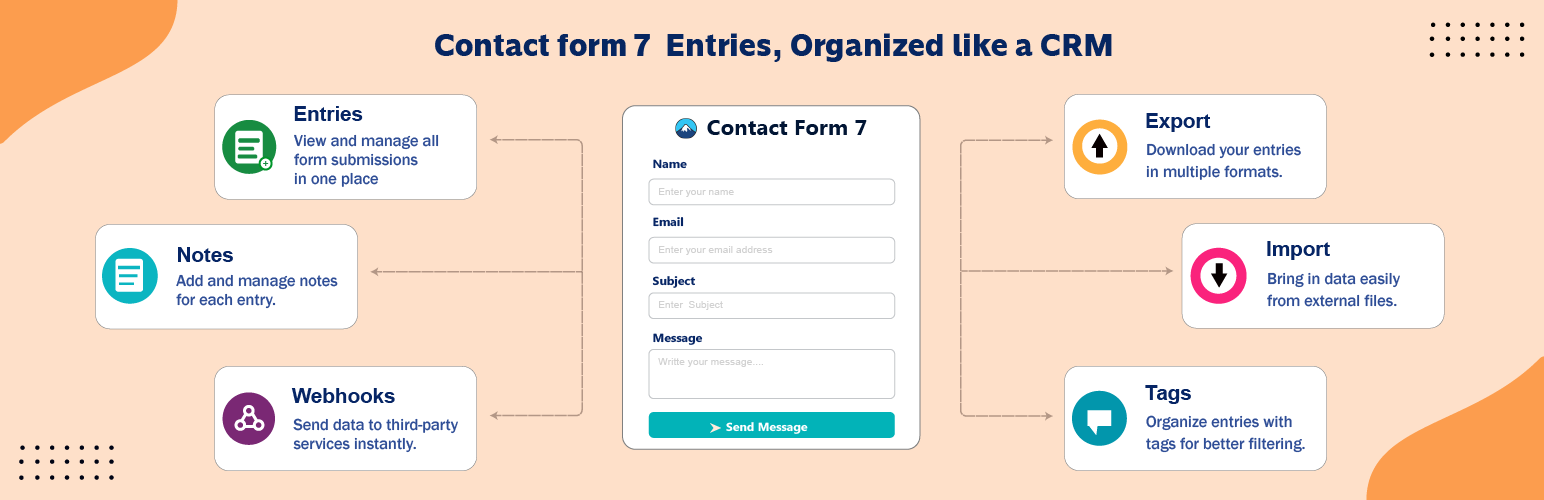
Form Insights Tracker 是一款專為 Contact Form 7 設計的外掛,能夠將所有提交的表單資料自動儲存至 WordPress 資料庫,並提供可搜尋、可標記及可分配的客戶追蹤資料庫,讓使用者輕鬆管理聯絡表單的每一筆查詢。
【主要功能】
• 自動捕捉無限表單及提交資料
• 高級篩選器可搜尋及排序資料
• 狀態管道追蹤潛在客戶進度
• 標籤管理及批次操作功能
• 完整的訪客追蹤及來源分析
• 簡潔的資料詳細頁面及歷史紀錄
外掛標籤
開發者團隊
② 後台搜尋「Form Insights Tracker – Contact Form 7 Entries, Database & Mini CRM」→ 直接安裝(推薦)
原文外掛簡介
Contact Form 7 doesn’t keep your submissions. It emails them and forgets them — one lost or filtered email means a lost lead, with no record it ever happened. Form Insights Tracker fixes that. It captures every Contact Form 7 submission straight into your WordPress database and turns it into a searchable, taggable, assignable customer follow-up database — a real mini CRM for your contact forms, right inside wp-admin.
No spreadsheets. No digging through your inbox. Just one clean screen for every enquiry that comes through your site.
Features
Entries inbox & customer database
Every real Contact Form 7 submission captured automatically — unlimited forms, unlimited entries.
Searchable, sortable, filterable entries table with an advanced filter builder.
Filter by form, date range, tags, status, assignee, read/unread, favourites, or your own custom conditions.
Choose and reorder table columns; save any filter + column setup as a Saved View and return to it in one click.
Global search across every form, plus per-form search.
Full entry detail page with every submitted field, private team notes, and a complete audit history of every change.
One-click duplicate, plus print or save-as-PDF straight from the entry.
Lead tracking & follow-up
Status pipeline — move each lead through New, Contacted, Converted or Lost.
Assigned To — give every entry an owner from your WordPress users, and filter by who’s handling what.
Read/Unread and Favourites, so nothing important gets missed.
Tags — create, apply and filter by tags across all your forms.
Bulk actions — favourite, trash, change status, assign or mark read/unread across many entries at once.
Where your leads come from
Full visitor tracking and attribution on every entry: UTM source/medium/campaign/term/content, referrer, landing page, page title, IP address, device, browser, OS, screen resolution and city/country — know exactly which campaign or channel a lead came from.
Dashboard
A report card per tracked form with a submissions chart, average line, and today / this week / this month counts. Reorder cards and choose your default date range and widgets.
Data tools
CSV export of your entries.
CSV import — bulk-add entries with column mapping, duplicate handling, and default tags, status and assignee.
Manual entry creation — log a lead yourself, from a phone call or an event.
Webhooks — send entry data live to Zapier, Make, your CRM or any endpoint you choose.
Trash
Deleted entries move to Trash with their tags, status and history intact. Restore or permanently delete, one by one or in bulk, with a configurable retention period.
Email notifications
Automatic emails on new entry, status change, or when an entry is trashed.
Per-form notifications with To/Cc/Bcc, a custom From name, editable subject and body, and match conditions.
Dynamic tokens for system info and the visitor’s own submitted field values, so an alert can quote exactly what they wrote. Test before you switch it on.
Team & access
User roles — Super Admin and Admin, so you control who on your team can see and manage entries.
A guided onboarding wizard and welcome tour to get you set up fast.
Optional “delete all plugin data on uninstall” setting — off by default, so your data survives deactivation and deletion.
Who is it for?
Sales teams: capture every contact form lead, assign it to a rep, move it through Contacted, Converted or Lost, and get emailed the moment a new one arrives.
Agencies and freelancers: keep client enquiries from many sites and forms organised in one place, tagged by project.
Support and service teams: track every request, see what is unread, assign an owner and keep an audit trail.
Small businesses and non-profits: a lightweight customer database without the cost and complexity of a full CRM.
Requirements
Form Insights Tracker works with Contact Form 7, which must be installed and active.
External service
On every tracked form submission, the plugin looks up the visitor’s public IP address with the third-party service ipapi.co (https://ipapi.co, terms, privacy). The IP is never sent for local or private addresses, or for entries created by import or manual entry. The city, region, country and network (ISP) name it returns are stored with the entry; if the lookup fails they are left blank.