
內容簡介
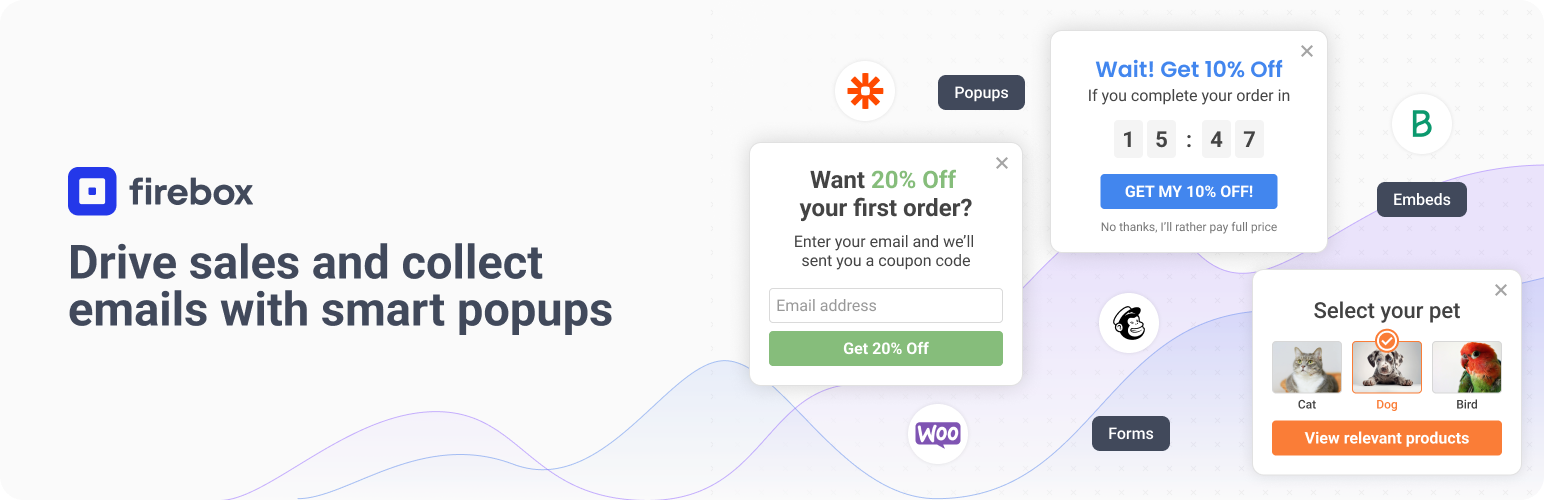
火盒是一個WordPress彈出視窗生成器外掛,可提高轉換率。它可幫助您使用引人注目的彈出視窗將訪問者轉換為訂閱者和客戶。精確的定位和智能觸發器可以向正確的人傳遞正確的信息,無需任何編程知識。
火盒基於WordPress最新的區塊編輯器Gutenberg,為您帶來全新的彈出視窗編輯體驗。使用區塊,您可以插入、重新排列和設計您的彈出視窗,非常適合沒有技術知識的用戶。使用區塊而不是編寫自定義代碼,可以更好地關注內容本身。
可以輕鬆地創建滾動彈出視窗、退出彈出視窗、訂閱彈出視窗、聯繫表單彈出視窗、模式框、燈箱、浮動條、固定條、側欄、滾動框、滑入彈出視窗、全屏覆蓋、歡迎墊子、歡迎框、歐盟cookie條類等不同類型的彈出視窗。
您還不知道彈出視窗生成器可以為您的網站做些什麼?這裡有一些實際案例。
1. 收集潛在客戶信息
- 收集電子郵件地址-提供免費運輸、優惠券和其他獎勵,減少購物車放棄,進行贈品促銷,舉辦季節性促銷(聖誕節、黑色星期五、萬聖節等)。
- 增長短信列表-提供優惠券和其他獎勵、提供免費回撥、重定向到WhatsApp聊天等。
- 收集表單提交-提供技術支持、進行調查、預訂會議、允許請求回撥、收集意見反饋等。
2. 提高銷售額
- 激增銷售額-推廣特殊優惠、防止購物車放棄、推薦產品等。
- 減少購物車放棄-提供折扣、提醒訪客上次購物會話記錄、提供額外折扣來完成購買、運用社交證明、徵詢反饋、提供客戶支持、針對閑置訪問者。
- 產品跨銷/上銷-提供智能產品推薦。
3. 引導訪客
- 增加用戶參與度-創建測驗、通過Yes/No重定向、顯示相關內容(文章)、收集社交媒體追隨者、顯示視頻。
- 做出公告-推廣活動、推廣特殊優惠、推廣退貨政策、Cookie法律同意、AdBlock檢測、年齡驗證、顯示COVID-19通知、條款和條件。
- 增長社交媒體追隨者-鼓勵人們關注(到社交網路的鏈接)、鼓勵人們分享(輕量級社交分享小部件)、社交聊天啟動器、增長您的Messenger列表,增加YouTube視頻的觀看。
4. 工具
- Cookie法律同意-為GDPR顯示Cookie同意條款欄。
- AdBlock檢測-顯示AdBlock檢測警告消息。
- 年齡驗證-顯示一個年齡驗證彈出視窗。
- 外部鏈接通知-為外部鏈接創建離開通知彈出視窗。
- 條款和條件-顯示一個條款和條件彈出視窗。
- 滾動到頂部按鈕-顯示一個滾動到頂部按鈕。
- 通知-在彈出視窗中顯示警告,成功和信息消息。
所有功能均已包含,多功能的彈出視窗生成器。具備直觀的可視化編輯器,基於區塊,無需任何編程知識即可建立彈出視窗。
外掛標籤
開發者團隊
② 後台搜尋「FireBox Popups – Increase Sales and Grow Your Email List」→ 直接安裝(推薦)
📦 歷史版本下載
原文外掛簡介
Increase Sales & Capture Leads with FireBox
FireBox is the best popup plugin for WordPress. Boost your revenue with our Gutenberg-based popup builder. Promote special offers, fight cart abandonment, and grow your email list with personalized popups that can be triggered on page load, on exit-intent or even on user scroll.
FireBox Website | Templates | Knowledge Base | Test Drive PRO
✉️ Collect Email Addresses
FireBox helps you collect email signups on your website, as well as convert visitors into loyal subscribers, and customers. With customizable options, you can entice visitors with engaging incentives like discount codes, giveaways, lead magnets, or newsletters.
Email Opt-in Popup
MailChimp Popup
SendInBlue Popup
Grow Newsletter
Discounts Popup
Offer Free Resources
Run Giveaways
Restrict Content
📈 Increase Product Sales
Boost your revenue with FireBox, the ultimate WordPress popup plugin, by effectively promoting sales, special offers, and products. Our WordPress popups showcase bestsellers, new arrivals, and related items, reducing cart abandonment and increasing average order value.
Promote Offers
Increase Average Order Value (Recommend Products)
WooCommerce Upsell Popup
WooCommerce Cross-sell Popup
Related Products Popup
Limited Stock Popup
Best Sellers Popup
Recently Viewed Popup
Frequently Bought Together Popup
Reduce Cart Abandonment
Remind Shoppers What They Left in Cart
Get User Complete Their Purchase
Free Shipping Bar
Offer Free Gift Over $$ Spend
Detect AdBlock Popup
💡 Measure Real Revenue from Your Campaigns
With the new Revenue Attribution feature you can finally link your campaigns to actual sales. FireBox automatically tracks View-Through Revenue and Conversion-Through Revenue (for WooCommerce & Easy Digital Downloads) so you know which campaigns drive money, and not just views.
Learn more: https://www.fireplugins.com/docs/revenue-attribution/revenue-attribution/
📣 Guide Visitors
Stay connected with your audience and convey important messages with FireBox’s announcement features, the essential WordPress popup plugin. Whether it’s promoting your social network, displaying relevant content, or communicating policies like return or COVID protocols, FireBox popup has you covered.
Make Announcements
COVID-19 Announcement
Grow Social Network
Show Relevant Content
Promote Return Policy
Age Verification Popup
Cookie Consent Banner (EU Cookie Notice)
External Link Notification Popup
WordPress Login Popup
📝 Connect with Visitors
Empower visitors to engage with your brand and take action by providing various contact and interaction options with FireBox, the versatile WordPress popup plugin. Whether collecting feedback, booking meetings, offering support, or creating interactive quizzes and surveys, FireBox popup facilitates seamless communication and relationship building.
Contact Form Popup
Collect Phone Numbers
Book Meetings
Offer Custom Quotes
Offer Support
Create Quiz
Run Surveys
Campaign Formats
Choose the perfect popup campaign format to display the most attention-grabbing message to your visitors for maximum engagement. FireBox WordPress popup plugin comes with the following popup formats:
Classic Popup (Lightbox): Easily create custom popups to grow your email list, show coupons, make a WooCommerce cross-sell or WooCommerce upsell campaign, and more, using our popup plugin.
Slide-in Popup: A high-converting popup format that slides from the bottom of the screen to highlight related WooCommerce products, related posts, and newsletter forms.
Fullscreen Popup: Create full-screen popups and welcome mats to focus your visitor’s attention on your best offer.
Notification Bar: Create notification bars, hello bars, and floating bars to show free shipping notices, website announcement alerts, sale countdown timers, and more.
Floating Button Popup: Engage more visitors with a popup triggered by a floating button at any corner of your screen.
Sidebar Popup: Turn every page into a lead generation opportunity. We even made it easy to do if you’re using Gutenberg Blocks.
Welcome Mat: A screen-filling box (also known as interstitials or welcome mats) that slides in and pushes the content down.
Embeds: Unlike a popup, inline campaigns can be embedded anywhere inside your page content.
Smart Triggers
Detect visitors’ behavior and use smart triggers to display the right campaign to the right person at the right time. Display a popup on page load, click, hover, exit intent, scroll, and even when the user is using an AdBlock extension!
On Page Load: Display a popup when the page has fully loaded.
On Scroll (Pro): Show a popup when the visitor scrolls reached the specified amount of scroll depth set in percentage or pixel.
On Element Visibility (Pro): Show a popup when a specified element(s) enters the viewport after scrolling down.
On Exit Intent (Pro): Show a popup when the visitor intends to leave the site.
On Click: Show a popup when the user clicks a button, link, or banner.
On Hover / Mouseover: Show a popup when the visitor hovers over an element.
On AdBlock Detect (Pro): Show a popup when the visitor has an AdBlock enabled.
On Idle / User Inactivity (Pro): Show a popup when the visitor is idling.
On External Link Click: Show a popup when the users click on external links.
Floating Button: Show a floating button that triggers your popup.
Manually: Show a popup programmatically using Javascript.
Advanced Targeting
Every visitor is different. Why treat them all the same? FireBox comes with Display Conditions that can help you easily target visitors with popups.
Date / Time
Date & Time (Pro): Show only on a certain date range.
Day of Week (Pro): Show only on specific days of the week.
Month (Pro): Show only on specific months.
Time (Pro): Show only on a specific time range.
WordPress
User (Pro): Target specific users.
Menu: Target specific menu items.
User Roles (Pro): Target specific user roles.
Post: Target specific posts.
Page: Target specific pages.
Post Tag (Pro): Target posts with specific tags.
Post Category (Pro): Target posts in specific categories.
Custom Post Type (Pro): Target specific post types.
Homepage: Show only on the homepage only.
Technology
Device (Pro): Target mobile phone, tablet, or desktop users.
Browser (Pro): Target users using a specific browser, like Chrome or Firefox.
Operating System (Pro): Target users using specific operating systems such as Windows, Linux, or Mac.
Geolocation
Country (Pro): Target users physically in a specific country.
City (Pro): Target users physically in a specific city.
Region (Pro): Target users physically in a specific area.
Continent (Pro): Target users physically on a specific continent.
Integrations
Language (Pro): Target users browsing the site in a specific language (WPML Plugin).
FireBox
Viewed Another Popup (Pro): Target users who previously viewed a FireBox Popup.
Submitted Form (Pro): Target users that have previously submitted a specific FireBox Form.
WooCommerce & Easy Digital Downloads
Products In Cart (Pro): Target users that have added specific products to their cart.
Cart Items Count (Pro): Target users that have added X products to their cart.
Amount In Cart (Pro): Target users whose cart value amounts to X.
Current Product (Pro): Target users viewing specific products.
Purchased Product (Pro): Target users that have purchased specific products.
Last Purchased Date (Pro): Target users based on the last date they purchased specific WooCommerce products.
Current Product Price (Pro): Target users based on their viewing product price.
Total Spend (Pro): Target users based on the total amount spent.
Current Product Stock (Pro): Target users based on the stock of the product they are viewing.
Current Product Category (Pro): Target users viewing products in specific categories.
Category (Pro): Target users viewing specific categories.
Advanced
URL: Show only on URLs or URLs that contain certain keywords.
Referrer URL (Pro): Show only to users who landed on your site from specific URLs or URLs that contain certain keywords.
IP Address (Pro): Target users behind a specific IP address or IP range.
Page Views (Pro): Target users who have visited X number of pages.
Cookie (Pro): Fine-tune your personalization with custom cookie retargeting.
PHP (Pro): Use PHP to create your conditions. The sky’s the limit!
Time on Site (Pro): Target users who have spent a specific amount of time on the site.
New/Returning Visitor (Pro): Target new users or returning visitors.
All features – A multi-purpose popup plugin
Intuitive Visual Editor – Block-based popup builder that lets you create popups without coding.
Position Everywhere – Configure your campaign to appear from any corner of your website.
Popup Gallery – Ready-to-use, responsive, and highly customizable pre-made popup templates and presets so you can start in just a few minutes.
Forms – Create beautiful forms to capture leads. Convert visitors into leads and leads into customers. Integrate with your favorite CRM such as MailChimp, SendInBlue, AcyMailing, and more! Use our Zapier Integration to sync your form submissions with 5,000+ apps.
Multiple Campaign Types – Popup, Floating Bar, Notification Bar, Fullscreen Popup, Slide-in Popup—all in one plugin!
Precision Targeting – Every visitor is different. Show targeted campaigns based on the user’s device, the URL they came from, or even their physical location.
Smart Triggers – Detect visitors’ behavior and use smart triggers to display the right campaign to the right person at the right time. Display a popup on page load, click, hover, exit intent, scroll, and even when the user is using an AdBlock extension!
Analytics – Easily find out which campaigns are converting the most. FireBox tracks the number of times a popup is viewed, the average time each popup is opened, the total form submissions, and the conversion rate.
Actions (Pro) – Control what happens when a certain campaign event fires in the browser.
Customize Display Frequency (Pro) – Customize the frequency settings to Avoid annoying visitors by repeatedly displaying the same popup.
Cookie Popup – Choose how your popup will behave after visitors close it. You can keep showing the popup or hide it for a set amount of time before it starts to reappear using cookies.
Google Analytics Tracking (Pro) – In addition to the native analytics, FireBox comes with a Google Analytics Tracking add-on that helps you track your popup events with your Google Analytics account.
Highly Customizable – You have Total control of the appearance, including colors, Size, Background, Border, Paddings, Overlay, and many more.
Mobile-Friendly – The web is no longer just for desktops. That’s why FireBox is 100% mobile optimized and responsive.
60+ Animations Effects – Play the role of a director from a list of 60+ eye-catching animation effects.
Opening Sound – Catch the user’s attention by playing a sound when the popup opens.
Custom Code – You can display the content of your favorite plugin by adding shortcodes or Custom Codes inside a Code element.
Smart Tags – Personalize your popups with dynamic smart variables.
Shortcodes Support – Include your favorite plugin shortcode within your popups.
Compatible with form builders – Display your existing forms with FireBox
Great Performance – FireBox is built with ease and performance in mind. The plugin accounts for less than 1% of the page load for the average optimized website. It consists of 1.7 KB of CSS and 24 KB of JS.
Forms – Collect email addresses and sync with your favorite CRM!
FireBox provides a built-in Gutenberg Form block that allows you to create forms, collect email addresses and sync your submissions with your CRM!
Send unlimited email notifications.
MailChimp Integration.
AcyMailing Integration.
Brevo Integration.
Zapier Integration to connect to 5,000+ apps.
Built-in honeypot anti-spam solution.
Cloudflare Turnstile Integration to help your forms against spam.
hCaptcha Integration to help your forms against spam.
Integrations with 3rd Party WordPress Plugins and Apps
Zapier – Sync your popup form submissions with 5,000+ apps!
WooCommerce – Create a WooCoomerce Popup and add upsell and cross-sell popups, free shipping bars, announcement bars, coupon wheels, and more.
Easy Digital Downloads – Create an EDD Popup to incorporate upsell and cross-sell popups, free shipping bars, announcement bars, coupon wheels, and other similar features.
Elementor – Build your popups using the Elementor page builder.
Gravity Forms – Create a Gravity Forms popup that includes payment forms, contact forms, user registrations, login forms, and other Gravity Forms campaigns with just a few clicks.
Contact Form 7 – Create a Contact Form 7 popup.
WPForms – Create a WPForms popup including contact forms, survey popups, and polls, or embed any WPForms form inside lightbox popup modals.
Ninja Forms – Easily create Ninja Forms popups with FireBox.
MailChimp – Easily create MailChimp popups and email opt-in forms and see your list grow in a few minutes!
Google Maps – Display Google Maps in a popup triggered by clicking or dragging over.
OpenStreetMap – Display OpenStreetMaps in a popup triggered when the user clicks a button.
YouTube – Easily create a YouTube video popup with just a few clicks and increase your views!
Hands-on Tutorials
How to Create a Popup That Opens on a Button Click in WordPress
How to Display a Popup Only Once per User in WordPress
How to Create a Fullscreen Popup in WordPress + 10 Real-World Examples
How to Play an Opening Sound with WordPress Popups
How to Make a Popup With a Blurred Background in WordPress
Personalized WooCommerce Popups: The Key to Increasing Sales on Your WordPress Site
How to Send Form Submissions from WordPress to Notion Database
How to Display a Terms & Conditions Popup in WordPress
How to Create a Contact Form Popup in WordPress
How to Add a Cookie Consent Notice in WordPress for GDPR
How to Create a WordPress Login Popup Modal in 2022
How to Create a Scroll Popup in WordPress
How to Create an Exit Popup in WordPress
How to Add Age Verification in WordPress
How To Detect AdBlock Users and Recover Lost Revenue in WordPress
How to Create a Sticky Floating Bar in WordPress
How to Open a Popup on Page Load in WordPress
External services
This plugin relies on the following external services:
hCaptcha.com:
– Description: Used for form spam protection via the hCaptcha integration.
– Website: https://www.hcaptcha.com/
Cloudflare Turnstile (Cloudflare.com):
– Description: Optional bot protection via Cloudflare Turnstile for forms.
– Website: https://www.cloudflare.com/products/turnstile/
Google Analytics:
– Description: Optional Google Analytics tracking add‑on used to send popup event data to Google Analytics.
– Website: https://www.google-analytics.com/
Google Maps:
– Description: Embed/display Google Maps inside popups (uses Google Maps APIs).
– Website: https://developers.google.com/maps
OpenStreetMap:
– Description: Option to display OpenStreetMap maps inside popups.
– Website: https://www.openstreetmap.org/
YouTube:
– Description: Embed YouTube videos …














