內容簡介
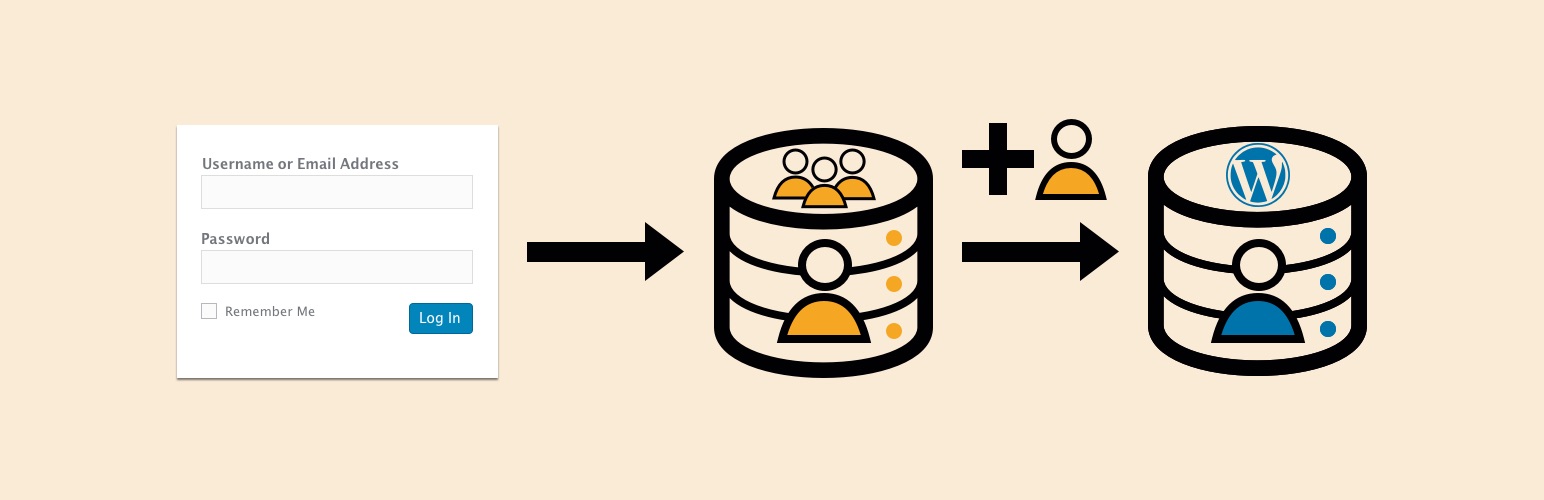
External Login 外掛讓您可以使用「外部資料庫」登入 WordPress 網站,而不是使用 WordPress 資料庫。這意味著如果您已經有一個登入系統,您可以將其整合到 WordPress 網站中。您想要使用的「外部資料庫」並不一定要是 WordPress 資料庫。
此外掛會重新在 WordPress 資料庫中建立使用者,這有兩個好處:
1. 讓您可以適當地與其他需要已登入使用者的外掛一起使用 WordPress。
2. 如果「外部資料庫」無法使用,您可以允許此外掛利用使用者在本地 WordPress 版本中的資訊進行登入。
功能
使用不同資料庫中的現有使用者資料表來登入 WordPress
將您的資料庫欄位名稱對應到所需的 WordPress 欄位
將您的「外部資料庫」中的角色對應到 WordPress 中的角色,例如「外部資料庫」中的學生會成為 WordPress 資料庫中的編輯者。
每當使用者登入時,他們的 WordPress 使用者資訊將會更新為「外部資料庫」的詳細資訊。
基於「外部資料庫」中使用者資料表的任何欄位,排除某些使用者對 WordPress 管理區的訪問權限。
如果「外部資料庫」無法使用,可以使用所產生的 WordPress 使用者備用登入。
基於角色,封鎖使用者
基於您的使用者資料表的任何欄位,封鎖使用者
成功驗證後,將使用者重新導向
支援不同的資料庫類型:
MySQL
PostgreSQL
Microsoft SQL
支援多種密碼雜湊方法,包括:
bcrypt
md2
md4
md5
sha1
sha256
sha384
sha512
未雜湊
等等
支援為每個密碼準備獨立的密碼鹽
支援所有密碼使用一個密碼鹽
支援將密碼鹽前置或後置於密碼中
在設定選單中測試連線,確認您的資料被正確提取
選擇在停用外掛時刪除外掛資料。
這個外掛是否符合我的需求?
以下是此外掛的基本邏輯流程,讓您瞭解它是否適合您的需求:
1. 使用者登入正常的 WordPress 登入畫面。
2. 我們使用在設定中選擇的方法和鹽(如果有的話),將使用者的密碼雜湊。
3. 我們使用簡單的 SQL 查詢來檢查他們的使用者名稱和雜湊密碼是否符合外部資料庫中的使用者。
4. 我們創建或更新新使用者的詳細資訊。
5. 我們登入該使用者。
6. 當使用者登出 WordPress 時,WordPress 會結束該使用者的連線。
請注意,此系統建立用於登入流程是完全不同於其他任何登入流程,因此如果您正在尋找單一登入 (Single Sign On) 解決方案,我認為您應該尋找 OAuth 解決方案。
功能警告和限制
使用此外掛前,務必備份您的資料庫並測試功能。
WordPress 中建立的使用者將被覆蓋,如果外部資料庫中有相同的使用者名稱。可以通過附加獨立字串來修復此問題。
在 WordPress 中編輯使用者的資訊將在使用者登入時被覆蓋。
外掛標籤
開發者團隊
📦 歷史版本下載
原文外掛簡介
External Login allows you to login to your WordPress site using an ‘external database’ instead of the WordPress database. This means if you already have a login system you can integrate that into your WordPress site. The ‘external database’ that you would like to use does not have to be a WordPress database.
The plugin will re-create users in the WordPress database which has has two benefits:
1. It will allow you to use WordPress correctly with other plugins that require a named user to be logged in.
2. If the ‘external database’ is not available, you can allow the plugin to log them in with the local WordPress version of their user.
Features
Use your current table of users in a different database to login to WordPress
Map the names for your database fields against the required WordPress fields
Map roles from your ‘external database’ to those found in WordPress e.g. a student in the ‘external database’ becomes an editor in the WordPress database.
Every time a user logs in, their WordPress user will be updated with the details from the ‘external database’.
Exclude certain users from accessing the WordPress admin area based on any field in the Users table on the External Database
Ability to fall back to the generated WordPress user for login if the ‘external database’ is unavailable.
Block users based on their role
Block a user based on any field in your users table
Redirect the user after being successfully authenticated
Support for different database types:
MySQL
PostgreSQL
Microsoft SQL
Many password hashing methods are supported including:
bcrypt
md2
md4
md5
sha1
sha256
sha384
sha512
no hashing
and more…
Support for separate password salts for each password
Support for one salt for all passwords
Support for salts being prepended or appended to the password
Test the connection in the settings menu to make sure your data is being pulled correctly
Option to delete plugin data on plugin deactivation
Is this plugin what I need?
To give an idea of whether this plugin does the job you need it to, here is the basic logic flow:
1. User logs in to the normal WordPress login screen.
2. We hash the users password with the method and salt (if given) that is chosen in the settings
3. We so a simple SQL query to the external database to see if their username and the hashed password match a user.
4. We create or update the details of the new user.
5. We log that user in
6. When the user logs out of WordPress the WordPress session ends
Please note that this system is built for the login process to be a completely different login process to anything else.
If you are looking for Single Sign On (log in to one website and you’re logged in else where) you should be looking for a OAuth solution in my opinion.
FUNCTIONALITY WARNINGS AND LIMITATIONS
ALWAYS take a backup of your database and test the functionality before using this plugin in production.
Users created in WordPress will be overwritten if users in the external database have the same username. This could be fixed by appending usernames with a separate string.
Edits to a user made in WordPress will be overwritten when the user logs back in with the ‘external database’. This is only the case for fields that are being pulled from the external database.
Security Notes
Database User
It is recommended that you create a new Database user to access the external database. This way you can set appropriate permissions to the user so that they do not have write access.
Hashing
For the security of your users, your ‘external database’ should be hashing your users passwords. Although support is given for other hashing methods, ‘bcrypt’ is advised as it uses SLOW hashing. Without this it would be far easier for someone to derive your users password through a brute force attack if they gained access to your database.
It is also highly recommended that a salt is used. This is done by default with ‘bcrypt’. Using one salt for all passwords is supported but it is recommended to use a separate salt for each password as a different field in your database. This helps prevent the use of ‘rainbow tables’ to derive your users passwords.
For explanation and more information on this I recommend this article starting from the section “Hash and Salt Your Users’ Passwords”.
Storing Settings in wp-config.php
You may prefer to store your settings in ‘wp-config.php’. This could have security benefits, so long as you are careful not to store your code in a publicly accessible repository and you ensure your wp-config file cannot be accessed on the server.
Below is an example of code that can be added to ‘wp-config.php’.
// ** EXTERNAL LOGIN SETTINGS ** //
/** EXLOG - The External Database Name */
define('EXTERNAL_LOGIN_OPTION_DB_NAME', 'dojo2016');
/** EXLOG - The External Database Host */
define('EXTERNAL_LOGIN_OPTION_DB_HOST', 'localhost');
/** EXLOG - The External Database Port */
define('EXTERNAL_LOGIN_OPTION_DB_PORT', '3306');
/** EXLOG - The External Database Username */
define('EXTERNAL_LOGIN_OPTION_DB_USERNAME', 'root');
/** EXLOG - The External Database Password */
define('EXTERNAL_LOGIN_OPTION_DB_PASSWORD', 'root');
/** EXLOG - The External Database Type */
define('EXTERNAL_LOGIN_OPTION_DB_TYPE', 'mysql');
/** EXLOG - Password Salt */
define('EXTERNAL_LOGIN_OPTION_DB_SALT', 'ksjefh2lkrh2r2oh23');
You can of course set these with environment variables if you wish in the following way:
/** EXLOG - The External Database Name */
define('EXTERNAL_LOGIN_OPTION_DB_NAME', getenv('MY_EXLOG_DB_NAME_ENVIRONMENT_VARIABLE'));
All settings (except from those mapping roles) can currently be set this way. For a full list and possible settings see the “FAQ” question – “What values can I set in wp-config.php?”.
Special Thanks
A special thank you to Ben Lobaugh for a great article which I used heavily for this plugin.
DONATE
Like the plugin and want to buy me a beer? Well, thank you!