外掛標籤
開發者團隊
② 後台搜尋「Equiroof – Fair Housing Language & Rental Fee Disclosure」→ 直接安裝(推薦)
原文外掛簡介
Property listings are advertisements, and real estate advertising has two growing problems.
1. Discriminatory wording, even when nobody meant it. Under fair housing advertising rules, a listing can be a problem if an ordinary reader would understand it as showing a preference for, or against, a group of people. Phrases like “perfect for young professionals”, “adults only” or “no section 8” can create real risk. AI-written listing copy makes these slips easier to miss.
2. Hidden “junk” fees. Rentals are often advertised with a low base rent while trash, amenity, admin or tech fees are added later. A growing number of places now expect advertised rent to include mandatory recurring fees.
Equiroof gives agents, brokers, landlords and property managers practical tools for both, right inside WordPress.
Fair housing language checker
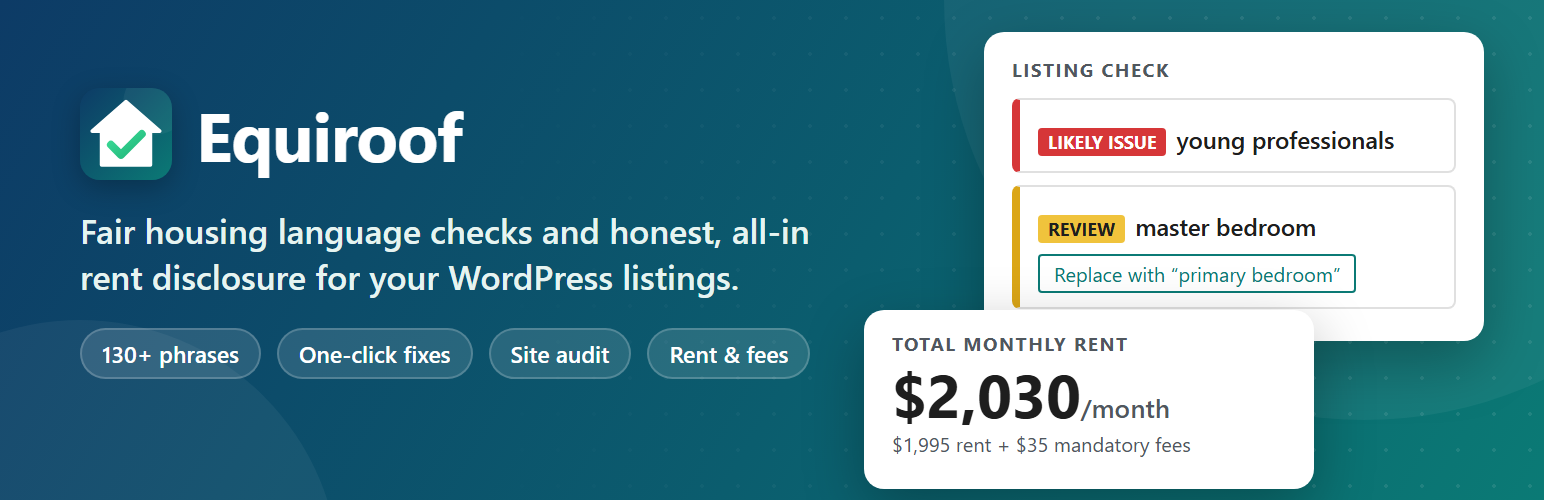
Live check in the block editor. A “Listing check” panel scans the title, excerpt and every block as you type, explains why a phrase was flagged and suggests neutral wording. Click “Show in content” to jump to the block.
One-click fixes. Where a like-for-like alternative exists, replace the phrase with one click, for example “master bedroom” becomes “primary bedroom” and “no pets” becomes “assistance animals welcome; no other pets”.
Approved exceptions. Mark a phrase as reviewed for a single listing, such as “55+ community” for qualifying senior housing, so it stops being flagged there while every other listing is still checked.
Two levels. “Likely issue” for wording that states who may or may not live in a home, and “Review context” for phrases that are often fine but can signal a preference, such as “near church” or “master bedroom”.
More than 130 built-in phrases covering familial status, age, sex, disability, race, color, national origin, religion, source of income and steering.
Pre-publish summary, with an optional confirmation step before content with likely issues can be published.
Site audit under Equiroof > Audit scans all existing content in batches and lets you export the findings to CSV.
Status column, filter and bulk re-check in your post and page lists show which listings are clear, need review or have likely issues.
Dashboard widget with listing counts by status and the latest listings that need attention.
Site Health test that reports listings with likely issues or listings that have not been checked yet.
Classic editor support. Content types that do not use the block editor get “Listing check” and “Rent & fees” meta boxes, so Equiroof also works alongside listing plugins built on the classic editor.
Your own rules. Add custom phrases with your own suggestions, or ignore built-in phrases that do not apply in your market.
Rent and fee disclosure
A “Rent & fees” panel stores the base rent, security deposit and an itemised list of fees with their frequency and whether they are mandatory.
The Rent Disclosure block (or the [equiroof_rent] shortcode) shows the total monthly rent first: base rent plus every mandatory recurring fee. Mandatory annual fees are converted to a monthly amount.
Upfront charges and optional extras are listed separately, together with an estimated move-in total (first month, deposit, monthly fees and one-time fees, plus annual fees explicitly marked as due at move-in), so renters see the full picture.
Optionally add the disclosure automatically after the listing content.
Equal housing statement
The Equal Housing Statement block and the [equiroof_housing_statement] shortcode display your statement. Edit the default text in Equiroof > Settings.
Works with your setup
Use regular posts as listings, or any custom post type registered by another plugin. Choose the content types in Equiroof > Settings.
No account, no external service and no tracking. All checks run on your own site.
Translation ready.
Important
Equiroof is an editorial aid. It does not provide legal advice and cannot guarantee that any content complies with the law. Fair housing and advertising rules differ between countries, states and cities. Review flagged phrases in context and ask a qualified professional when in doubt.