內容簡介
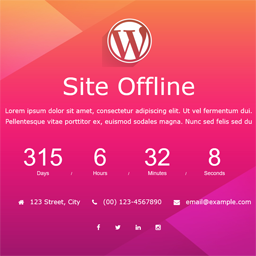
"Under Construction" 是一個一鍵啟用建設中模式的外掛程式,允許 WordPress 站點管理員關閉網站進行維護。它是一個輕量級的外掛程式,且高度可自訂。"Under Construction" 具有多種精美的內建建設中網頁模板,安裝與設定只需不到一分鐘。
"Under Construction" 外掛程式完全免費,且將永遠免費,供任何想在他們的站點進行後端作業時顯示建設中/維護頁面的人使用。
安裝 "Under Construction" 外掛程式
點擊位於主 WP 管理選單中的 "Easy Under Construction" 管理員選單
從模板選單中選擇所需範本,然後點擊「建設中模式 - 開啟」
就這樣。
特色
一鍵啟用建設中模式 - 開啟 / 關閉
自訂標題、標題文字、內文文字
自訂背景
無限的色彩方案
SEO 配置
啟用 / 關閉 503 錯誤
內建維護範本
存取 / 限制
具有響應設計
輕量級
支援自訂 HTML 頁面
清晰 Retina
靈活且使用者友好的設定
支援跨瀏覽器
支援
如果您在使用 "Under Construction" 遭遇到任何問題,請直接從外掛程式選項頁面聯繫我,或使用支援論壇。我將盡快解決您的問題。
想要說「感謝」?請按此發表評論。
捐贈
外掛標籤
開發者團隊
原文外掛簡介
Under construction is a one click under construction mode enabler, which allows the WordPress site administrator to close the website for maintenance. It is a light weight plugin and highly customizable. Under construction have multiple nicely designed built-in under construction page templates that takes less than a minute to install & configure.
Under construction plugin is “COMPLETELY FREE AND ALWAYS WILL BE” for anyone who wants to display an under construction / maintenance page while they are doing work on their site backend.
Install Under Construction plugin
Click on “Easy Under Construction” admin menu located in the main WP admin menu
Select the template which you want from templates menu and click on construction mode – on
That’s it.
Features
One click under construction mode – on / off
Customize title, headline, body text
Customize background
Unlimited colour Scheme
SEO configuration
503 error on/off
Built-in maintenance templates
Access/Restriction
Responsive Design
Light weight
Custom HTML Page Support
Clean Retina
Flexible and user-friendly setup
Cross Browser Support
Support
If you face any problem using Under Construction, please feel free to contact me directly from the plugin options page or use the support forum. I will do my the best to resolve your problem as soon as possible.
Want to say “Thank You”? Please Click here to leave a review.
Donations