內容簡介
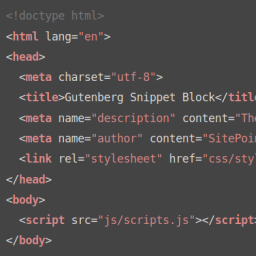
Easy Syntax Highlighter 是一款強大的 WordPress 外掛,旨在提升網站的程式碼展示效果,提供美觀的語法高亮功能。它使用最新的 Highlight.js 函式庫,支援超過 20 種程式語言,並提供 80 多種色彩主題,適用於經典編輯器和 Gutenberg 編輯器。
【主要功能】
• 現代化 Highlight.js 引擎
• 超過 80 種主題選擇
• 支援 20 多種程式語言
• 智能資源加載優化
• 安全性強調,輸入消毒
• 乾淨的管理介面設置
外掛標籤
開發者團隊
原文外掛簡介
Easy Syntax Highlighter is a powerful WordPress plugin that helps improve your website’s code presentation by providing beautiful syntax highlighting. Using the latest Highlight.js library, it supports over 20 programming languages with 80+ color themes, copy-to-clipboard functionality, and seamless integration with both classic and Gutenberg editors.
Features
Modern Highlight.js Engine: Uses the latest Highlight.js library for fast, accurate syntax highlighting
80+ Themes Included: Over 80 themes for both light and dark modes, all stored locally for offline compatibility
Unlimited Language Support: Supports 20+ programming languages including JavaScript, PHP, Python, CSS, HTML, SQL, Bash, and more
Modern JavaScript: Promise-based loading with proper error handling and performance optimizations
Performance Optimized: Smart asset loading—only loads when code blocks are present on the page
Security Focused: Proper input sanitization and output escaping
Admin Interface: Clean, modern settings page with visual theme selector integrated with WordPress admin
Localization Ready: Translation-ready with proper text domains
Backward Compatible: Automatic migration from old plugin versions
How to Use
Gutenberg Block Editor: Use the default WordPress “Code” block. The plugin automatically detects the language and highlights it. There is no language setting in the sidebar; detection is automatic. If you need to force a language, edit the block as HTML and add a class to the element (e.g., ).
Classic Editor: Use the TinyMCE button (code icon) with the modal dialog for easy code insertion.
Copy to Clipboard: Double-click any code block to instantly copy its content with visual feedback.
Use Cases
Technical blogs and tutorials
Documentation websites
Programming courses and educational content
Developer portfolios
API documentation
Code examples and snippets
Support
For support, bug reports, or feature requests, please visit: Github
Contributing
Contributions are welcome! Please feel free to submit pull requests or open issues on GitHub.
License
This plugin is licensed under the GPLv2 or later.
License URI: https://www.gnu.org/licenses/gpl-2.0.html