內容簡介
總結:Easy Menu Icon 是一個多功能且使用友好的外掛,可增強您的 WordPress 菜單,支持圖標。此外,這個外掛讓您輕鬆將圖標添加到菜單項目中,使得您的導航更直觀、更吸引人。支持多種圖標庫,包括 Dashicons、FontAwesome、Elusive Icons、Fontello Icons 甚至自訂圖標,Easy Menu Icon 為您的 WordPress 菜單提供卓越的靈活性和自定義選項。
問題與答案組:
1. 啟用 Easy Menu Icon 外掛後應該前往哪裡來編輯菜單?
- 答案:前往 [外觀] > [選單] 來編輯菜單。
2. 如何在菜單項目中添加圖標?
- 答案:點擊 [新增圖標] 鏈結,然後選擇您想要的圖標即可輕鬆在菜單項目中添加圖標。
3. Free 版本的 Easy Menu Icon 具有哪些功能?
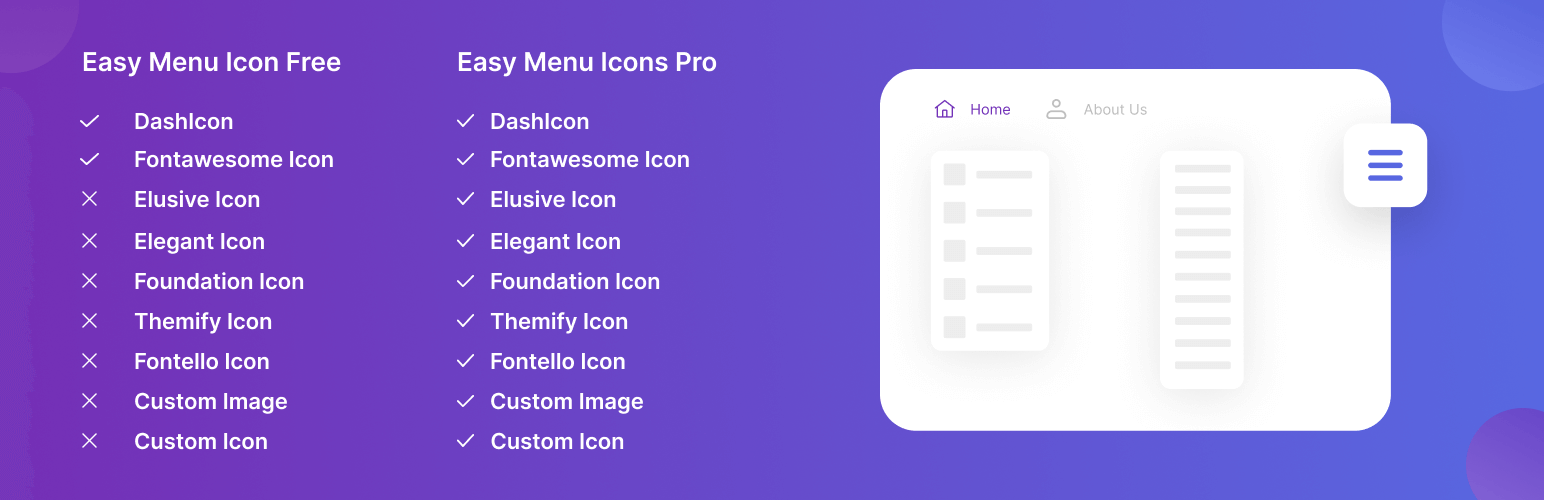
- 答案:自由改變菜單圖標的顏色、調整圖標大小、輕鬆調整圖標位置、管理圖標間距,同時僅支持 DhasIcon(WordPress 核心圖標)。
4. Pro 版本的 Easy Menu Icon 有哪些額外功能?
- 答案:包括所有 Free 版本功能,支持 Font Awesome、Elegant Icons、Foundation Icons、Elusive Icons、Themify Icon、Fontello 等圖標庫,以及支持自定義圖標如 SVG、PNG 圖像等。
外掛標籤
開發者團隊
② 後台搜尋「Easy Menu Icons – WordPress Menu Icon Plugin」→ 直接安裝(推薦)
原文外掛簡介
Easy Menu Icons is a versatile and user-friendly plugin that enhances your WordPress menus with icon support. This plugin allows you to effortlessly add icons to your menu items, making your navigation more intuitive and visually appealing. With support for a wide range of icon libraries, including Dashicons, FontAwesome, Elusive Icons, Fontello Icons, and even custom icons, Easy Menu Icons provides unparalleled flexibility and customization options for your WordPress menus.
Demo | Upgrade to Pro
Usage
After the plugin is activated, go to Appearance > Menus to edit your menus
Add your icon now to your menu item
Select icon by clicking on the “Add Icon” link
Save the menu
Free Version Features
Easily Change Menu Icon Color
Adjust Your Icon Size
Adjust Your Icon Position Easily
You can manage Icon Spacing As well
You can use Dashicon and Font Awesome Only for free version.
Pro Version Extra Features
All Free version features included
Fontawesome Icon Supported Font Awesome
Elegant Icon Supported Elegant Icons
Foundation Icon Supported Foundation Icons
Elusive Icon Supported Elusive Icons
Themify Icon Supported Themify Icon
Fontello Icon Supported Fontello
Generic Icon Font Supported Genericons
Custom Icon like SVG, PNG images supported