
內容簡介
DynaMaker CAD Configurator Integration 外掛讓使用者能輕鬆地在 WordPress 頁面或文章中嵌入 DynaMaker CAD 設計器,並提供快速的設置流程,提升使用者的互動體驗。
【主要功能】
• 嵌入 DynaMaker CAD 設計器於 WordPress
• 按鈕開啟 DynaMaker CAD 設計器
• 包含頁面特定的 meta 和預選選項
• 使用 WordPress 登入限制訪問權限
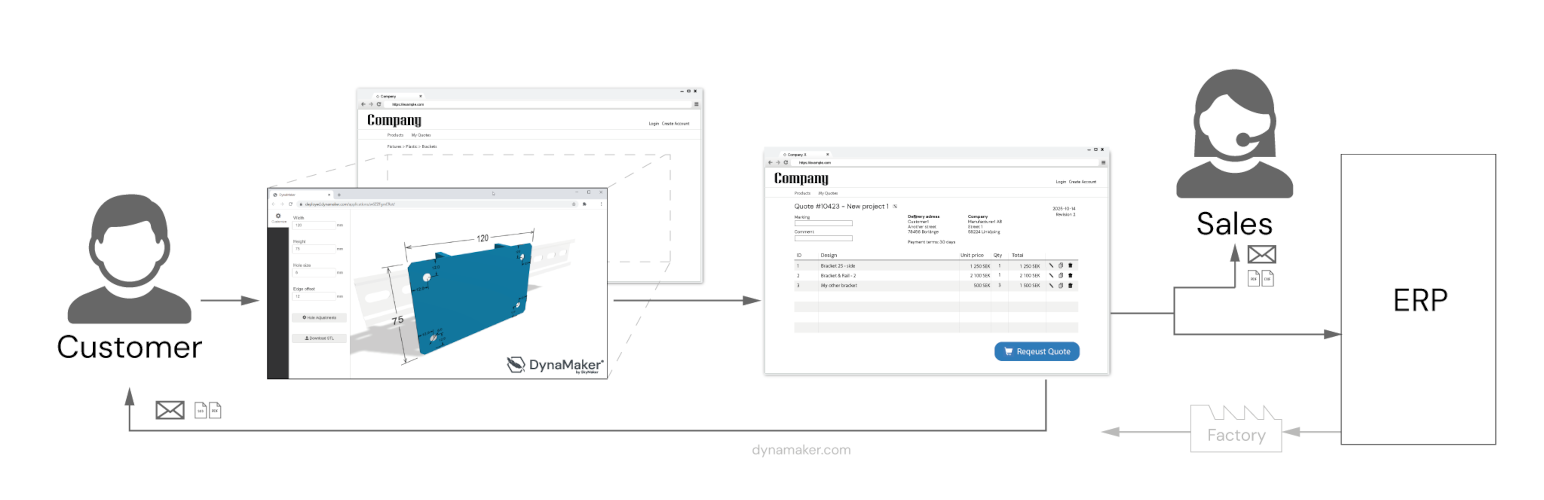
• 提供報價請求入口網站功能
• 記錄使用者的報價請求歷史(選擇性)
外掛標籤
開發者團隊
② 後台搜尋「DynaMaker CAD Configurator Integration」→ 直接安裝(推薦)
原文外掛簡介
With the DynaMaker Plugin for WordPress you can easily display your Online CAD onfigurators in a WordPress page or post, with very few clicks and short setup time.
DynaMaker CAD Configurator features
– Embed your DynaMaker CAD Configurator on your WordPress
– Open your DynaMaker CAD Configurator with a button
– Include page specific meta and preselected choices in url
– Use wordpress login and registration to limit access and enable save / load of configurations in DynaMaker (optional)
– Connect DynaMaker with other services like SendGrid to enable Quotation Requests direct to the sales teams inbox
Request for Quote (RFQ) Portal
– Useful features for logged in WordPress users to submit a quotation request with data from their CAD Configurators
– Checkout of several configurations as individual rows before submit
– Form fields for what information to include with the request (JSONForm)
– History of users requested quotes (optional)
– Send Request trigger endpoint (eg Microsoft Power Automate) to forward request

