內容簡介
DoubleScale 是一款全方位的 WordPress CRM 外掛,能夠管理聯絡人、發送電子郵件行銷活動、安排預約及處理支援票證,所有資料都儲存在您的 WordPress 資料庫中,無需依賴第三方服務。
【主要功能】
• 單一聯絡記錄管理所有資料
• 模組化設計,隨需開啟或關閉功能
• 自我託管,符合 GDPR 規範
• 無聯絡人數量限制及自訂欄位
• 與 WooCommerce 等外掛原生整合
外掛標籤
開發者團隊
② 後台搜尋「DoubleScale CRM | All-in-One CRM – Sales, Multi-Channel Marketing, Newsletter, Booking, Helpdesk, Automation, MCP & More」→ 直接安裝(推薦)
📦 歷史版本下載
原文外掛簡介
DoubleScale is the all-in-one CRM for WordPress. Manage contacts, send email marketing campaigns and newsletters, automate follow-ups, run your sales pipeline, send proposals and invoices, take appointment bookings and answer support tickets, all from one plugin and one contact record, stored in your own WordPress database.
Instead of paying for a separate CRM, email marketing service, scheduling app, helpdesk and SMTP plugin, DoubleScale brings them together and keeps every customer’s history in one timeline.
Live demo: try.doublescale.io · Website: doublescale.io · Documentation: doublescale.io/docs · Video tutorials: YouTube
Why teams choose DoubleScale
One contact record for everything. Campaigns, deals, invoices, bookings, tickets and tasks all attach to the same contact.
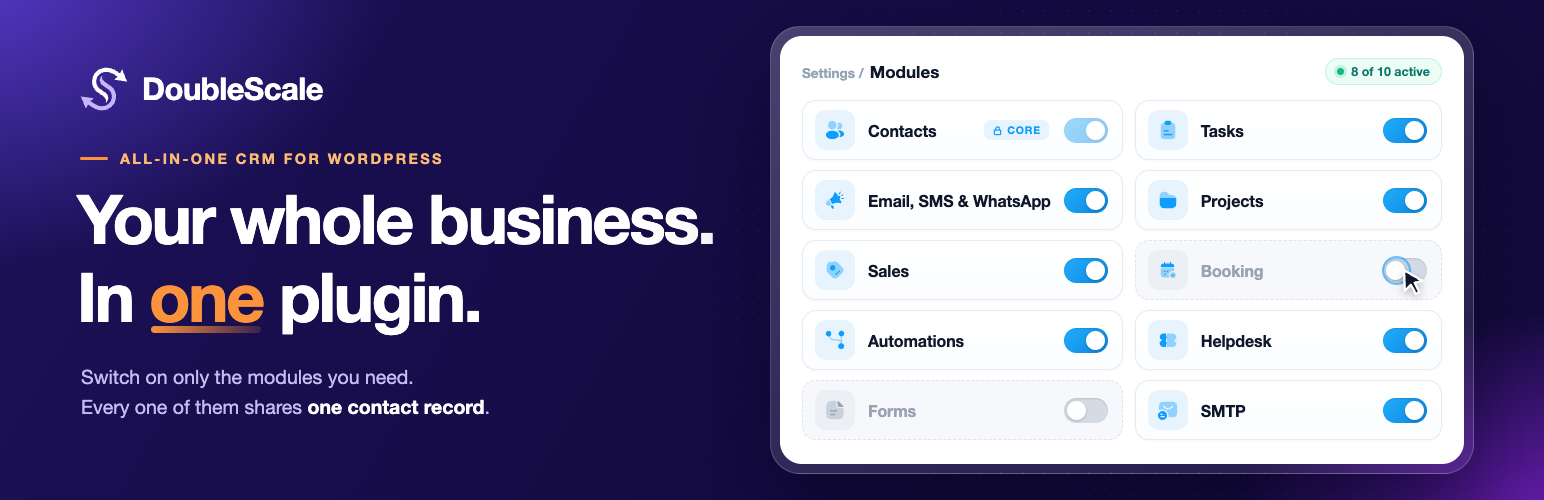
Turn on only what you need. Every major module can be switched on or off from Control Modules, so your team sees a clean, focused admin.
Self-hosted and GDPR-friendly. Your data stays in your WordPress database: no third-party CRM cloud, no vendor lock-in.
No per-contact pricing. Unlimited contacts and unlimited custom fields.
Built for WordPress. Native integrations with WooCommerce, popular form builders, LMS and membership plugins.
Modular by design: switch modules on or off
DoubleScale is a modular CRM plugin. Open Control Modules in the DoubleScale header to enable or disable Sales (with Pipelines, Proposals & Invoices, Contracts, Credit Notes and Products), Campaigns, Automations, Forms, Booking, Helpdesk, Tasks, Projects and SMTP. Turning a module off hides its menus and pauses its background jobs, APIs and role permissions. Turn it back on at any time without reinstalling, and nothing is lost.
CRM and contact management
A complete WordPress CRM for leads and customers. Store unlimited contacts with custom fields, organise them with tags and lists, and build dynamic segments with rules. Import contacts from CSV, WordPress users or WooCommerce customers. Every contact has a full activity timeline showing emails, messages, deals, bookings, support tickets, form submissions, page visits and automation runs, in one chronological view.
Email marketing and newsletters
Send professional email marketing campaigns and newsletters directly from WordPress.
Drag-and-drop email builder with responsive blocks, a Navigator to jump to any section, column or block, saved templates and merge tags
Broadcast to lists, tags or segments, send now or schedule for later
A/B testing for subject lines and content
Email sequences (drip campaigns) for onboarding and nurture flows
Open, click, bounce and unsubscribe tracking with full delivery logs
Unsubscribe and preference pages handled for you
SMS and WhatsApp marketing (Pro)
Reach customers on the channels they read most. Send SMS campaigns through Twilio and WhatsApp campaigns with Meta-approved WhatsApp Business templates, using the same audiences, composer and merge tags as email. Opt-outs and delivery status are recorded on each contact.
Marketing automation
A visual workflow builder that connects every module. Choose from 100+ triggers across contacts, campaigns, deals, forms, bookings, support tickets, WooCommerce, LMS and membership plugins, then add actions: send an email, SMS or WhatsApp message, start an email sequence, add tags, update a deal, create a task or call a webhook. Add delays, conditions, goals and branches to build complete customer journeys, such as welcome series, abandoned cart recovery, lead nurturing and post-purchase follow-ups.
Sales pipeline and deal management
Track every opportunity on a drag-and-drop kanban board. Create multiple sales pipelines with custom stages, deal values, owners and custom fields, and see forecasts at a glance. Moving a deal to a new stage can trigger automations, for example sending a proposal, creating a task or tagging the contact.
Proposals, quotes, invoices and contracts
Run the whole quote-to-cash process inside WordPress.
Proposals and quotes with line items, taxes and online acceptance with e-signature
One-click conversion from an accepted proposal to an invoice
Invoices with branded PDFs and online payments through Stripe, PayPal and other gateways (Pro)
Contracts with templates and signatures
Credit notes, products and tax rates
XRechnung e-invoices for German public-sector customers (Pro)
Subscriptions and recurring billing (Pro)
Client portal
Give customers one secure place to see their proposals, invoices, contracts, bookings and support tickets. Add the portal to any page with the [doublescale_client_portal] shortcode. Customers can accept proposals, pay invoices and follow their documents without emailing you.
Appointment booking and scheduling
A complete appointment booking system built into your CRM, so you no longer need Calendly or a separate booking plugin. Clients book meetings, consultations, demos, classes and coaching sessions from a booking page on your own site, and every booking is saved on their contact record.
One-to-one and group events, with a maximum number of attendees per time slot
Availability schedules with working hours, date overrides, buffer time between meetings and booking frequency limits
Embeddable booking pages with automatic time zone detection for your guests
A booking form that collects your guests’ details before the meeting
Email confirmations and reminders for guests and hosts, with easy rescheduling and cancellation
Online, phone and in-person meetings, with the meeting details sent to your guest
Bookings dashboard to view, filter and manage every appointment
Booking Manager and Booking Agent roles so each team member manages their own calendar
Every booking on the contact’s timeline, next to their emails, deals and tickets
Booking Pro adds team scheduling with round-robin and collective availability, two-way calendar sync with Google Calendar, Outlook / Microsoft 365, Apple Calendar and iCal, Zoom, Google Meet and Microsoft Teams links created automatically, custom booking questions with conditional logic, paid bookings with online payments, waiting lists when a slot is full, SMS reminders, and automations that run when a booking is created, confirmed, rescheduled, completed or cancelled, for example to send a follow-up email or create a deal.
Helpdesk and support tickets
A complete ticketing system next to your sales and marketing data.
Shared inbox with overview cards for all, open, pending, resolved and closed tickets
Assign agents, set status and priority, add tags, internal notes and CC recipients
File attachments with secure downloads
Customer support portal on any page with [doublescale_support_portal], or inside the client portal
Email notifications for customers and agents, plus helpdesk reports
Email-to-ticket through IMAP, custom ticket fields, auto close for inactive tickets and an incoming webhook (Pro)
Tasks and projects (Pro)
Plan and deliver client work without a separate project management tool. Create and assign tasks with due dates and reminders, and manage projects on kanban boards with statuses, progress, discussions and custom fields, all linked to contacts and invoices.
Built-in SMTP for reliable email delivery
Replace your SMTP plugin. DoubleScale routes wp_mail() through 20+ email providers, including Amazon SES, SendGrid, Mailgun, Postmark, Brevo, SparkPost, SMTP2GO, Mailjet, MailerSend, Mandrill, Elastic Email, SendLayer, SocketLabs, toSend, Emailit, Gmail, Outlook, Zoho and any SMTP server. Use different connections for transactional and marketing email, add a fallback connection, send test emails and review full email logs.
Analytics and reports
Dashboards for contacts, campaigns, email delivery, automations, sales pipelines and support, with KPI cards, charts, date ranges and CSV export, so everyone can see what is working without exporting data to another tool.
Team roles and permissions
Give every team member the access they need and nothing more. Each person gets one level, Manager or Agent, with access to the whole CRM or to chosen modules: CRM Manager and CRM Agent, Campaign Manager and Campaign Agent, Sales Manager and Sales Rep (Pro), Project Manager and Project Member (Pro), Support Manager and Support Agent, Booking Manager and Booking Agent, and Automation Manager and Automation Agent. Contacts have an owner and collaborators, agents can be limited to their own contacts, new leads can be routed to one person or shared in turns, and a departing member’s records can be handed to someone else in one step. Each person chooses their own notifications.
AI and MCP
AI writing assistant. Connect your own OpenAI, Google Gemini, Groq, OpenRouter or OpenAI-compatible API key to draft emails, generate templates and suggest subject lines.
Built-in MCP server. Connect Claude, Cursor and other Model Context Protocol clients with API keys, so AI assistants can work with your contacts, documents, campaigns and bookings, within the same module and role permissions as your team.
Integrations
E-commerce: WooCommerce (orders, customers, abandoned carts, subscriptions and reviews), Easy Digital Downloads and SureCart
Form builders: Contact Form 7, WPForms, Fluent Forms and Quill Forms (free); Elementor Forms, Gravity Forms, Ninja Forms, Formidable Forms, Forminator, MetForm, WS Form, Bit Form, SureForms, eForm and JetFormBuilder (Pro)
LMS: LearnDash, Tutor LMS, LifterLMS and LearnPress
Membership: MemberPress and Paid Memberships Pro
Messaging and payments: Twilio, WhatsApp Business, Stripe, PayPal and more
Who is DoubleScale for?
Small businesses, agencies, consultants, coaches, course creators, online stores and growing sales and support teams who want a self-hosted WordPress CRM that replaces several SaaS subscriptions, from solo founders to teams managing 100,000+ contacts.
How DoubleScale compares
Looking for a HubSpot alternative, a Mailchimp alternative or a FluentCRM alternative? See our detailed comparisons: vs FluentCRM · vs HubSpot · vs ActiveCampaign · vs Pipedrive · vs GoHighLevel · vs FunnelKit · vs Brevo · vs MailerLite · vs Omnisend
Source Code
This plugin includes compiled JavaScript and CSS in the build/ directory. Human-readable source lives in src/.
Public repository: DoubleScale on GitHub
Build from source
1. Install Node.js (LTS recommended)
2. From the plugin directory: npm install
3. Production assets: npm run build
4. Development/watch: npm run dev
Outputs include client bundles under build/. Third-party libraries are listed in package.json.
Lint / code standards
The PHP code follows the WordPress Coding Standards (WPCS 3.x) with WordPress-Extra (security sniffs) and PHPCompatibilityWP enabled.
composer install — installs PHPCS, WPCS, and the rest of the dev tools.
composer lint — runs phpcs --standard=phpcs.xml.dist against doublescale.php, includes/, bin/, and phpunit/.
composer format — runs phpcbf to auto-fix what it can (whitespace, indentation, brace style).
For plugin-structure / readme / asset-organization checks, install the official Plugin Check plugin into a local WordPress install and run it via Tools → Plugin Check. Plugin Check is the same tool the WordPress.org review team runs.
Privacy Policy
DoubleScale stores CRM, campaign, booking, task, support, and analytics data in your WordPress database. The plugin does not transmit that core repository to DoubleScale servers by default.
Where you enable optional third-party integrations (SMTP providers, Twilio, Stripe, WhatsApp, Slack, ActiveCampaign, HubSpot, etc.), data flows are governed by those providers’ terms — and only carry the fields you explicitly map. You can disable any connector by removing credentials or turning off related automations.
Privacy-minded operators have access to: per-contact GDPR exports, hard-delete workflows, consent tracking per channel, retention rules for tracking data, and unsubscribe handling for every send.
External Services
DoubleScale connects to external services only when you configure those integrations. No data is transmitted without your API keys, OAuth grants, or explicit provider setup. Each provider listed below is independent of DoubleScale; using one means you also agree to that provider’s terms and privacy policy.
For every service below:
Endpoint — API base URL used after you save credentials (not a public marketing or documentation page; it may not load in a browser).
Terms / Privacy — Public legal pages for that provider. These are the URLs WordPress reviewers and site owners should open to read each service’s policies.
AI services
OpenAI (optional)
* Purpose: AI-assisted email composition and template generation.
* Data sent: The prompt text and any campaign content you submit through the AI builder. Sent only when you click an AI generate action.
* Endpoint: https://api.openai.com
* Terms: https://openai.com/policies/terms-of-use
* Privacy: https://openai.com/policies/privacy-policy
Google Gemini (optional)
* Purpose: Alternative AI provider for email composition.
* Data sent: Prompt text and campaign content, only when you click an AI generate action.
* Endpoint: https://generativelanguage.googleapis.com
* Terms: https://policies.google.com/terms
* Privacy: https://policies.google.com/privacy
SMTP / email providers
Each provider is selectable per connection. DoubleScale sends outgoing mail to that provider’s API only after you save credentials.
SendGrid — https://api.sendgrid.com · Terms · Privacy
Mailgun — https://api.mailgun.net · Terms · Privacy
Postmark — https://api.postmarkapp.com · Terms · Privacy
SparkPost — https://api.sparkpost.com · Terms · Privacy
SMTP.com — https://api.smtp.com · Terms · Privacy
SMTP2GO — https://api.smtp2go.com · Terms · Privacy
MailerSend — https://api.mailersend.com · Terms · Privacy
Mailjet — https://api.mailjet.com · Terms · Privacy
Brevo (Sendinblue) — https://api.brevo.com · Terms · Privacy
Mandrill — https://mandrillapp.com/api · Terms · Privacy
ElasticEmail — https://api.elasticemail.com · Terms · Privacy
SendLayer — https://console.sendlayer.com/api · Terms · Privacy
SocketLabs — https://inject.socketlabs.com · Terms · Privacy
Loops — https://app.loops.so/api · Terms · Privacy
Amazon SES — AWS regional endpoints (e.g. https://email.us-east-1.amazonaws.com) · Terms · Privacy
OAuth-based mail providers
Send mail through your own account via OAuth. Outgoing email content and profile email are sent on connect.
Gmail / Google Workspace — https://www.googleapis.com/oauth2/*, https://gmail.googleapis.com · Terms · Privacy
Microsoft Outlook / 365 — https://login.microsoftonline.com, https://graph.microsoft.com · Terms · Privacy
Zoho Mail — https://accounts.zoho.com, https://mail.zoho.com/api · Terms · Privacy
CRM sync providers (Pro)
Two-way contact and deal sync. Only mapped fields are sent.
ActiveCampaign — Your account’s API host · Terms · Privacy
HubSpot — https://api.hubapi.com · Terms · Privacy
Pipedrive — https://api.pipedrive.com · Terms · Privacy
GoHighLevel — https://marketplace.gohighlevel.com, https://services.leadconnectorhq.com · Terms · Privacy
Messaging providers (Pro)
Twilio — SMS sending and inbound. Phone numbers and message content sent. https://api.twilio.com · Terms · Privacy
Meta WhatsApp Business — WhatsApp sending and inbound via Cloud API. https://graph.facebook.com · Terms · Privacy
Payments (Pro)
Stripe — Booking payments (amount, currency, payer email). https://api.stripe.com · Terms · Privacy
Plugin-specific services
DoubleScale (doublescale.io) — License validation, Pro add-on store, update checks. Sends site URL, environment type, and (on explicit action) license key / add-on ID. No CRM or contact data. https://doublescale.io · Terms · Privacy
UI Avatars (ui-avatars.com) — Gravatar fallback. The browser loads an initials avatar when no Gravatar exists; only the display name is in the URL. https://ui-avatars.com/api/ · Terms · Privacy
AI provider endpoints (optional, bring-your-own-key)
Point DoubleScale at any OpenAI-compatible endpoint with your own API key. Providers are not contacted unless you save credentials.
OpenRouter — https://openrouter.ai/api/v1 · Terms · Privacy
Groq — https://api.groq.com/openai/v1 · Terms · Privacy
Any other OpenAI-compatible endpoint you supply.
Disabling
Disable any connector by removing its credentials in DoubleScale → Settings or by deactivating the related automation. Outgoing API calls only happen when you trigger an action that requires the configured service.
Credits
Website & documentation: doublescale.io
Support
Website & documentation: doublescale.io
WordPress.org support: https://wordpress.org/support/plugin/doublescale/ (when the plugin listing is public)
Contribute
Bug reports, ideas, and pull requests are welcome …