內容簡介
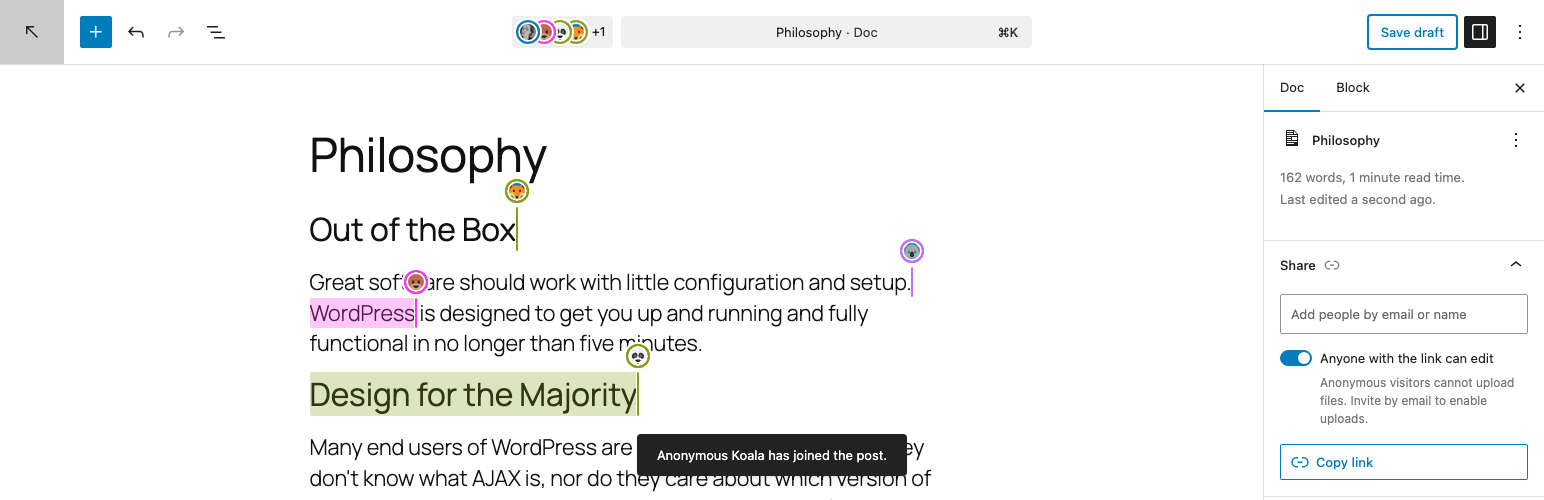
Docs 外掛讓使用者能在 WordPress 中創建文件,並與他人分享以進行閱讀和編輯。透過獨特的連結,使用者可以選擇開放編輯或限制特定電子郵件地址的訪問權限,並支援即時協作編輯。
【主要功能】
• 支援即時協作編輯,多位使用者可同時編輯
• 共享面板可控制訪問權限
• 匿名使用者可編輯但無法上傳文件
• 邀請特定人員可上傳文件
• 文件完全在 wp-admin 中運行,無公開前端
外掛標籤
開發者團隊
原文外掛簡介
This plugin allows you to create documents with WordPress, and to share them with others so they can also read and edit. Share the unique link to let anyone edit, or restrict access to specific email addresses.
With the Gutenberg plugin, Docs supports real-time collaborative editing — multiple users can edit the same document simultaneously, seeing each other’s cursors and changes live.
Sharing
The share panel (in the document sidebar) lets you control access:
Anyone with the link — anonymous users get a randomly generated animal name and emoji avatar (e.g. “Anonymous Fox”). They can edit text but cannot upload files.
Specific people — invite collaborators by email. They receive a magic link to access the editor. Email-invited users can upload files.
Existing users — add collaborators from the user autocomplete. They get full editing and upload access.
Restricted — only the document author and invited people can access.
How it works
Documents live entirely in wp-admin — there’s no public frontend. Each doc gets a unique and secret shareable URL that opens the editor directly.
Anonymous visitors don’t create any database entries. Their identity exists only in a browser cookie and disappears when it expires.
Email-invited people are created as real WordPress users (without a role) so their edits show up in revision history. They log in via magic links sent to their email.