內容簡介
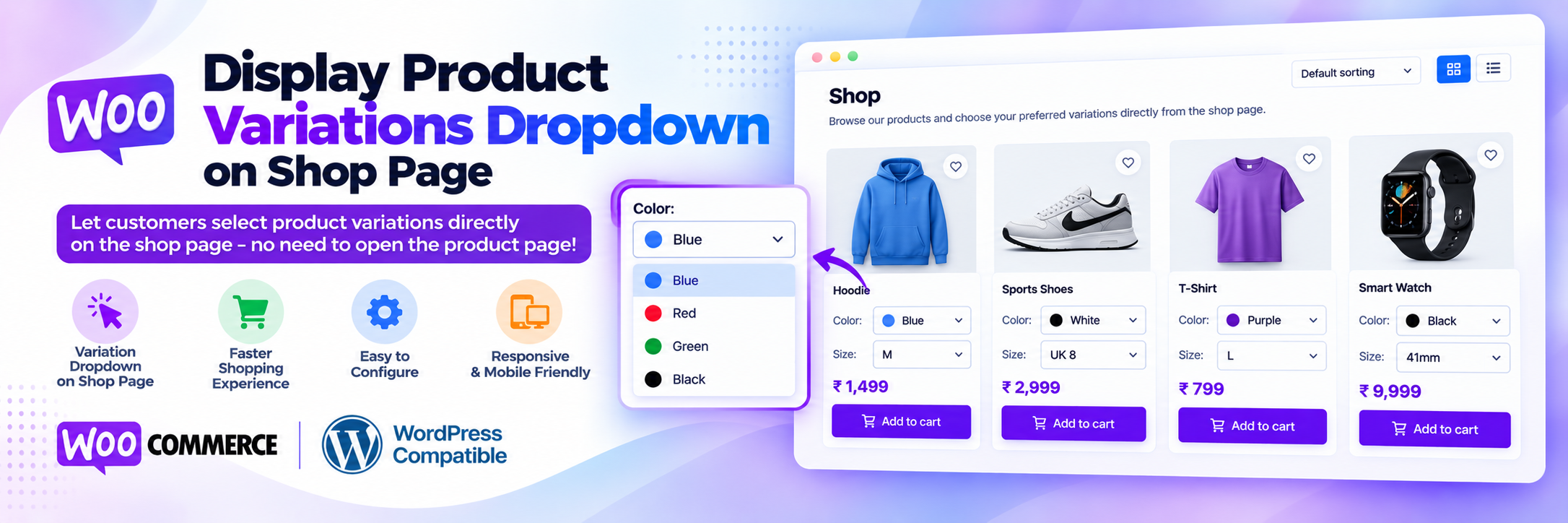
Display Product Variations Dropdown on Shop Page 外掛讓顧客可以直接在 WooCommerce 商店頁面、類別頁面及其他產品檔案中選擇產品變體(如尺寸、顏色、材質等)。這樣顧客無需打開每個產品頁面即可選擇選項,提升購物效率,增加銷售機會。
【主要功能】
• 商店頁面顯示變體下拉選單
• 支援所有產品檔案類型
• 顧客可選擇數量
• 簡單產品保持不變
• 可自訂選項文字
• 銷售儀表板概覽
外掛標籤
開發者團隊
② 後台搜尋「Display Product Variations Dropdown on Shop Page」→ 直接安裝(推薦)
原文外掛簡介
Display Product Variations Dropdown on Shop Page lets customers choose product variations (size, color, material and more) directly on your WooCommerce shop page, category pages and other product archives. Customers no longer have to open every product page just to pick a size or color. They select the options, set the quantity and click Add to cart from the product list.
By default, WooCommerce shows only a “Select options” button for variable products on the shop page. This plugin replaces that button with the variation dropdowns, so shoppers make their choice right where they browse. That means fewer clicks between browsing and checkout, which can help you sell more.
How it works
The plugin uses WooCommerce’s own variation form, the same one used on the single product page. That means:
All attributes are shown, including products with two or more attributes such as Color + Size + Material.
Global attributes (Products > Attributes) and custom product attributes are both supported.
The price, stock status and availability of the selected variation are shown before adding to cart.
Out-of-stock and unavailable variation combinations are handled by WooCommerce, just like on the product page.
WooCommerce validates stock, quantity and the chosen variation when the product is added to the cart, so the correct variation appears in the cart, checkout and order.
Sale prices, taxes and price display settings work as configured in WooCommerce.
Key features
Variation dropdown on the shop page: show variable product dropdowns and the Add to cart button in the product loop.
Works on all product archives: shop page, product category, product tag, product attribute archives, product search results and the [products paginate="true"] shortcode.
Quantity selector: customers choose the quantity for the selected variation.
Simple products stay unchanged: simple, grouped and external products keep the standard WooCommerce Add to cart button, including AJAX add to cart.
Change the “Choose an option” text: keep the default text, show the attribute name (for example “Color” or “Size”), or set your own text per product.
Per-product custom dropdown text: use the {attribute} placeholder, for example “Choose {attribute}” shows “Choose Color” and “Choose Size”.
Variation description control: show or hide the variation description on the shop page and limit it to a maximum number of words.
One-click enable/disable from the plugin settings page.
Sales dashboard: an overview of total, yearly, monthly, weekly and daily sales, order count, customers and guest customers, today’s discount and tax, low/out-of-stock products, recent orders, order status, payment methods, top customers and top countries.
Lightweight: no extra front-end CSS framework; one small script loads only on product archive pages.
Accessible: each product’s dropdowns get unique IDs and screen-reader labels when many products are listed.
Compatibility
WooCommerce High-Performance Order Storage (HPOS) and legacy order storage.
WooCommerce Cart and Checkout blocks and the classic cart and checkout.
PHP 8.x.
Classic WooCommerce themes such as Storefront and other themes that use the standard WooCommerce shop loop.
Pro version: Ni Display Product Variation Table Pro
Need more? The Pro version adds:
Product variation table or grid instead of the default dropdown on the product page
Bulk add to cart with quantities from the variation table
Default quantity, column selection and column order for the variation table
Show single variations as separate products on the shop and category pages
Monthly profit report and product summary dashboard
View variation table demo | View shop page dropdown demo | Get the Pro version
Support and custom development
We welcome your suggestions and feedback. For help, feature requests or custom WordPress and WooCommerce development, email [email protected].
Disclaimer
This plugin is provided without warranty. You are responsible for testing it on your store before use.