內容簡介
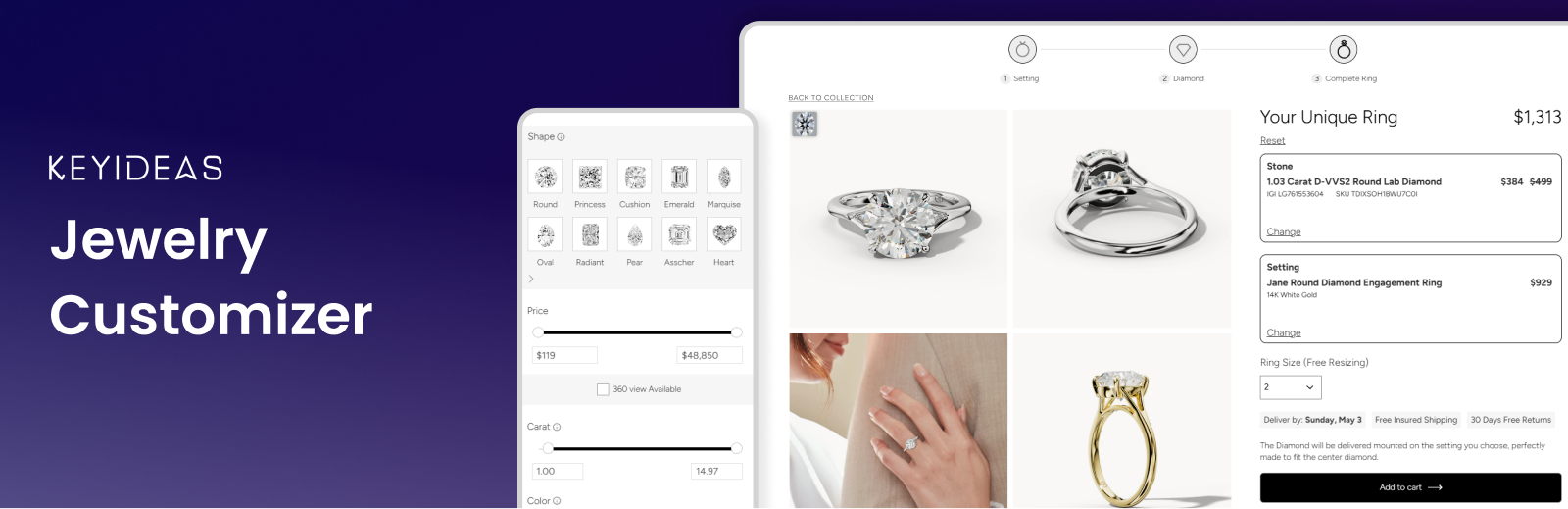
Keyideas RingBuilder 是一款專為 WordPress 和 WooCommerce 設計的外掛,讓顧客能夠自訂訂婚戒。透過互動式的設計體驗,顧客可以選擇鑽石、寶石及戒指設計,提升銷售額高達 30%。
【主要功能】
• 自訂戒指設計功能
• 360° 鑽石及寶石視圖
• 無需編碼的無縫 WooCommerce 整合
• 實時價格更新與預覽
• 支援多語言及多貨幣
外掛標籤
開發者團隊
② 後台搜尋「Keyideas Jewelry Customizer – Diamond Ring Builder & Engagement Rings for WooCommerce」→ 直接安裝(推薦)
📦 歷史版本下載
原文外掛簡介
Keyideas Jewelry Customizer adds a 3-step ring builder to WooCommerce. Shoppers choose a diamond or gemstone, pair it with one of your ring settings, pick their ring size and buy the finished ring through your usual WooCommerce checkout.
Activate it, choose the stones you offer and your ring collection, and the diamond listing, detail and review pages are created for you. It works with any WordPress theme and suits jewellery stores of every size, from independent jewellers to diamond retailers such as dimendscaasi.com, bongioielli.com and ramziandco.com.au.
Free Demo | Documentation | Video Tutorials
Features
Build Your Own Ring – start with a stone or a ring setting; the review page shows both with the total price and the ring size
Ring, earring and pendant builders – sell fine jewellery beyond rings: matched earring pairs and pendant settings, in the same steps
Diamond search – natural, lab-grown and colored diamonds and gemstones, with shape, carat, color, clarity, cut and price filters, grid or list view, compare and recently viewed
Diamond detail pages – 360° view, grading certificate, a diamond viewer that shows the stone on a hand, and carat, cut, color and clarity guides
Feed Center – set margins by price or carat, add discounts and choose which inventory is live
Your own stones – import diamonds and gemstones with a CSV file and sell them in the same ring builder
Sales dashboard – stones sold, revenue, profit and monthly trends
Appearance – brand colors and typography, with a private preview before you save
Language & Region – English (US/UK), French, German, Italian and Spanish storefronts, editable text and your region’s ring sizes
WooCommerce – complete rings and loose stones in the cart; each order shows the stone’s stock number and the setting
SEO and speed – diamond products are noindex, listing pages are cached, mobile-ready and HPOS compatible
Shortcodes
The plugin creates its pages on activation. To place them yourself:
[KIRB-RingBuilder-Listing category="NATURAL"] – diamond listing; category NATURAL, LAB CREATED, GEMSTONE or COLORED DIAMONDS
[KIRB-RingBuilder-DetailPage] – diamond detail page
[KIRB-RingBuilder-BYORPage] – ring review page
[KIRB-RingBuilder-BYORStrip] – the 3-step ring builder bar
[KIRB-RingBuilder-SettingButton] – the “Choose This Setting” button
Plans: Free vs Pro
Every store starts on Free, which never expires. The Pro plans are:
Basic – $49/month billed yearly ($590), or $59 monthly
Standard – $99/month billed yearly ($1,190), or $119 monthly
Premium – $141/month billed yearly ($1,690), or $169 monthly
What changes with the plan:
Nivoda diamonds (Nivoda account needed) – Free: sample diamonds / Pro: 400K, 600K or 800K
Your own imported diamonds – Free: 200K / Pro: 400K, 600K or 800K
Ask AI messages a month – Free: 20 / Pro: 40, 60 or 100
Keyideas logo – Free: shown / Basic and Standard: removable ($330 or $230 one-time) / Premium: no logo
Advanced CSS – Free: no / Pro: on yearly plans
Diamond suppliers, grid view on mobile, redacted certificate PDFs – Free: no / Pro: paid add-ons
Every plan, Free included, has the complete ring builder with WooCommerce checkout, the earring and pendant builders, the Feed Center, CSV import, the sales dashboard, Appearance, Language & Region and AI diamond score. Show/hide filters and engraving are free on every plan for a limited time.
Add-ons such as the Product Library (100+ ring designs with 360° videos) and Custom Supplier Integration (RapNet, VDB and others) can be added on any plan. Compare plans and add-ons
More From Keyideas
Keyideas Jewelry Filter and Search for fast filters across every jewellery type, Vizora – 3D Try-On for trying on jewellery with augmented reality, Jewelith – 3D Design Studio for real-time 3D jewellery design, and Timenox for luxury watches.
Support
Use Contact Us in the plugin, book a free consultation or email [email protected]. Help translate the plugin at translate.wordpress.org.
Keyideas RingBuilder API (https://engagement-ring-builder-o4hk8.kinsta.app)
Provides diamond inventory and sold-out updates until the store connects to the RingBuilder app (below). Data sent:
* Activation: site domain, store and admin email, currency, name, company, phone and country.
* Listing and detail pages: filters, currency and product IDs.
* Ring built, added to cart or ordered: diamond ID, event type and session ID, for usage statistics.
* Uninstall: owner name, company and email.
Keyideas RingBuilder app and Feed Center (https://ring-builder.apps.keyideasglobal.com)
Provides diamond inventory and the Feed Center once the store connects automatically. Data sent:
* Connecting: site URL and name, admin email and country, currency, plugin version and a one-time code. An admin key is returned to /kirb/v1/admin-secret.
* Listing and detail pages: shop name, store token, filters, currency and product IDs.
* Paid ring builder orders: shop name, stock numbers, order item IDs and product IDs, for the Sales dashboard.
* Ring built, added to cart or ordered: shop name, store token, diamond ID, event type and session ID, for the Sales dashboard.
* Feed Center: shop name and a short-lived sign-in token.
Keyideas forms service (https://apps-manager.apps.keyideasglobal.com)
Renders the Contact Us form in the plugin dashboard and the optional feedback form shown when the plugin is deactivated.
* Contact Us: the details the administrator enters are sent when they submit the form.
* Deactivation feedback: the form is only loaded when the administrator clicks “Deactivate” for this plugin. Only if they submit it, the chosen reason, any text they type, the administrator’s email address and the site URL are sent. “Skip & deactivate” sends nothing.
geoPlugin (http://www.geoplugin.net)
Used on the plugin activation form in the admin dashboard to pre-select the administrator’s country. The administrator’s IP address is sent when the activation form is displayed.
Terms and Privacy Policy.
Google Fonts (https://fonts.googleapis.com)
The Poppins and Assistant fonts are loaded from Google Fonts on the ring builder pages, and so are the heading fonts chosen in Appearance → Typography (only when one is chosen; the default inherits the theme’s font). Google receives the visitor’s IP address and browser information.
Terms of Service, Privacy Policy.