內容簡介
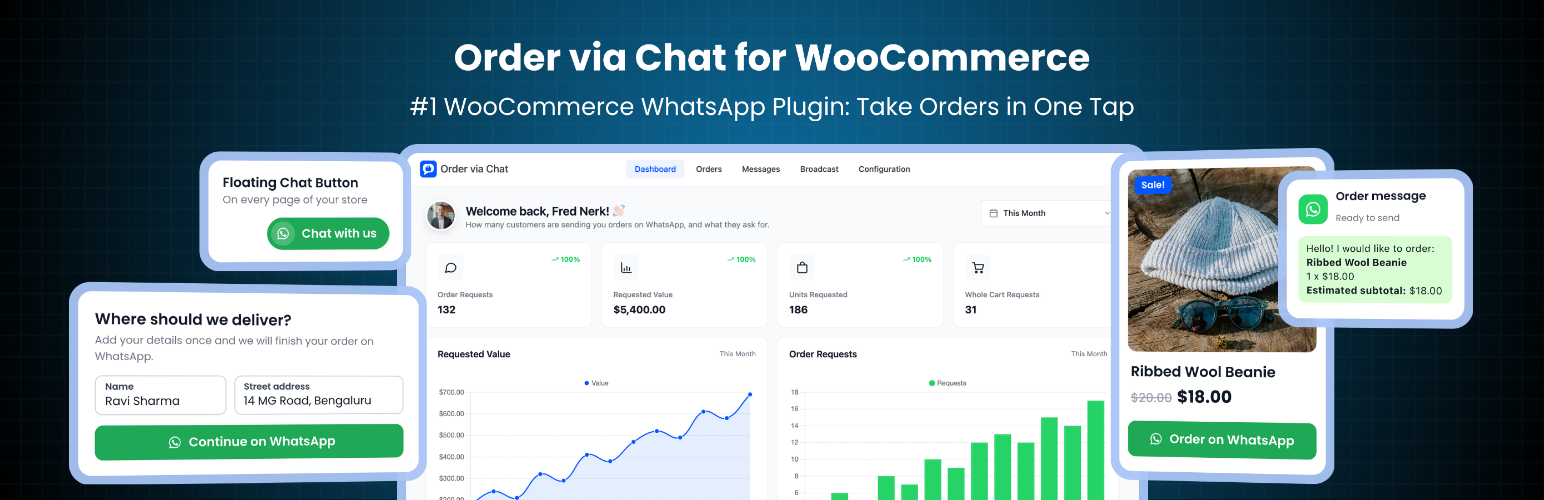
此外掛為 WooCommerce 提供 WhatsApp 訂單按鈕,讓顧客能夠透過聊天方式下單,簡化購物流程。顧客只需點擊按鈕,便可快速發送訂單資訊,提升購物體驗。
【主要功能】
• 在產品、商店及購物車頁面添加 WhatsApp 訂單按鈕
• 自動填寫訂單資訊,包括產品名稱、數量及價格
• 支援變數產品選項,並檢查庫存
• 提供 WooCommerce 目錄模式,僅透過 WhatsApp 接受訂單
• 可自訂 WhatsApp 訂單訊息內容
• 提供浮動 WhatsApp 聊天按鈕
外掛標籤
開發者團隊
② 後台搜尋「Order via Chat for WooCommerce – Click to Chat Order Button & Catalog Mode」→ 直接安裝(推薦)
原文外掛簡介
Plenty of shoppers would rather ask than fill in a checkout form. They want to check a size, agree a delivery time or simply talk to a person before they pay. In many countries that conversation happens on WhatsApp.
This WooCommerce WhatsApp plugin adds an Order on WhatsApp button to your product, shop and cart pages. One tap opens WhatsApp with the order already written out: the products, options, quantities, prices, an estimated subtotal and where to deliver. The customer presses send, and you finish the sale in the chat.
It works with your personal WhatsApp or the free WhatsApp Business app. There is no API account to set up, no monthly fee and no message limit, because the plugin only opens a chat. Nothing is sent through a third party server. Want to see it first? Try the live demo.
Quick links
Free Plugin Live Demo
Pro Demo
Documentation
Support
Upgrade to Pro
How to let customers order on WhatsApp
You add your WhatsApp number and choose where the button appears.
A customer taps Order on WhatsApp on a product, or sends their whole cart from the cart page.
If they are a guest, or their account has no address yet, a short popup asks for their delivery details. Your own required checkout fields are used.
WhatsApp opens on their phone or computer with the full order typed in, ready to send to you.
You confirm the order, the price and the delivery in the chat.
What the free plugin does
WhatsApp order button for product, shop and cart pages
The button sits where customers already decide to buy, so ordering by chat is never more than one tap away.
Order on WhatsApp button on single product pages, in eight positions
WhatsApp button on shop and category pages, before or after Add to cart, including Product Collection block grids
Send the whole cart to WhatsApp from the cart page, in the classic cart and the Cart block
Variable products: the chosen options and the matching variation are sent, and the button waits until an option is picked
The quantity field is respected, and stock is checked before WhatsApp opens
Show the buttons on all devices, on phones and tablets only, or on desktop only
Prefilled WhatsApp order message with delivery details
You get everything you need to confirm the order without a single follow up question.
Product names, options, quantities, unit prices and product links
An estimated subtotal at today’s prices, including sale prices
The delivery address, taken from the customer’s account or from a short popup that uses your store’s required checkout fields
Edit the message with tags such as {items}, {subtotal}, {customer_name}, {customer_phone} and {address}. Lines whose tag is empty drop out on their own
WooCommerce catalog mode: take orders on WhatsApp only
Some stores do not want a checkout at all. They quote, confirm and collect payment in the chat.
The WhatsApp button replaces Add to cart on the products you sell through WhatsApp
Customers still pick options and quantity on the product page
Adding those products to the cart is blocked on the server too, so a hidden button cannot be bypassed
Hide prices for wholesale, custom or “ask for price” products, and leave prices out of the message
Products you exclude keep their normal checkout
WhatsApp order button block and shortcode
An Order on WhatsApp block for the block editor, with a live preview
The [ddwcpvw_button] shortcode for page builders and custom templates
Pass id="123" for a specific product, or type="cart" to send the whole cart
Send my order on WhatsApp after checkout
A Send my order on WhatsApp button on the order received page, with the order number, items, shipping, tax, payment method and total. Works with the block checkout too
Edit that message with tags such as {order_number}, {order_total} and {order_summary}
A WhatsApp box on the order edit screen: one click opens a chat with the customer, the order already written out and editable before you send
Floating WhatsApp chat button
A WhatsApp bubble in the corner of every page, or on store pages only
Its own number, prefilled message and optional text label
On product pages the product name and link are added to the message
Left or right corner, and an option to hide it on phones
Button design and store controls
Exclude products or whole categories, which keep their normal checkout
Hide the button on out of stock products
Ask guests to log in first, or let them order with the popup
Button text, colours, corner roundness, full width and WhatsApp icon, with a live preview
A setup wizard that gets you running in about a minute
WhatsApp order tracking and analytics
A dashboard with order requests, requested value, units requested and whole cart requests, compared with the previous period
Daily charts and a list of your most requested products
All figures are counted on your own site and stored in your own database
Optional events for Google Analytics 4, Google Tag Manager and Meta Pixel when a customer opens WhatsApp with an order, using the tracking code already on your site
There is no limit on products, requests or messages in the free version.
Who this is for
Stores whose customers prefer to order by message
Shops that sell made to order, personalised or quote based products
Wholesale and B2B catalogs that agree prices in the chat
Local businesses that deliver by hand or take payment on delivery
Anyone who wants a WhatsApp click to chat order button without an API account
Free vs Pro
The free plugin opens WhatsApp and lets you take it from there. Pro is for stores that want the chat itself to do the work. It connects your number to the official WhatsApp Business Platform through Twilio, so your store can talk to customers on its own. Pro installs on top of the free plugin and keeps your settings.
Orders created in the chat (Pro)
A chat assistant that turns the request into a real WooCommerce order, with shipping and payment chosen in the chat
A secure payment link for card gateways, and cash on delivery or bank transfer confirmed in the chat
STATUS, HELP and AGENT replies, with handover to a person
Automatic WhatsApp messages (Pro)
Order confirmations and status updates on WhatsApp
A new order alert on your own phone
Reminders for unfinished chats and unpaid orders
Broadcast messages to customer groups
WhatsApp opt in at checkout, with STOP and START handled for you
Records and integrations (Pro)
A full message log with delivery status and CSV export
A dashboard with WhatsApp orders, revenue and delivery rate
Pay from a DevDiggers Wallet balance inside the chat
A note from the founder
Hi, I am Yash Kapoor, founder of DevDiggers. Many shoppers would rather send a message than fill in a checkout form, and someone on the team ends up retyping every order. I built this plugin so a chat turns into a real WooCommerce order. My team keeps it updated for every new WooCommerce release, and the developers who wrote it answer the support forum.
Have a question? Ask in the support forum or message me directly on LinkedIn.
External services
WhatsApp click to chat (wa.me)
What it is: WhatsApp’s public click to chat address, https://wa.me/.
What it is used for: Opening a WhatsApp chat with your store’s number, with the order message already typed.
When data is sent: Only when a visitor taps an Order on WhatsApp, send order or floating chat button, or when an administrator clicks Open in WhatsApp on an order screen. The plugin itself never calls WhatsApp from your server.
What data is sent: The visitor’s browser opens the address with your WhatsApp number and the prefilled message: the products, quantities, prices and, if entered, the customer’s name, phone, email and delivery address.
Provided by WhatsApp LLC (Meta): Terms of Service, Privacy Policy.
The bundled DevDiggers framework, which draws the admin screens, connects to the services below. All of them run only inside the WordPress admin.
1. DevDiggers extensions directory
What it is: A read only API on devdiggers.com that returns the public list of DevDiggers extensions.
What it is used for: Showing available DevDiggers extensions on the Extensions admin page.
When data is sent: Only when a logged in administrator opens the Extensions admin page. The response is cached for 24 hours.
What data is sent: A standard outbound HTTP request only, meaning your server’s IP address and a plugin user agent string. No personal data and no store data are sent. The page also loads each listed extension’s image from devdiggers.com in the administrator’s browser.
Endpoint: https://devdiggers.com/wp-json/ddwcs/v1/plugins
2. Newsletter subscription (optional)
What it is: A contact and newsletter endpoint on devdiggers.com.
What it is used for: Adding your email address to the DevDiggers newsletter, only if you choose to subscribe.
When data is sent: Only when an administrator submits the optional newsletter form in the plugin dashboard. Nothing is sent automatically.
What data is sent: The email address you enter and your site URL.
Endpoint: https://devdiggers.com/?fluentcrm=1&route=contact
The services above are provided by DevDiggers. By using them you agree to the DevDiggers Terms and Conditions (https://devdiggers.com/terms-and-conditions/) and Privacy Policy (https://devdiggers.com/privacy-policy/).
3. Gravatar (avatar images)
What it is: Gravatar, the avatar service operated by Automattic.
What it is used for: WordPress core’s get_avatar_url() shows the logged in administrator’s avatar in the plugin dashboard header. This is standard WordPress behaviour.
When data is sent: Only when a logged in administrator opens the plugin dashboard and avatars are enabled under Settings > Discussion. Turning avatars off there stops the request.
What data is sent: A hash of the administrator’s email address inside the image URL, plus the usual request data such as IP address and user agent.
Endpoint: https://secure.gravatar.com/avatar/
Terms of Service: https://automattic.com/terms/
Privacy Policy: https://automattic.com/privacy/
This plugin contains no licence checks, no update checks and no telemetry.
Source code and build tools
The admin, storefront and block editor JavaScript and CSS are compiled from the src/ folder with webpack and Babel. The complete, human readable source code, including all build configuration, is published in our public GitHub repository:
https://github.com/DevDiggers-Technologies/order-via-chat-for-woocommerce
To build the assets from source:
Run npm install to install the build dependencies listed in package.json.
Run npm run build to compile the production assets into assets/js and assets/css.
The build configuration is in webpack.config.js and babel.config.js. Two third party libraries used by the admin screens ship unmodified under the MIT licence inside devdiggers-framework/assets/js/: Chart.js (https://www.chartjs.org) and Select2 (https://select2.org).