外掛標籤
開發者團隊
② 後台搜尋「Buy Now Pay Later for WooCommerce – BNPL, Pay in 4, Installments & Net 30」→ 直接安裝(推薦)
原文外掛簡介
Plenty of stores already let trusted customers pay later. They just do it with spreadsheets, invoices and reminder emails written by hand.
Buy Now Pay Later for WooCommerce is a free WooCommerce buy now pay later plugin (BNPL) that turns that into a proper checkout option with installment payments and Net 30 terms. You approve the customers you trust and give each one a credit limit. They pick Pay in 4 or Pay in 30 days at checkout, and the plugin tracks every installment, sends the reminders and lets them pay from My Account with any payment method you already accept.
The credit is yours. There is no third party lender, no API key, no account to sign up for and no cut taken from your orders. Everything runs inside WooCommerce on your own server.
Quick links
Free Demo
Pro Demo
Documentation
Support
Free vs Pro Comparison
Upgrade to Pro
How it works
A customer applies from the Pay Later section in My Account, or you let every logged in customer use it straight away.
You approve them on the Customers screen and they get your store credit limit.
At checkout they choose the Pay Later payment method and a plan: Pay in 4 or Pay in 30 days.
The order total comes off their available credit and the installments are scheduled.
Before each due date they get a reminder email with a link to pay. They pay the installment in My Account with card, bank transfer or any other gateway you run.
Each payment goes back onto their credit, so they can shop again.
What the free plugin does
Pay in 4 and Net 30 payment plans
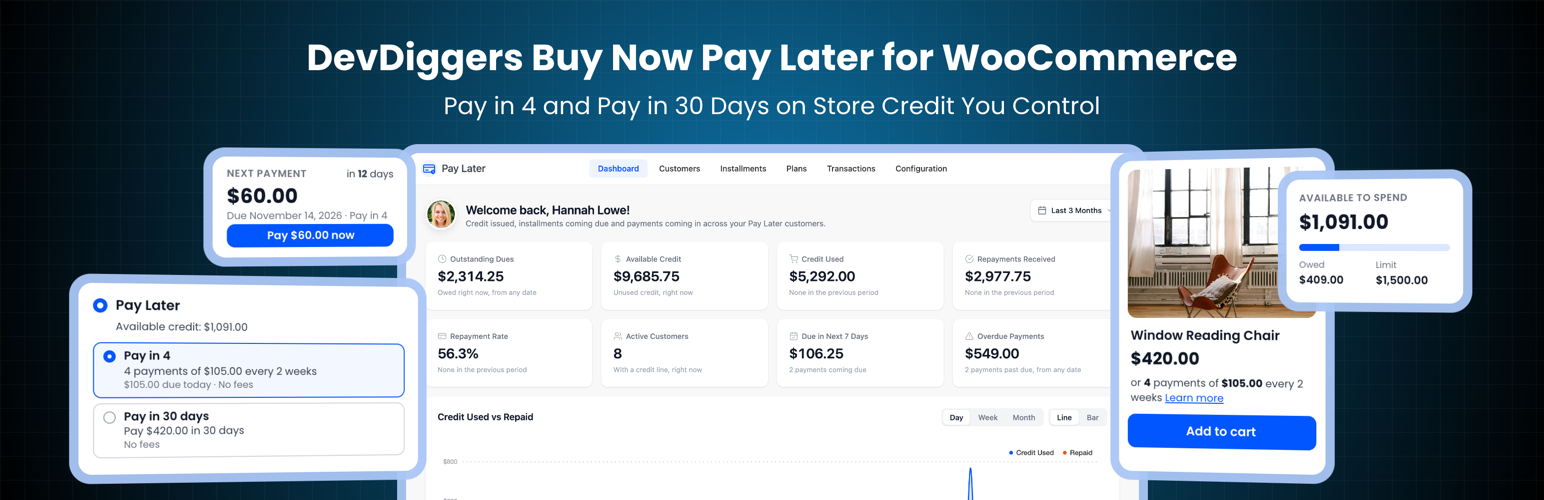
Two ready made plans cover what most stores need. Customers choose one at checkout and see exactly what they will pay and when.
Pay in 4: four equal payments, one every two weeks. The first is due at purchase and the order stays on hold until it is paid, so your risk on a new customer is one quarter of the order.
Pay in 30 days: the full amount in one payment, 30 days after the order. Classic Net 30 terms for trade and repeat customers.
Switch either plan on or off under Configuration > General. Customers only see the plans their credit covers.
No fees and no interest on either plan.
A store credit line for each customer
One credit limit for every approved customer, saved when their credit line starts so a later change never moves what they owe
Add or remove dues by hand, with a note and an optional email to the customer
Available credit shown under the payment method at checkout
Hide Pay Later at checkout for orders below or above an amount you set
Customer approval
Manual review: customers apply in one click and you approve or reject them
Or no review: every logged in customer can activate credit
Optionally start the credit line the moment you approve someone
Email to the store when a new application comes in, and to the customer when it is approved or rejected
Installment pricing on product pages
Showing “or 4 payments of $25.00 every 2 weeks” under the price is one of the simplest ways to lift order value, and it is on by default.
Show it on product pages, in product lists and under the cart total
Updates live when a shopper picks a variation
Edit the text with placeholders such as {count}, {amount} and {interval}
A Learn more link opens a short explainer with your active plans
[ddwcpp_installments_message] shortcode for page builders and custom templates
Reminders and missed payments
A reminder email a set number of days before every installment is due
An overdue notice the day after a missed payment, with a link to pay
Optionally pause credit for overdue customers until they catch up. Checkout tells them why Pay Later is not available.
Payments settle the oldest installment first
Nine customer and store emails using your WooCommerce email design. Edit the subject, heading and message of each one, with placeholders such as {amount} and {due_date}, or switch it off
My Account Pay Later section
Customers get their own page under My Account, with tabs that switch without reloading.
Available credit, what they owe and a usage meter
Next payment with a one click Pay now button
Every order on a plan, with its full schedule
A complete history of purchases, payments, refunds and adjustments
Rename the menu item and change its address, for example /my-account/pay-later/
Orders, refunds and the admin dashboard
Refund a Pay Later order from WooCommerce and the amount goes back onto the customer’s credit
Cancelled and failed orders return the credit too
The payment schedule shows on the order screen, the thank you page, the customer’s order view and the order emails
Record a payment you received outside the store, such as a bank transfer, from the Installments screen
Dashboard with outstanding dues, credit used, repayments, repayment rate, overdue amounts, upcoming payments and charts
Customers, Installments and Transactions screens with search and filters
Works with the classic checkout and the WooCommerce Cart and Checkout blocks
Compatible with High-Performance Order Storage (HPOS)
Setup wizard that gets you running in a couple of minutes
Free vs Pro
The free plugin gives every approved customer one store credit line, the Pay in 4 and Pay in 30 days plans, reminders and the full admin. Buy Now Pay Later Pro adds the controls stores ask for once credit sales take off. You can see every Pro setting in the free plugin, marked with a PRO tag.
Plans and terms (Pro)
Plan builder: create and rename plans with their own number of payments, schedule, fee and order amount limits
3, 6 or 12 monthly payments, weekly schedules, up to 60 installments
Net 15, Net 45, Net 60 or any number of days
A fixed or percentage fee per plan, shown before the customer chooses
Credit and risk (Pro)
A different credit limit per customer, edited inline on the Customers screen
Late fees and a grace period, fixed or a percentage, charged once per missed payment
Interest on repayments and partial payments with a minimum amount
Document verification: customers upload an ID or business licence when they apply, stored in a private folder
Offer credit to chosen user roles only, such as wholesale or B2B customers
Keep chosen products and categories cash only
Messaging and design (Pro)
Show the installment price to approved customers only and pick which plan it advertises
Rewrite the Learn more explainer with your own logo, steps and footnote
Credit card style balance, tab styles, corners, eleven brand colors and your own labels
Admin tools (Pro)
Bulk actions for customers and installments
CSV export of installments and transactions
One click payment reminders
Every customer, balance and installment from the free plugin carries over when you upgrade.
External services
Applications, balances, installments and transactions are stored in your WordPress database, and emails go out through the WooCommerce mailer. The plugin contains no licence checks, no update checks and no telemetry. It relies on the external services listed below.
1. Gravatar (avatar images)
What it is: Gravatar (gravatar.com), the avatar service operated by Automattic. Images are loaded from secure.gravatar.com through WordPress core’s get_avatar() and get_avatar_url() functions.
What it is used for: Showing the logged in administrator’s avatar in the welcome header of the plugin dashboard, and customers’ avatars on the dashboard, Customers, Installments and Transactions screens.
When data is sent: When those admin screens are viewed and avatars are enabled under Settings > Discussion. Turning avatars off there stops the requests.
What data is sent: A hash of each shown user’s email address inside the image URL, plus the usual request data of the administrator’s browser such as IP address and user agent. Nothing is sent from the storefront.
Terms of Service: https://automattic.com/terms/
Privacy Policy: https://automattic.com/privacy/
The bundled DevDiggers framework, which draws the admin screens, connects to the two services below. Both run only inside the WordPress admin.
2. DevDiggers extensions directory
What it is: A read only API on devdiggers.com that returns the public list of DevDiggers extensions.
What it is used for: Showing available DevDiggers extensions on the Extensions admin page.
When data is sent: Never by default. The Extensions admin page shows a “Load extensions from devdiggers.com” button, and the list is requested only after an administrator clicks it (opt-in). The response is cached for 24 hours.
What data is sent: A standard outbound HTTP request only, meaning your server’s IP address and a plugin user agent string. No personal data and no store data are sent. The page also loads each listed extension’s image from devdiggers.com in the administrator’s browser.
Endpoint: https://devdiggers.com/wp-json/ddwcs/v1/plugins
3. Newsletter subscription (optional)
What it is: A contact and newsletter endpoint on devdiggers.com.
What it is used for: Adding your email address to the DevDiggers newsletter, only if you choose to subscribe.
When data is sent: Only when an administrator submits the optional newsletter form in the plugin dashboard. Nothing is sent automatically.
What data is sent: The email address you enter and your site URL.
Endpoint: https://devdiggers.com/?fluentcrm=1&route=contact
The DevDiggers services are provided by DevDiggers. By using them you agree to the DevDiggers Terms and Conditions (https://devdiggers.com/terms-and-conditions/) and Privacy Policy (https://devdiggers.com/privacy-policy/).
Source code and build tools
The admin, storefront and checkout block JavaScript and CSS are compiled from the src/ folder with webpack and Babel. The complete, human readable source code, including all build configuration, is published in our public GitHub repository:
https://github.com/DevDiggers-Technologies/buy-now-pay-later-for-woocommerce
To build the assets from source:
Run npm install to install the build dependencies listed in package.json.
Run npm run build to compile the production assets into assets/js and assets/css.
The build configuration is in webpack.config.js and babel.config.js. Two third party libraries used by the admin screens ship unmodified under the MIT licence inside devdiggers-framework/assets/js/: Chart.js (https://www.chartjs.org) and Select2 (https://select2.org).