200+
安裝啟用
—
尚無評分
2420 天前
最後更新
—
問題解決
WordPress 4.0+ v1.0 上架:2018-01-14
內容簡介
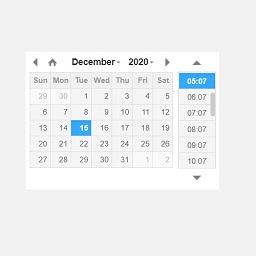
為「GravityForms」外掛建立一個名為「日期/時間」的自訂欄位:
新增一個名為「日期/時間」的欄位到 GravityForms 欄位清單中。
使用者可以將該欄位拖曳到表單中並使用。
該欄位將允許使用者在一個欄位中選擇日期和時間。
外掛標籤
開發者團隊
⬇ 下載最新版 (v1.0) 或搜尋安裝
① 下載 ZIP → 後台「外掛 › 安裝外掛 › 上傳外掛」
② 後台搜尋「Date/Time Fields for Gravity Forms」→ 直接安裝(推薦)
② 後台搜尋「Date/Time Fields for Gravity Forms」→ 直接安裝(推薦)
原文外掛簡介
Create a new custom field for “GravityForms” plugin called “Date/Time” field:
Add a new field called “Date/Time” field to GravityForms fields.
User can drag that field into the form and use it.
The field will allow user to select both Date and Time for one field.