內容簡介
Transliteration(音譯)是將一個字符轉換成另一個字符,例如把西里爾字母轉換為拉丁字母。通常用於改善永久鏈接的可讀性,避免顯示和讀取文件時出現問題,因為整個網絡都是基於拉丁字母的。許多英語開發人員製作的插件在西里爾字母下並未進行優化,可能運作不穩定。
Cyrlitera轉寫外掛可以將文章、頁面和標籤上的西里爾文和喬治亞字母替換為可讀的永久鏈接。同時,此插件會修正錯誤的文件名並刪除不必要的字符,這些字符可能會導致訪問該文件時出現問題。
西里爾語鏈接範例:
_site.dev/%D0%BF%D1%80%D0%B8%D0%B2%D0%B5%D1%82-%D0%BC%D0%B8%D1%80
轉換成拉丁字母:
_site.dev/privet-mir
在第一種情況下,無法直觀地理解編碼鏈接的內容。在第二種情況下,實現了轉寫,一切都看起來更清晰,鏈接更短。
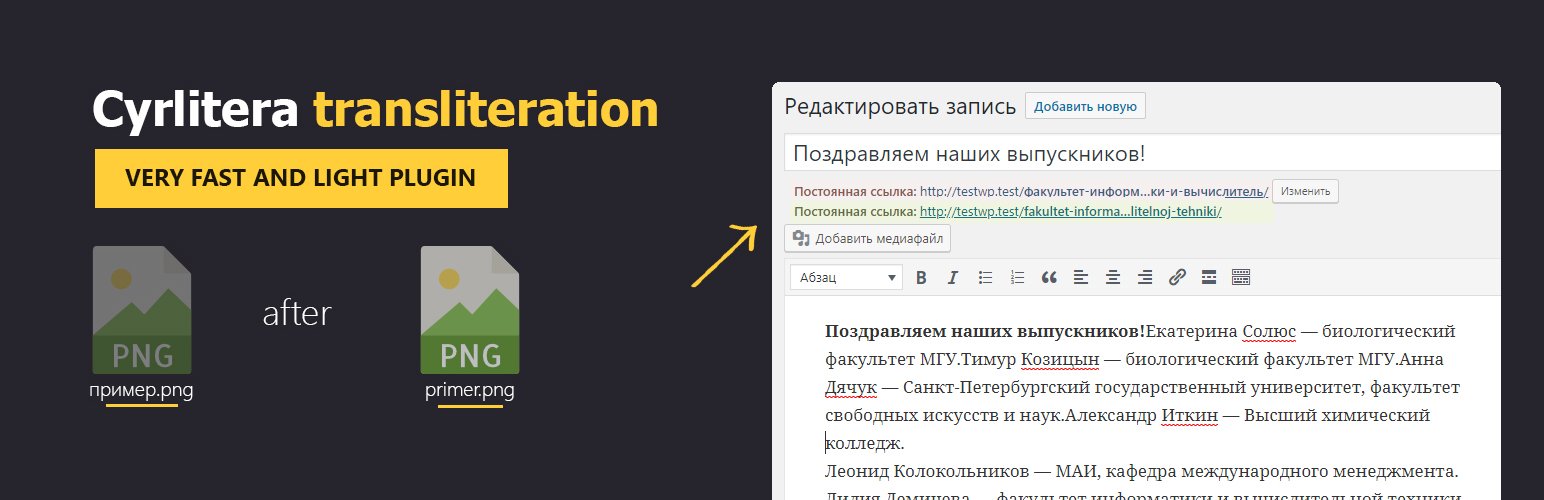
錯誤的文件名轉寫範例:
%D0%BC%D0%BE%D0%B5_image_ 290.jpg
A+nice+picture.png
圖像轉寫範例:
moe_image_ 290.jpg
a-nice-picture.png
如果忽略文件名創建規則,則可能會得到404錯誤和損壞的鏈接。
因此,請使用拉丁字母和數字創建文件名,避免特殊字符,除了破折號和下劃線。或者使用這個插件,在通過WordPress界面上傳文件時自動執行所有這些工作,並減少損壞鏈接的數量。
功能
啟用選項時,轉換現有文章、頁面、分類和標籤的永久鏈接;
保持記錄和頁面的永久鏈接的完整性;
從舊文章和頁面名稱創建重定向到具有轉換鏈接的新文章;
對附件文件名進行音譯;
將文件名轉換為小寫;
包含俄語、白俄羅斯語、烏克蘭語、保加利亞語、格魯吉亞符號;
可以進階設置字符轉寫基礎;
如果插件轉換了你的URL錯誤,你可以回復更改。
感謝插件作者
我們使用了一些插件的功能:
WP Translitera, Rus-To-Lat, Cyr to Lat, Clearfy — WordPress optimization plugin and disable ultimate tweaker,translit-it, Cyr to Lat enhanced, Cyr-And-Lat, Rus filename translit, rus to lat advanced
推薦的單獨模塊
我們邀請您查看我們的團隊生產的其他幾個相關免費插件,您可能會特別有用:
Clearfy - WordPress optimization plugin and disable ultimate tweaker
Disable Comments for Any Post Types (Remove Comments)
Disable updates, Disable automatic updates, Updates manager
Cyr-to-lat reloaded - transliteration of links and file names
Disable admin notices individually
WordPress Assets manager
外掛標籤
開發者團隊
② 後台搜尋「Cyrlitera – Transliteration of Links and File Names」→ 直接安裝(推薦)
原文外掛簡介
Cyrlitera converts Cyrillic and Georgian URLs and file names to Latin. It works for all post types, pages, and terms. It gives you options to define your own custom characters and enable automatic redirects.
How It Works
Transliteration is the process of converting characters from one writing system to another, such as converting Cyrillic symbols to Latin. Because most web software and URLs are designed around Latin characters, using Cyrillic or other non-Latin symbols in links or file names can lead to unreadable URLs, accessibility issues, and even broken links. Transliteration ensures your URLs and file names remain clean, readable, and compatible across all platforms.
Cyrlitera automatically replaces Cyrillic and Georgian characters with Latin equivalents to create clean and readable URLs for posts, categories, taxonomies, products, and custom post types. It also fixes incorrect file names by removing unsafe characters and transliterating them during upload, helping prevent 404 errors and broken media links.
Examples
Cyrillic URL before transliteration:
https://example.com/%D0%BF%D1%80%D0%B8%D0%B2%D0%B5%D1%82-%D0%BC%D0%B8%D1%80
Same URL transliterated to Latin:
https://example.com/privet-mir
Incorrect file names before transliteration:
%D0%BC%D0%BE%D0%B5_image_290.jpg
A+nice+picture.png
Readable transliterated file names:
moe_image_290.jpg
a-nice-picture.png
By using Latin-based file names and URLs, you avoid issues with encoding, broken links, and unreadable paths. This plugin performs the transliteration automatically each time a file is uploaded, ensuring your media library stays clean and consistent.
Features
Automatically transliterates all new permalinks for posts, pages, categories, tags, and custom post types.
Automatically transliterates all new attachment file names on upload, with an option to convert them to lowercase.
Creates automatic redirects from old URLs to new transliterated ones to prevent broken links.
Supports multiple alphabets, including Russian, Belarusian, Ukrainian, Bulgarian, and Georgian.
Fully customizable character mapping – define your own characters and their Latin substitutions to support any language.
Preserves original permalinks, keeping old URLs intact so nothing is lost during conversion.
Optional conversion of existing slugs, allowing you to transliterate existing URLs.
Rollback tool that lets you restore original URLs if needed.
Support
We’re here to help. Feel free to open a new thread on the [Support Forum] (https://wordpress.org/support/plugin/cyrlitera/).
Useful Resources
If you like this plugin, you’re sure to love our other plugins as well.
Our blog is a great place to learn more about WordPress.
Get the most out of your website with our helpful WordPress YouTube Tutorials.