內容簡介
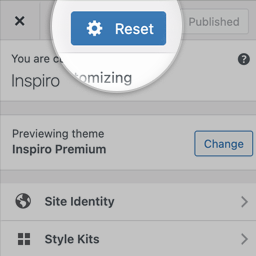
透過一個按鈕,重置、匯出及匯入 WordPress 自訂器 (Customizer) 的設定。
特色如下:
重置自訂器設定
匯出自訂器設定
匯入自訂器設定
重置 WordPress 自訂器
您必須逐個取消每個設定才能從自訂器上啟動最新的設置嗎?沒問題!透過這個簡單按鈕,就可以快速重置 WordPress 自訂器。
匯出和匯入自訂器設定
透過一個按鈕,快速匯出自訂器的設定快照,方便匯入到其他 WordPress 網站或子佈景主題中。
自訂器重置外掛允許您在 WordPress 自訂器中直接取得設定快照,並且匯出或匯入自訂器設定,在需要遷移至其他 WordPress 網站或子佈景主題時使用。
相容的佈景主題
此外掛應該可以和所有 WordPress 佈景主題一起使用。
此插件最初是為了協助 Page Builder Framework 主題而開發的,該主題是一個為新的 WordPress 設計的快速且簡潔主題。
下一步是什麼?
如果您喜歡自訂器重置、匯出和匯入,請務必查看我們的其他產品:
Page Builder Framework – 一個為新的 WordPress 設計的快速且簡潔主題。
Ultimate Dashboard – 用於自訂 WordPress 儀表板和管理區域的第一 WordPress 外掛。
Better Admin Bar – 這個外掛可以取代預設的管理工具列,提供最好的使用者體驗,當編輯和瀏覽網站時。
外掛標籤
開發者團隊
② 後台搜尋「Customizer Reset – Export & Import」→ 直接安裝(推薦)
原文外掛簡介
Reset, export, and import your WordPress Customizer settings with just one click of a button.
Features:
Reset Customizer settings
Export Customizer settings
Import Customizer settings
Reset the WordPress Customizer
You have made changes in the Customizer and want to start fresh without undoing each setting individually? We’ve got you covered! Reset the WordPress Customizer with a simple click of a button.
Export & import Customizer settings
Take a snapshot and export your Customizer settings with just a click.
The Customizer Reset plugin allows you to take a snapshot and export/import your settings from directly within the WordPress Customizer. This can be useful if you want to migrate your Customizer settings to a different WordPress installation or child-theme.
Compatible Themes
This plugin should work with all WordPress themes out of the box.
It was initally created as a helper plugin for the Page Builder Framework theme. A fast & minimalistic WordPress theme designed for the new WordPress era.
What’s next?
If you like Customizer Reset – Export & Import, make sure to check out our other products:
Page Builder Framework – A fast & minimalistic WordPress theme designed for the new WordPress era.
Ultimate Dashboard – The #1 WordPress plugin to customize your WordPress dashboard and admin area.
Better Admin Bar – The plugin to make your clients enjoy WordPress. It replaces the default admin bar to provide the best possible user experience when editing & navigating a website.