內容簡介
### WooCommerce 我的帳戶頁面自定義
- **修改 WooCommerce 預設端點:**
- 輕鬆修改或停用預設 WooCommerce 端點:控制台、訂單、下載、地址、付款方式、帳戶詳細信息和登出。
- **創建自訂端點:**
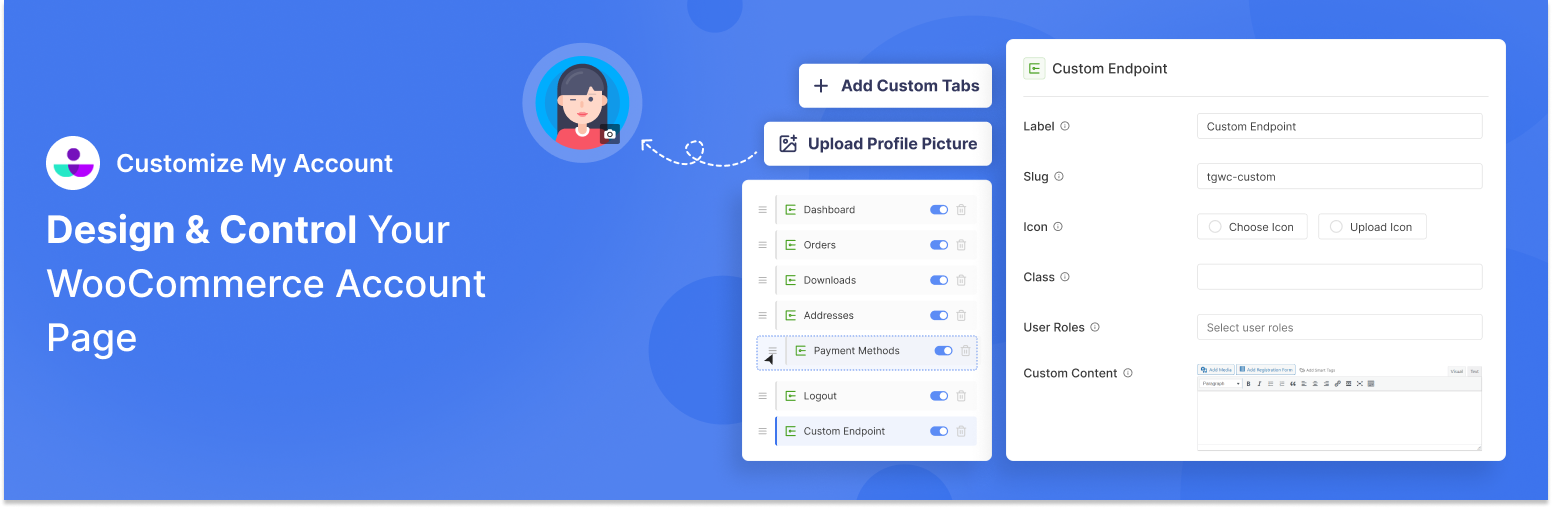
- 使用 Customize My Account Page 添加自訂端點。您可以指定其標籤、slug、圖示,並個性化頁面內容。
- **創建無限連結:**
- 添加無限選單項目,鏈接至 WooCommerce 商店中的另一頁面或外部網站。您可以在同一個標籤中或在瀏覽器中的新標籤中開啟該連結。
- **隱藏/顯示 WooCommerce 標籤:**
- 控制客戶我的帳戶頁面上顯示哪些預設 WooCommerce 端點。一次點擊切換顯示或隱藏。
- **端點的視覺樣式選項:**
- 更改個別端點的標籤和圖示。從可用圖示中選擇或上傳您自己的圖示。您可以使用自定義類進一步設置端點的風格。
- **顯示 WooCommerce 用戶自定義配置文件/頭像:**
- 允許客戶上傳自定義配置文件圖像到他們的帳戶頁面。支援 png 與 jpg 文件類型和預設占位符。
- **用戶角色特定的端點:**
- 預設情況下,端點對所有用戶可見。但您可以將端點限制為特定用戶角色。
- **使用自訂標籤和圖示自訂每個端點:**
- 更改每個端點的標籤和圖示。您可以從可用圖示中選擇或上傳您自己的圖示。
### 如何使用 WooCommerce 的 Customize My Account Page?
1. 安裝後
- 前往 WooCommerce > 自訂我的帳戶頁
2. 開始自定義您的我的帳戶頁面,使用拖放介面
3. 儲存您的更改並預覽結果
外掛標籤
開發者團隊
② 後台搜尋「Customize My Account Page For WooCommerce」→ 直接安裝(推薦)
原文外掛簡介
Customize the WooCommerce My Account page. Add tabs, reorder menus, and personalize content for your customers
Edit the default My Account Page by adding unlimited tabs, reordering menus items with drag and drop method, customizing default WooCommerce endpoints, and personalizing customer dashboard content.
Key Features of Customize My Account Page
Modify Default WooCommerce Endpoints: Easily modify or disable default WooCommerce endpoints: Dashboard, Orders, Downloads, Addresses, Payment Methods, Account Details, and Logout.
Create Custom Endpoint: Add a custom endpoint for your own using Customize My Account Page. You can specify its own label, slug, icon and personalize the page content.
Create Unlimited Links: Add unlimited menu items linking to another page within your WooCommerce store or external website. You can have the link open in the same tab or new tab in your browser.
Hide/Show WooCommerce Tabs: Control which default WooCommerce endpoints are visible on your customer’s My Account Page. Toggle between hide and show in a single click.
Visual Styling Options for Endpoints: Change label and icon of individual endpoints to your liking. Choose from the available icon or upload your own.You can use style the endpoint further using custom classes.
Display Custom Profile/Avatar for WooCommerce Users: Allow customers to upload custom profile images for their account page. It supports png and jpg file types and default placeholders.
User Role-Specific Endpoints: By default, endpoints are visible to all users. However, you can create limit endpoints to specific user roles only.
Customize Each Endpoint with custom label and icon: Change the label and icon of each endpoint to your liking. You can choose from the available icons or upload your own.
Change Layout of Account Page with Drag and Drop Menu Method: Re-order endpoints and links within the My Account Page easily through drag and drop interface. You can re-arrange both default and custom tabs using this method.
Custom Account Page Content: Customize content on the WooCommerce My Account page using our WYSIWYG editor. Add rich content with formatted texts, medias, custom HTML codes. You can also integrate content from your theme and plugins through shortcodes.
Personalize Content for Your Customers: Personalize content for your customers through use of available smart tags: User ID, User Name, User Email, First Name, Last Name, User Display Name, User IP Address, Site Name, Site URL, Page URL, Current Date, Current Time, Billing Address, Billing Company, Shipping Address, and Shipping Company.
How to Use Customize My Account Page for WooCommerce?
After Installation
Go to WooCommerce > Customize My Account Page
Start customizing your My Account page using the drag-and-drop interface
Save your changes and preview the results