內容簡介
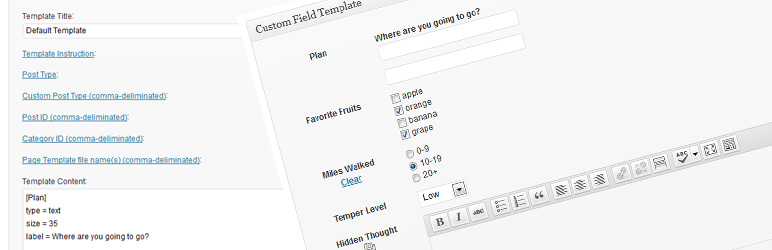
Custom Field Template 外掛可讓使用者在撰寫文章或頁面時,輕鬆新增和管理自訂欄位。此外掛提供多種模板選項,並支援多種功能,提升內容管理的靈活性與效率。
【主要功能】
• 支援多個自訂欄位模板切換
• TinyMCE 編輯器支援
• 自動插入自訂欄位值至標籤
• 短碼 [cft] 顯示自訂欄位模板
• 自訂欄位搜尋功能
• 匯入與匯出功能
外掛標籤
開發者團隊
📦 歷史版本下載
原文外掛簡介
The Custom Field Template plugin adds the default custom fields on the Write Post/Page. The template format is almost same as the one of the rc:custom_field_gui plugin. The difference is following.
English Custom Field Template Manual
We have finally published a manual site for the custom field template plugin. You can also use the custom field refinement search for posts in the admin panel. Please check here.
You can set any number of the custom field templates and switch the templates when you write/edit the post/page.
This plugin does not use the ini file for the template but set it in the option page of the plugin.
Support for TinyMCE in the textarea.
Support for media buttons in the textarea. – requires at least 2.5.
Support for multiple fields with the same key.
Support for hideKey and label options.
You can see the full option list in the setting page of the plugin.
You can customize the design of custom field template with css.
You can replace custom keys by labels.
You can use wpautop function.
You can use PHP codes in order to set values. (experimental, code = 0)
You can set an access user level in each field. (level = 1)
Supprt for inserting custom field values into tags automatically. (insertTag = true)
Adds [cft] Shortcode to display the custom field template. (only shows the attributes which have output = true)
Adds template instruction sections.
Adds the value label option for the case that values are diffrent from viewed values. (valueLabel = apples # oranges # bananas)
Adds the blank option. (blank = true)
Adds the break type. Set CSS of ‘#cft div’. (type = break)
Adds [cft] Shortcode Format.
Adds the sort option. (sort = asc, sort = desc, sort = order)
Support for Quick Edit of custom fields. (tinyMCE and mediaButton are not supported yet)
Support for the custom field search. (only shows the attributes which have search = true.)
Adds [cftsearch] Shortcode Format. (under development)
Adds PHP codes for the output value. (outputCode = 0)
Adds PHP codes before saving the values. (editCode = 0)
Adds the save functionality.
Adds the class option. (class = text)
Adds the auto hook of the_content(). (experimental)
You can use the HTML Editor in the textarea. (htmlEditor = true)
Adds the box title replacement option.
Adds the select option of the post type.
Adds the value count option.
Adds the option to use the shortcode in the widhet.
Adds the attributes of JavaScript Event Handlers. (onclick = alert('ok');)
Adds the Initialize button.
Adds the attributes of before and after text. (before = blah, after = blah)
Adds the export and import functionality.
Adds the style attribute. (style = color:#FF0000;)
Adds the maxlength attribute. (maxlength = 10)
Adds the attributes of multiple fields. (multiple = true, startNum = 5, endNum = 10, multipleButton = true)
Adds the attributes of the date picker in text type. (date = true, dateFirstDayOfWeek = 0, dateFormat = yyyy/mm/dd)
Adds the filter of page template file names (Thanks, Joel Pittet).
Adds the attribute of shortCode in order to output the shortcode filtered values. (shortCode = true)
Adds the attribute of outputNone in case there is no data to output. (outputNone = No Data)
Adds the attribute of singleList attribute in order to output with
- if the value is single. ex) singleList = true
Adds the file upload type. (type = file)
Adds the fieldset type. (type = fieldset_open, type = fieldset_close)
Adds the option to deploy the box in each template.Localization
Belorussian (by_BY) – Marcis Gasuns
Catalan (ca) – Andreu Llos
Czech (cs_CZ) – Jakub
German (de_DE) – F J Kaiser
Spanish (es_ES) – Dario Ferrer
Farsi (fa_IR) – Mehdi Zare
French (fr_FR) – Nicolas Lemoine
Hungarian (hu_HU) – Balazs Kovacs
Indonesian (id_ID) – Masino Sinaga
Italian (it_IT) – Gianni Diurno
Japanese (ja) – Hiroaki Miyashita
Dutch (nl_NL) – Rene
Polish (pl_PL) – Difreo
Brazilian Portuguese (pt_BR) – Caciano Gabriel
Russian (ru_RU) – Sonika
Swedish (sv_SE) – Pontus Carlsson
Turkish (tr_TR) – Omer Faruk
Ukranian (uk_UA) – Andrew Kovalev
Uzbek (uz_UZ) – Alexandra Bolshova
Chinese (zh_CN) – hurri zhuIf you have translated into your language, please let me know.
Japanese Custom Field Template Manual
Are you interested in other plugins? See the following site CMS x WP.
Known Issues / Bugs
UninstallDeactivate the plugin
That’s it! 🙂延伸相關外掛