內容簡介
Currency.Wiki World Clock 外掛可讓您在 WordPress 網站上輕鬆添加世界時鐘,支援多達八個城市的即時顯示,適合遠端團隊、旅遊網站及國際商店使用。
【主要功能】
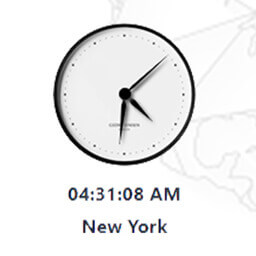
• 五種時鐘小工具樣式:數位、類比、多城市、旋轉地球、日期卡
• 無需 API 金鑰:時間在瀏覽器中計算
• 支援顯示最多八個城市的世界時鐘
• 旋轉地球:顯示城市時間的向量地球
• Gutenberg 區塊:內建編輯器及即時預覽
• 短碼使用:可在任何文章或小工具中使用
外掛標籤
開發者團隊
② 後台搜尋「Currency.Wiki World Clock – Time Zones & Clock Widget」→ 直接安裝(推薦)
原文外掛簡介
Add a world clock to your WordPress site in seconds. Choose from five clock widget styles — a digital clock, an analog clock, a multi-city world clock, a spinning 3D globe, or a date card. Every clock updates in real time in the visitor’s own browser, so there is no API key, no server calls, and nothing to configure to get started.
Show a single time zone, or up to eight cities side by side — useful for remote teams, travel sites, international stores, and anyone whose readers are not in one place.
View the Visual Builder
Key Features
5 clock widget styles — Digital, Analog, World Clock, Spinning Globe, Date Card
No API key — times are computed in the browser; nothing to sign up for
World clock — show up to 8 cities across time zones at once
Spinning globe — a glowing vector Earth with live city times orbiting it
Gutenberg block — native block editor with a live preview
Shortcode — use [cwiki_time] in any post, page, or text widget
Themes & colors — Light, Dark, or Auto, plus any accent color
12 / 24 hour — automatic per locale, or force one
Localized dates — weekday and month names in 40+ languages
Lightweight — loads asynchronously, no impact on page speed
Privacy-friendly — no cookies, no personal data collected
No credit link unless you want one – attribution is off by default
Widget Styles
Digital (240×152) — clean digital time + date
Analog (200×210) — classic analog face
World Clock (264×288) — multiple cities, live
Spinning Globe (280×292) — vector Earth with orbiting city times
Date Card (240×230) — big date with day of week
Usage
Gutenberg Block:
Add a block, search for “World Clock”, and adjust the settings in the sidebar. A live preview updates as you type.
Shortcode:
[cwiki_time]
With options:
[cwiki_time style="globe" theme="dark" accent="f59e0b"]
[cwiki_time style="digital" tz="Asia/Tokyo" city="Tokyo" format="24"]
[cwiki_time style="world" zones="America/New_York~New York,Europe/London~London,Asia/Tokyo~Tokyo"]
Shortcode Attributes
style — digital, analog, world, globe, date (default: digital)
theme — auto, light, dark (default: auto)
accent — hex color without # (default: 2563eb)
format — auto, 12, 24 (default: auto)
seconds — 1 or 0 (default: 1)
date — 1 or 0 (default: 1)
tz — IANA timezone for single-clock styles, e.g. Asia/Tokyo (default: visitor’s local time)
city — label shown under a single clock
zones — cities for world/globe styles: tz~Label,tz~Label
lang — language code for weekday/month names (default: your site language)
branding – 1 or 0 (default: 0) – show the optional credit link on this embed
External services
This plugin relies on an external service to render the clock widget: Currency.Wiki, operated by CurrencyWiki Technologies LLC.
What the service is and what it is used for
The clock itself is drawn by a small JavaScript widget hosted at widget.currency.wiki. The plugin does not bundle that script; it builds an embed URL and loads the widget from the service. This is what allows the plugin to stay small and to receive style and localization improvements without a plugin update.
What data is sent, and when
On every page view where a clock is displayed, the visitor’s browser requests the widget script from https://widget.currency.wiki/time/v3/script.js. That request carries the display settings you configured (style, theme, accent color, hour format, time zone or city list, language) as URL parameters, plus a source=wp marker indicating the request came from the WordPress plugin. As with any web request, the visitor’s IP address and user agent are visible to the server.
No personal data is collected, and no cookies are set. The current time is computed in the visitor’s own browser from the operating system clock and the standard Intl time zone database — it is never requested from the server.
In the WordPress admin, two screens show live previews from https://widget.currency.wiki/time/v3/embed (each flagged preview=1 so it is not counted as a site using the widget), which send the same display settings listed above: the plugin’s settings screen renders a small gallery of the five styles, and the block editor renders a live preview while you configure a block. No personal data is sent from the admin.
Terms and privacy
Terms of Service: https://currency.wiki/terms-of-service
Privacy Policy: https://currency.wiki/privacy-policy