內容簡介
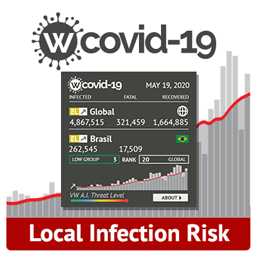
這個外掛可以顯示最新的確診或死亡數據,並且可以透過網頁內嵌碼或小工具在網站上展示。此外,外掛還會在網站上方工具欄添加一個鏈接,以便快速查看更多相關資訊。該外掛還提供一個可以加入到頁尾或菜單中的小工具。
您可以在我們的博客中查看更多示例和完整的說明文件,其中包含了完整文檔和示例。
即時數據短碼
您可以在文章中使用短碼,總是引用最新的確診數字。
使用短碼 [covid-watch] 在您的文章中顯示最新確診數字。
您可以傳遞國家和狀態,例如 [covid-watch country="France" status="confirmed"] 或 [covid-watch country="US" status="deaths"],以僅顯示該國家的結果。
列出所有國家
要在表格中列出所有國家及其相關的新冠病毒 COVID-19 數據,請嘗試使用 [covid-watch country="All"],這將返回按字母順序排序的所有當前病例的表格。
傳遞 sort 屬性按已確認案例或死亡排序,例如:[covid-watch country="All" sort="confirmed"]。
傳遞 limit 屬性限制結果數量,例如:[covid-watch country="All" sort="confirmed" limit="3"]。 limit 屬性只適用於具有 country="All" 屬性的結果。
即時地圖短碼
這個短碼將顯示所有病例的地圖。
在您的文章和頁面中使用短碼 [covid-live-map] 顯示地圖。您可以傳遞 sort 參數以更改國家的顏色。 按 人口、已確認(預設)、死亡 或 致死率 進行著色。
完整示例可能如下:[covid-live-map sort="confirmed" height="250px"]。
歷史數據短碼
您也可以使用歷史短碼 [covid-history] 顯示歷史數據表格。
與即時數據短碼中一樣,您可以傳遞屬性到歷史短碼中,例如:[covid-history country="France" status="confirmed" limit="3"]。
疫苗數據短碼
您可以在文章中使用短碼,總是引用最新的接種疫苗數據。
使用短碼[covid-vaccines] 在您的文章中顯示目前接種疫苗數量。
您可以傳遞國家和狀態,例如[covid-vaccines country="France" status="people_vaccinated"] 或[covid-vaccines country="US" status="people_partially_vaccinated"],以僅顯示該國家的結果。
您還可以創建所有國家數據的表格,就像處理病例一樣。參見“列出所有國家”,將 covid-watch 替換為covid-vaccines。
關於康復數據
一些類似的外掛可能會提供“康復”數據。 我們得知許多國家不再報告康復數據,因為醫療團隊沒有時間跟進每個患者。因此,約翰霍普金斯大學和其他資料來源停止報告康復病例,我們也同樣建議您不要顯示康復病例數據。
外掛標籤
開發者團隊
原文外掛簡介
Free live data shown on your dashboard and via shortcode or widget. Show up to date confirmed cases or deaths in your country or globally. The plugin will also add a helpful link in the top toolbar to quickly get more info. There’s also a widget that you can add to your footers or menus.
Check out examples and more on our blog containing the full documentation and examples.
Live data shortcode
The shortcode you can use in your posts will always reference the most up to date number of confirmed cases.
Use the shortcode [covid-watch] in your code to show the current number of confirmed cases.
You can pass a country and status, like [covid-watch country="France" status="confirmed"] or [covid-watch country="US" status="deaths"] to get results only from that country.
Listing all countries
To get a table of all countries and their respective current Coronavirus COVID-19 data, try [covid-watch country="All"], which will return a table of all current cases sorted alphabetically.
Pass the sort attribute to sort by confirmed cases or deaths, like so: [covid-watch country="All" sort="confirmed"].
Pass the limit attribute to limit the amount of results, like so: [covid-watch country="All" sort="confirmed" limit="3"]. The limit attribute only works in conjunction with the country="All" attribute.
Live map shortcode
This shortcode will display a map of all cases.
Use the shortcode [covid-live-map] in your posts and pages to show the map. You can pass the sort parameter to change how countries are coloured. Colour by population, confirmed (default), deaths, or mortality.
A full example might look like [covid-live-map sort="confirmed" height="250px"].
Historical data shortcode
You can also use the historical shortcode, [covid-history] to show a table of historical data.
Just like in the live data shortcode, you can pass attributes to the history shortcode, like so [covid-history country="France" status="confirmed" limit="3"].
Vaccine data shortcode
The shortcode you can use in your posts will always reference the most up to date number of vaccinations.
Use the shortcode [covid-vaccines] in your code to show the current number of administered vaccines.
You can pass a country and status, like [covid-vaccines country="France" status="people_vaccinated"] or [covid-vaccines country="US" status="people_partially_vaccinated"] to get results only from that country.
You an also create a table of all country data, as you can with cases. See “Listing all countries” and replace covid-watch with covid-vaccines.
About recovered data
Some similar plugins may provide “recovered” data. We’ve been informed that a lot of countries are no longer reporting on recovered data because medical teams don’t have the time to follow up with each patient. Because of this, Johns Hopkins and other data sources have stopped reporting recovered cases, and so have we. We recommend you don’t show recovered cases as no accurate data is available.
Features
100% free
Up to date information from Johns Hopkins University
Incredibly fast – no performance impact on your site
Shortcodes to have self-updating case numbers in your posts
Admin dashboard box showing live confirmed cases
Widget for confirmed cases that you can add to your footers or menus
Privacy policy
This plugin uses data from Johns Hopkins University and ARCGIS, provided via API thanks to M Media (mmediagroup.fr). Here’s a link to M Media, the API provider. Access the API directly here M Media. The M Media API privacy policy is here, the terms of use here and the JHU Data Usage policy is here.