
內容簡介
一般連結:
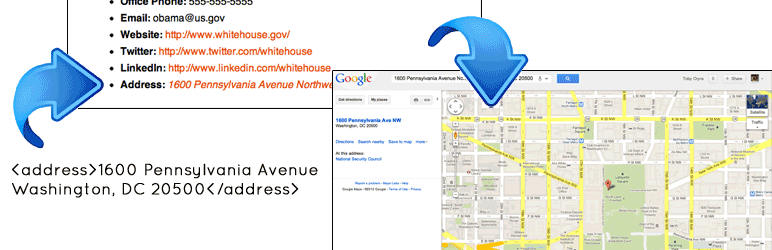
此簡單外掛將 <address></address> 標籤中的地址轉換為連結,點擊後會在新視窗中開啟 Google 地圖。同時,它也會將任何帶有 "address" 類別的地址轉換為 Google 地圖連結,並會在新視窗中開啟。
注意:為了讓此外掛正常運作,地址必須放在 <address></address> HTML 標籤中,或是帶有 "address" 類別的 HTML 元素內。例如,你需要在你的程式碼中加入以下內容:<address>3 Abbey Rd, London NW8 9AY, United Kingdom</address> 或 <span class="address">3 Abbey Rd, London NW8 9AY, United Kingdom</span> 或 <div class="address">3 Abbey Rd, London NW8 9AY, United Kingdom</div>
IFRAME 連結:
如果你想要在一個 iframe 中顯示 Google 地圖,只需要在你的標記中加入 "address-iframe" 類別即可。例如,<div class="address-iframe">3 Abbey Rd, London NW8 9AY, United Kingdom</div>(感謝Mike Jasper提供此建議和程式碼!)
註:此外掛適用於提供地址的自定欄位主題,但對於沒有自定欄位的主題可能不太有用,因為你需要進入文字檢視模式以添加適當的 HTML 標記。謝謝!
最後,非常感謝 Mike Jasper 撰寫 JavaScript 來驅動這個外掛程式。我只是將他的程式碼重新包裝了一下。
外掛標籤
開發者團隊
② 後台搜尋「Convert Address to Google Maps Link」→ 直接安裝(推薦)
原文外掛簡介
NORMAL LINKS:
This simple plugin converts addresses in “
” tags into links that open a Google Map in a new window. It also converts any address in a “.address” class into a Google Map link that opens in a new window.
NOTE: You need to put the address inside the
html tag or within an html element with the .address class for this plugin to work. For example, you would need to write the following into your code:
3 Abbey Rd, London NW8 9AY, United KingdomOR 3 Abbey Rd, London NW8 9AY, United Kingdom OR
IFRAME LINKS:
If you want to display the Google Map in an iframe, just use the .address-iframe class in your markup. For example,
(Thanks to Mike Jasper for this idea and code!)
FYI: This plugin is great for themes with custom fields that supply the address, but is probably not too useful for themes that don’t, because you’ll need to enter the text view to add the appropriate html markup. Thanks!
Finally, many many thanks to Mike Jasper , who wrote the javascript that powers this plugin. I merely repackaged his code.












