內容簡介
重要提示:除非您使用經典小工具外掛 (https://wordpress.org/plugins/classic-widgets/),否則此外掛在 WordPress 5.8 的小工具介面重新設計後將無法運作。使用經典小工具的用戶可以繼續得到支援和維護,但是沒有計劃讓條件小工具在小工具改為區塊後運作。
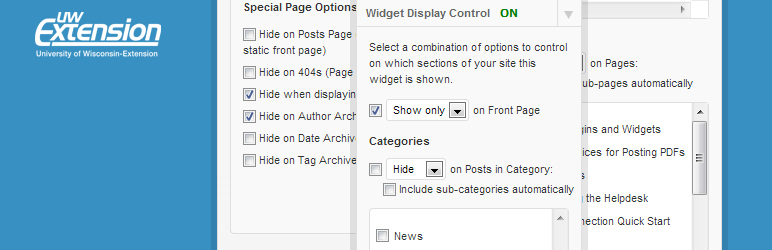
此外掛會在小工具面板上為每個小工具添加一個表單,讓使用者選擇該小工具要在哪些頁面和/或分類上顯示或隱藏。
對於每個小工具,您都可以選擇條件,在基於多個分類下選擇要顯示或隱藏該小工具。介面非常直觀,不需要了解 PHP 或條件標籤。
外掛標籤
開發者團隊
原文外掛簡介
IMPORTANT: This plugin will NOT function after the Widgets screen overhaul that is part of WordPress 5.8 unless you use the Classic Widgets plugin (https://wordpress.org/plugins/classic-widgets/). The plugin will continue to be supported/maintained for those using Classic Widgets, but there are no plans to make Conditional Widgets work once Widgets are Blocks.
This plugin adds a form to each widget on the Widgets panel which allows users to choose which pages and/or categories the widget is either displayed on or hidden from.
For each widget, you can choose criteria to either SHOW or HIDE the widget, based on a number of categories. The interface is quite intuitive, and requires no knowledge of php or conditional tags.