內容簡介
<html>
<ul>
<li><strong>總結:</strong> Collexpander WordPress 外掛可讓您透過切換按鈕動態隱藏或顯示選定的文字內容。</li>
</ul>
<ul>
<li><strong>問題:</strong> 使用 Collexpander WordPress 外掛的情境是什麼?</li>
<li><strong>答案:</strong> 當您想要展示長篇描述、常見問題、技術文件或產品的其他詳細資訊時,而又不想把讀者壓倒。</li>
</ul>
<ul>
<li><strong>問題:</strong> 如何在文章或頁面中使用這個外掛?</li>
<li><strong>答案:</strong> 您只需在文章或頁面中插入 shortcode 配對即可:</li>
<li>[collexpander-show-content]</li>
<li>[collexpander-hide-content]</li>
</ul>
<ul>
<li><strong>問題:</strong> 兩個 shortcode 配對之間的內容起初是如何呈現的?</li>
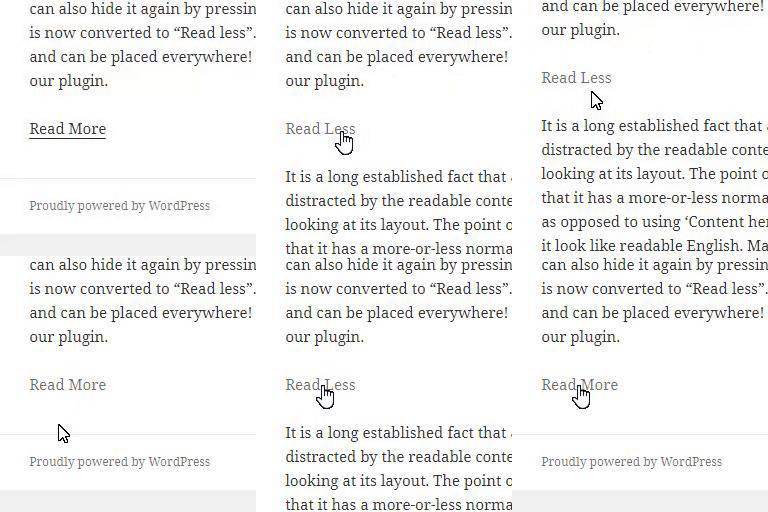
<li><strong>答案:</strong> 這兩個 shortcode 之間的所有內容起初是隱藏的,訪客點擊切換按鍵時可以展開或折疊。</li>
</ul>
<ul>
<li><strong>問題:</strong> 這個外掛包括哪些可自訂的按鈕樣式和按鈕文字選項?</li>
<li><strong>答案:</strong> 外掛包括三種可自訂的按鈕樣式(預設、輪廓和極簡)和兩種按鈕文字選項(例如“顯示” / “隱藏” 或 “更多” / “更少”)。</li>
</ul>
<ul>
<li><strong>問題:</strong> 使用者如何輕鬆調整按鈕標籤和顏色?</li>
<li><strong>答案:</strong> 使用者可以輕鬆地調整按鈕標籤和顏色。</li>
</ul>
<ul>
<li><strong>問題:</strong> 這個外掛如何有助於提升內容的可讀性和提供乾淨、用戶友好的體驗?</li>
<li><strong>答案:</strong> 這個外掛有助於改善內容的可讀性,提供簡潔、用戶友好的體驗,特別適合於博客、產品頁面、常見問題解答和教育內容等地方,內容組織和清晰度至關重要。</li>
</ul>
</html>
外掛標籤
開發者團隊
原文外掛簡介
The Collexpander WordPress plugin allows you to hide or show selected text content dynamically with a toggle button.
It’s useful when you want to display long descriptions, FAQs, technical documentation, or additional product details without overwhelming the reader.
Simply insert the shortcode pair in your post or page:
[collexpander-show-content]
[collexpander-hide-content]
Everything placed between the two shortcodes will be initially hidden, and can be expanded or collapsed when the visitor clicks the toggle button.
The plugin includes three customizable button styles (default, outline, and minimal) and two button text options (e.g., “Show” / “Hide” or “More” / “Less”).
You can also easily adjust button labels, colors.
This plugin helps improve content readability and provides a clean, user-friendly experience — ideal for blogs, product pages, FAQs, and educational content where text organization and clarity matter.