內容簡介
自動指派 WordPress 角色給使用者,依據 IDP 群組成員身份限制 WordPress 存取權限。
多個 WordPress 環境支援,可管理多個 WordPress 環境(Prod、Dev、Staging、Test),遷移測試、暫存環境保留 SSO 設定與屬性映射。
WordPress 單一登出,登出 WordPress 網站並將使用者從 IDP 登出並終止當前登入會話。
SAML 头像設定同步,若您使用 Office 365,您可選擇將 AzureAD/Office365 头像與 WordPress 使用者頭像同步。
從元數據自動同步 IdP 配置,只需上傳您的 IDP 元數據 XML 檔案,便可更輕鬆地與 WordPress 同步 SAML 元數據。
小工具和合短碼添加 SAML IDP 登入鏈接,使用我們的 WordPress 小工具登入初始程序自定讀您的登入頁面,並使用合短碼在 WordPress 任何地方放置登入鏈接。
多個 SAML IDP 支援,添加多個 SAML 身份提供商,允許使用者從任何 IDP 登入。
多站點網絡 SSO 支援,啟用多站點 SSO,並使用 1 個外掛管理網絡站點登入,更輕鬆地管理多站點網絡的單一登入。
免費版功能
在 1 個 SAML 身份提供者中,無限制執行身份驗證登入
基本屬性映射,限定 (電子郵件、名、姓、顯示名稱)
小工具和合短碼添加 SAML IDP 登入鏈接
保護 WordPress,自動重定向到 IDP
高級版功能 10 日免費試用
所有免費版功能
進階屬性映射,任何 SAML 使用者屬性都可以映射到 WordPress 使用者身上,例如 (職稱、部門、電話、城市、員工 ID,等等)
WordPress 角色映射,使用 IDP 群組設定將 WordPress 角色自動指派給使用者
多個 WordPress 環境支援,可管理多個 WordPress 環境(Prod、Dev、Staging、Test),遷移測試、暫存環境保留 SSO 設定與屬性映射。
WordPress 單一登出,登出 WordPress 網站並將使用者從 IDP 登出並終止當前登入會話。
SAML 头像設定同步,若您使用 Office 365,您可選擇將 AzureAD/Office365 头像與 WordPress 使用者頭像同步。
從元數據自動同步 IdP 配置,只需上傳您的 IDP 元數據 XML 檔案,便可更輕鬆地與 WordPress 同步 SAML 元數據。
小工具和合短碼添加 SAML IDP 登入鏈接,使用我們的 WordPress 小工具登入初始程序自定讀您的登入頁面,並使用合短碼在 WordPress 任何地方放置登入鏈接。
多個 SAML IDP 支援,添加多個 SAML 身份提供商,允許使用者從任何 IDP 登入。
多站點網絡 SSO 支援,啟用多站點 SSO,並使用 1 個外掛管理網絡站點登入,更輕鬆地管理多站點網絡的單一登入。
外掛標籤
開發者團隊
② 後台搜尋「Cloud SAML SSO – Single Sign On Login」→ 直接安裝(推薦)
原文外掛簡介
WP Cloud SSO – SAML Single Sign On (WordPress Login Security)
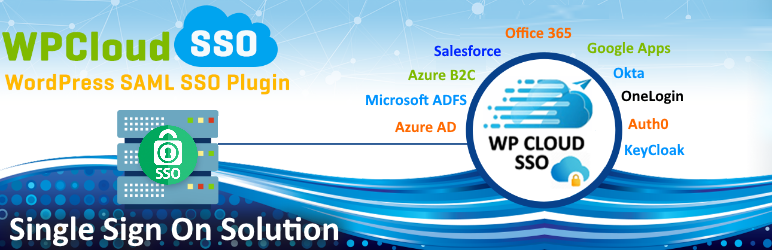
WordPress Single Sign On by Cloud Infrastructure Services Ltd. Our WordPress SSO plugin offers WordPress SAML SSO Single Sign On for your WordPress logins. Login to WordPress (WP) using Azure AD, Azure B2C, Okta, ADFS, Keycloak, OneLogin, Salesforce, Google Apps (G Suite), Shibboleth, Auth0 and other IdPs (Identity Providers). It acts as SAML SP (Service Provider) which can be configured to establish a trust between our WordPress SSO plugin and your IDP to securely authenticate and enable SSO / Login for your users into the WordPress (WP) site.
The following video explains the features of WP Cloud SSO plugin.
WP Cloud SSO – WordPress SSO Features
Unlimited SSO Authentications With your SAML IdP. Auto redirect your user logins to WordPress, authenticating against your IDP for SSO authentication. Automate the user experience with auto redirect, no need for username / password for a Single Sign On experience using your IDP to authorise the logins.
SAML Attribute Mapping Map user attributes from your identity provider to your WordPress user profiles. For example (Name, Username, Email, Job Title, Department, Telephone, City, Profile Picture, & more)
Protect WordPress, Auto-Redirect to IDP Protect your WordPress site (Auto-Redirect to IdP). Only authorised users can login to WordPress. Restrict WordPress to only logged in users by redirecting the users to your IdP if logged in session is not found
WordPress Role Mapping Automatically assign WordPress roles to users based on SAML IDP group membership. Restrict access to WordPress based on IDP Groups. Making WordPress secure and controlling WordPress user permissions.
Multiple WordPress Environments Support Manage multiple WordPress environments (Prod, Dev, Staging, Test). Migrate between test/staging environments keeping your SSO config and attribute mappings inplace. Supports platforms like (WP Engine, Pantheon, Sub domains & more).
WordPress Single Signout Logs the user out of your Identity Provider on logout from WordPress site acting as Service Provider (SP) and terminates current login session on both ends.
SAML Avatar Profile Pic Sync If you’re using Office 365, you have the option to sync your AzureAD / Office365 profile pics to your WordPress users avatar
Auto-sync IdP Configuration from metadata Easily upload your IDP metadata XML file, making it easier to sync your SAML metadata to WordPress
Widget, Shortcode to add SAML IDP Login Link Customise your login page with our WordPress widget login customiser. Use shortcode to place login links anywhere on WordPress
Multiple SAML IDP Support Add as many SAML Identiry providers to allow your users to login from any IDP
Free Version Features
Unlimited Authentications With 1 SAML Identity provider
Basic Attribute Mapping Basic Attribute Mapping (Email, First Name, Last Name, Display Name)
Widget, Shortcode to add SAML IDP Login Link
Protect WordPress, Auto-Redirect to IDP
Premium Version Features 10 Day Free Trial
All features from Free Version
Advanced Attribute Mapping Map any SAML user attributes to your WordPress users, for example (Job Title, Department, Telephone, City, Employee ID, etc etc)
WordPress Role Mapping Use IDP groups to map WordPress roles based on group membership (Default, Administrator, Editor, Author, Contributor, Subscriber). Allowing you to secure access to WordPress logins.
SAML Single Logout Allows the user to logout of your IDP when logging out of WordPress and terminates current login session on both ends.
Auto-sync IdP Configuration from metadata Sync IDP metadata to WordPress automatically.
Dedicated WordPress Support Team Access to our WordPress support team if you have any questions or assistance setting up WP Cloud SSO.
Enterprise Version Features 10 Day Free Trial
All features from Free Version & Premium
Multiple Environments Support / Migration (Dev, Staging, Prod) Add Multiple Environments SSO support (Staging, Dev, Test). Merge SSO Settings / Copy between evironments. Also works with (WP Engine, Pantheonsite, Kinsta, sub domains & Other WordPress Managed Platforms)
Multiple SAML IDP Support (Add unlimited SAML IDPs) Add as many IDPs as needed, no restrictions. Add unlimited amount of SAML identity providers.
Sync SAML User Pics to WordPress Avatar Sync supported SAML provider user pictures to WordPress user avatars. For example Office 365 user profile pictures.
List of Supported SAML Identity Providers
WP Cloud SSO supports the following SAML Single Sign On Providers. Full setup instructions to enable SSO for your WordPress Logins.
WordPress Azure AD SSO (Setup Azure AD SAML SSO for your WordPress Azure AD Logins)
WordPress Office 365 Login (Setup Office 365 SAML SSO for your WordPress Office 365 Logins)
WordPress ADFS SSO (Setup Microsoft ADFS SAML SSO for your WordPress ADFS Logins)
WordPress Azure B2C SSO (Setup Azure B2C SAML SSO for your WordPress Azure B2C Logins)
WordPress Salesforce SSO (Setup Salesforce SAML SSO for your WordPress Salesforce Logins)
WordPress Google Apps / GSuite SSO (Setup Google Apps / GSuite SAML SSO for your WordPress Google Logins)
WordPress OneLogin SSO (Setup OneLogin SAML SSO for your WordPress OneLogin Logins)
WordPress Okta SSO (Setup Okta SAML SSO for your WordPress Okta Logins)
WordPress KeyCloak SSO (Setup KeyCloak SAML SSO for your WordPress KeyCloak Logins)
WordPress Auth0 SSO (Setup Auth0 SAML SSO for your WordPress Auth0 Logins)
Check our website for more details on WordPress Single Sign On using WP Cloud SSO plugn and setup documentation.