
內容簡介
```html
<ul>
<li><strong>概述:</strong> Classy from GoFundMe 是一個提供非營利捐款表單的 WordPress 外掛,讓從任何網站捐款變得輕鬆且個人化,並能代表您獨特的品牌。</li>
</ul>
<h3>問題與解答:</h3>
<ul>
<li><strong>問題:</strong> Classy from GoFundMe 如何幫助組織最大限度地提高網站收益?</li>
<li><strong>答案:</strong> 通過智能要求金額來個性化請求,證實在測試中平均增加捐款量 11%;鼓勵您想要的捐助方式,包括定期捐贈和費用覆蓋提示;提供偏好支付選項,如 Venmo、PayPal、Apple/Google Pay、信用卡和ACH;讓捐贈者選擇他們的捐贈支持的項目和向誰致敬。</li>
<li><strong>問題:</strong> 如何快速獲得更多捐助者通過結帳流程?</li>
<li><strong>答案:</strong> 提升使用者體驗,讓他們在不離開您的網站的情況下進行捐款;利用簡化且引導式的結帳流程,測試並建立以降低退出率和轉換為目標;讓訪問者輕鬆從其手機捐款,包括一鍵付款;如果需要,可在結帳後詢問自定義問題,以避免影響轉換。</li>
<li><strong>問題:</strong> 如何打造一個感覺像「您」的捐款表單?</li>
<li><strong>答案:</strong> 透過可自定義的選項,從顏色到標誌,讓品牌您的非營利捐款表單與您的網站外觀和感覺相匹配;在您的網站的任何地方邀請捐款,具有品牌、內聯入口點的捐款方式;透過個性化的文本和圖像,在結帳過程中建立連接;通過定期捐贈和費用覆蓋的動畫提示來提升結帳價值。</li>
<li><strong>問題:</strong> 如何通過較少的後端工作提高網站性能?</li>
<li><strong>答案:</strong> 通過輕量級的捐款表單提高頁面加載速度,從而增加網站流量。</li>
</ul>
```
這樣使用 HTML 編寫的樣式將有助於在網頁上展示用於解釋 Classy from GoFundMe 外掛的問題和解答。
外掛標籤
開發者團隊
② 後台搜尋「GoFundMe Pro | Nonprofit Donation Forms」→ 直接安裝(推薦)
原文外掛簡介
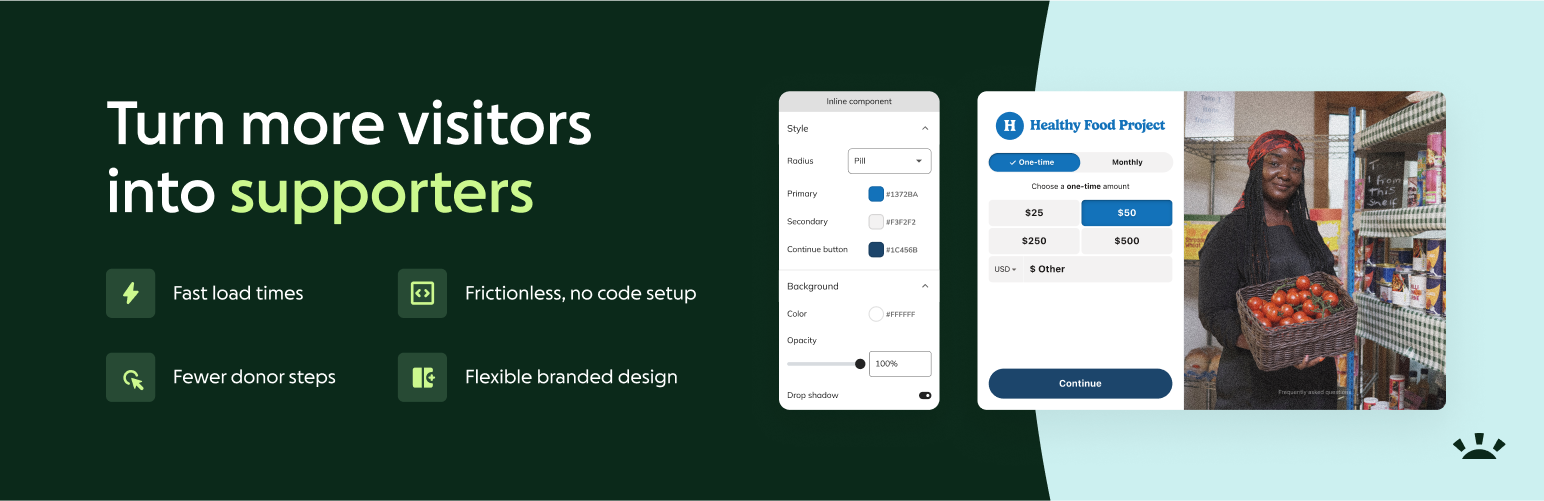
Supporting your organization should be simple and meaningful. GoFundMe Pro’s embedded donation forms empower donors to give from anywhere on any website. With a faster, more personalized experience, you’ll turn more visitors into dedicated supporters.
Features
Maximize website revenue
Personalize asks and boost revenue with Intelligent Ask Amounts, proven to increase donation revenue by 4.5% on average in giving season
Encourage the giving you want with customizable recurring gift and fee coverage nudges
Reach more supporters with preferred payment options, like Venmo, PayPal, Apple/Google Pay, credit card, and ACH
Let donors choose what their gift supports and who it honors with program designations and tributes
Get more donors through checkout, faster
Improve users’ experience by inviting them to make a donation without leaving your site
Leverage a simplified, guided checkout flow tested and built to reduce drop-off and convert
Make it easy for visitors to donate from their phones with mobile-optimized checkout, including one-click payment
Ask custom questions post-checkout, if desired, to avoid compromising conversion
Create a donation form that feels like “you”
Brand your nonprofit donation form with customizable options, from colors to logos, to match your website’s look and feel
Invite donations anywhere on your site with branded, inline entry points
Build connection through checkout with personalized text and images
Boost checkout value with animated nudges for recurring donations and fee coverage
Boost website performance with less back-end work
Increase website traffic with lightweight donation forms that boost page load speed and improve search rankings
Cut the sweat and expense of site updates with simple, no-code designs
Embed a single GoFundMe Pro-provided code snippet on your website to support an array of campaigns across your site
Track and understand how donors interact with your campaigns with GA4 and GTM
Why choose GoFundMe Pro’s nonprofit donation forms?
Only GoFundMe Pro gives you both the tested performance and design controls you need to maximize website contributions. Others restrict branding in the name of “optimization,” which means every form starts to look the same. We start with high-converting donation forms and let you break the one-size-fits-all mold with donor flows that deliver more because they’re personal.
What our customers say
“It’s been an incredibly seamless and intuitive tool for our campaigns. The platform makes it easy to customize our donation pages, creating a smooth and engaging experience for our supporters… the pages load faster, flow effortlessly, and have a sleek, polished look. The user-friendly design and flexibility have truly been game-changers for us!” -Pencils of Promise
“In the first month, we’ve already seen success with our new recurring donor nudge feature! Many simple feature changes like that are having a huge impact on our donors, helping us convert our website leads and prospects into donors.” -Birch Family Services
“The customization options allow us to personalize the pop-up to match our brand visuals, creating a cohesive experience that builds trust with our supporters.” -The Storehouse Community Center
“The Embedded Studio donation form has greatly improved the donation experience for our supporters, who have praised its modern look and ease of use. The pop-up box allows supporters to give without needing to navigate away… from the page they were viewing. Features such as the intelligent ask amounts have helped us increase our average donation size, meaning more funds can be directed towards our mission.” -Foundation for Women’s Cancer
FAQs
What are embedded donation forms?
Embedded donation forms offer a streamlined, guided donation experience that’s integrated directly into a nonprofit’s website. Donors can make a donation in as little as four steps, which has increased conversion and driven 28% more revenue per site visitor.
What are the benefits of an embedded donation form?
Using an embedded form allows nonprofit organizations to maintain control over their branding, offer donors a simplified, guided checkout without ever having to leave the page, and drive more conversions on their most trafficked digital asset—their website.
Where can I see an embedded donation form in action?
Learn how your nonprofit can optimize any page on your website for conversion with frictionless, intelligent donation forms designed to maximize giving potential.
Is the plugin free?
Yes, it’s completely free
What are the Privacy Policy and Terms of Service of the plugin and its integrations?
Please see Terms of Service and Privacy Notice
Integrations
GoFundMe Pro Donation Forms – This plugin integrates with GoFundMe Pro Donation Form.
Apple Pay Verification – Adds Stripe’s domain association file for Apple Pay verification to your WordPress site and makes Apple Pay available in the GoFundMe Pro Donation Forms of this plugin
Privacy
When using Intelligent Ask Amounts (IAA) on embedded forms, GoFundMe Pro assigns IDs to identify new and returning donors. IAA then uses these IDs to create personalized donation suggestions to help nonprofits raise more. Nonprofits have the ability to enable or disable the IAA feature, so it will not automatically be enabled with the plugin installation.
New visitors are given an ID [classy-session-id], placed on the same page as the embedded as a cookie, and IAA generates suggested amounts using session and demographic data that is associated with this ID. Returning donors are recognized based on their past donations, letting IAA personalize donation suggestions.
For all donations, prior to checkout donors are presented with the legalese “By donating, you agree to our Privacy Policy and GoFundMe Pro’s Terms and Privacy Notice. GoFundMe facilitates your donations.”
About GoFundMe Pro
GoFundMe Pro is the next evolution in nonprofit fundraising – combining powerful, flexible software with the scale and intelligence of the world’s largest fundraising platform. Designed to help organizations fundraise in any way they want, wherever they want, GoFundMe Pro unlocks new opportunities to inspire giving, reach broader audiences, and drive greater impact. Backed by $40 billion in giving since 2010, GoFundMe Pro is helping drive innovation in the sector with intelligent, AI-powered tools built from unmatched data and insights. Learn more at pro.gofundme.com.














