
內容簡介
CiteKit 是一款專為 WordPress 設計的參考管理外掛,能夠輕鬆添加和維護來源資料,並自動生成引用、註腳和書目,適合學術、醫療、法律等多種內容創作需求。
【主要功能】
• 參考資料庫:集中管理所有來源資料
• 手動輸入與查找:支持多種來源格式
• 引用導入與導出:兼容 BibTeX、RIS 等格式
• 工具提示與詞彙表:定義和連結術語
• 支持多種來源類型:包括網頁、書籍、影片等
外掛標籤
開發者團隊
② 後台搜尋「CiteKit Reference Manager with Footnotes, Citations, Bibliographies, Tooltips and Glossary」→ 直接安裝(推薦)
原文外掛簡介
Documentation | Live Demo | Shortcodes & Blocks Reference | Changelog | Support
Add and maintain sources in WordPress from DOI, ISBN, PubMed, YouTube and more, then publish citations, footnotes and bibliographies from your reference library. Add tooltips and glossaries to define and connect terminology across your content.
CiteKit keeps the source information behind your published content in WordPress, so references can be checked, corrected and used to generate citations, bibliographies and citation metadata throughout the site.
🎯 Built for content that cites its sources:
Research and academic blogs
Health, medical, and nutrition sites citing studies and clinical guidelines
Legal, policy, and government-focused publishers
Finance and business analysis
Product reviews and comparison sites
Independent publishers and journalists
AI-assisted content teams that need real, verifiable sources
Agencies managing citations across many client sites
📚 It includes:
Reference Library — keep source records in one library across your WordPress site. Search and filter references, see which posts use them, and reuse the same source without copying its metadata into every article.
Source lookup and manual entry — create references manually or look up sources using URLs and YouTube links, DOIs, ISBNs, PubMed IDs, or title search. Retrieved metadata can be reviewed and edited before the reference is saved.
Source types for online publishing — web pages, journal articles, books and chapters, reports, news, theses, datasets and standards, plus videos, social posts, wiki articles and code repositories, films, TV episodes, podcast episodes, music recordings and audiobooks. Each records what identifies the exact version cited, from a DOI to a wiki revision id to a commit, or a series, season and episode.
Reference import and export — import existing references from BibTeX, RIS, or CSL-JSON and export CiteKit references back into those formats for use in other reference-management and publishing systems.
Multiple citation styles — publish references using APA, MLA, Chicago Author-Date, Chicago Notes-Bibliography, Harvard, IEEE, Vancouver, AMA, Nature, or Web-Native. Choose one style for the whole site, and set the bibliography heading site-wide or per post.
Reference reuse — cite the same source from multiple posts while maintaining one underlying source record instead of duplicating its metadata throughout the site.
Structured creators — record each author or editor as a person or an organization, so institutional names are published whole and personal names are inverted or initialised as the citation style requires. Films, broadcasts, podcasts, recordings and audiobooks also record directors, writers, producers, performers, hosts, composers and narrators.
Post-level citation editor — review and edit the references used in the current post from one place.
Citation Link Checker — check the URLs attached to references and mark them as Live, Broken, or Unchecked so publishers can identify inaccessible or deteriorating sources.
Portable references and citations — content created outside WordPress can carry structured source data with it, allowing CiteKit to reconstruct and reuse the corresponding Reference Library records when the content is published.
✍️ CiteKit Reference Manager for WordPress also includes additional publishing features:
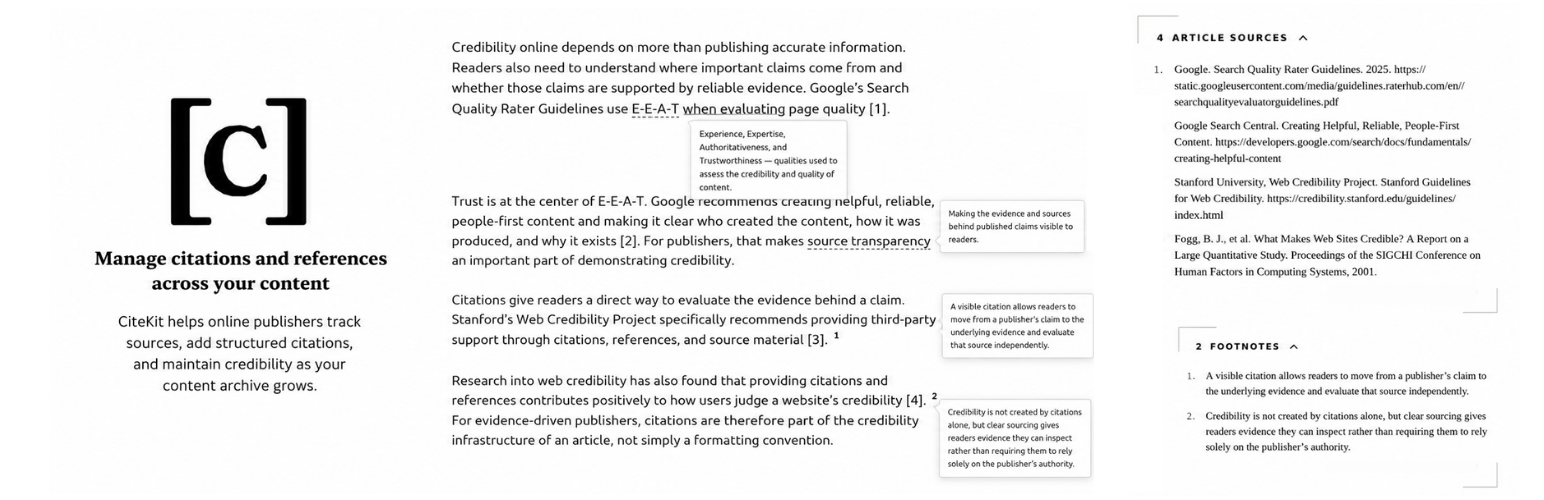
Citations — insert inline citations connected to structured references throughout WordPress content.
Bibliographies — generate formatted, backlinked bibliographies from the references cited in a post, with configurable headings and citation styles.
Footnotes — add numbered footnotes with hover previews and publish a complete numbered footnote list.
Tooltips — add inline definitions, explanations, and asides using dashed or dotted terms or superscript symbols, with the explanatory content displayed on hover.
Glossary — maintain a separate structured terminology library containing terms, definitions, aliases, concepts, related terms, examples, and URLs; import and export glossary data; promote tooltip definitions into reusable glossary terms; and publish a glossary or an index of it. Glossary terms are published with schema.org DefinedTermSet data.
Glossary term pages — give every term its own URL under the glossary page, with a definition, aliases, related terms, examples and source links. Renamed terms redirect from their old URL, and removed terms return a proper 404.
Glossary SEO — per-term titles, meta descriptions, canonical URLs, Open Graph tags and schema.org DefinedTerm data, with sitemap entries for every term. Works with WordPress core sitemaps, Yoast SEO and Rank Math.
Glossary auto-linking — optional: switch it on and the first mention of a term in your content links to its glossary entry, skipping headings, existing links and code. Links are added as the page renders, so switching it off puts everything back.
Glossary search and A–Z — filter a long glossary as you type and jump to a letter, without leaving the page.
⭐ CiteKit Premium
Custom Citation Style Builder — build your own in-text and bibliography formats (author order, punctuation, italics, separators) with a live preview, applied site-wide, per post type, or per post.
Multi-style switching — give any post its own citation style instead of one style for the whole site.
Global reference editing — edit a reference in your Reference Library and the change propagates to every post that cites it.
In-post reference search — search your Reference Library and insert a predefined reference right from the post editor.
Custom post type support — use CiteKit on all posts, pages, and custom post types, and apply a custom-built citation style per post.
Citation metadata — output schema.org / JSON-LD data for every cited source so search engines and other tools can read and understand the citation metadata.
Rich footnotes & tooltips — a native rich footnote and tooltip editor: add formatting, links, lists, images, alt text, and captions directly in WordPress, without writing custom markup.
Glossary sync from Google Sheets — keep the glossary in a sheet and let the site follow it on a schedule. Every sync is all or nothing: a broken row never takes the live glossary down, and you get the line number that caused it.
Multiple glossaries — run more than one glossary, each with its own page, URLs, sync source and structured data — a glossary per brand, per section, or per language.
Glossary term control — formatted definitions and images on term pages, a per-term SEO title and description, auto-linking rules per post type, and a report of which posts use which terms.
🧱 CiteKit Blocks & Formats
Three blocks in the CiteKit category of the block inserter:
Bibliography by CiteKit — the formatted, backlinked bibliography for the current post.
Footnotes by CiteKit — the numbered footnote list collected from earlier in the post, with hover previews and integration with the rest of the plugin.
Glossary by CiteKit — publish the site’s glossary as a full term list or index.
Three inline formats on the block toolbar — Citation, Tooltip, and Footnote.
⚙️ Try These Free Tools from CiteKit
Use CiteKit’s free browser tools to find source information, generate citations and bibliographies, check citation links, create citation schema, and inspect reference data before publishing.
Bibliography Generator
Citation Generator
Citation Link Checker
Citation Schema Generator
LLM Reference Auditor
🔌 External Services
CiteKit Reference Manager can look up source details for you instead of making you type them. Each lookup is something you start, in the admin, by pasting a URL, DOI, ISBN or PubMed ID, or by searching. Nothing is sent automatically, nothing is sent from the front end of your site, and no personal data or site data is transmitted — only the identifier you entered.
Crossref — when you add a source by DOI or by a link that contains one, search by title, or add a web page that states its DOI but not its authors, date or type of work, the DOI or your search text is sent to api.crossref.org to retrieve the work’s title, authors, journal and publication date.
Privacy policy
Open Library (Internet Archive) — when you add a source by ISBN, the ISBN is sent to openlibrary.org to retrieve the book’s title, authors and publisher.
API documentation · Terms of use
Google Books — when an ISBN is not found at Open Library, the ISBN is sent to www.googleapis.com/books as a fallback for the same details.
Terms of service · Privacy policy
NCBI E-utilities (PubMed) — when you add a source by PubMed ID or by a pubmed.ncbi.nlm.nih.gov link, the PMID is sent to eutils.ncbi.nlm.nih.gov to retrieve the article’s title, authors and journal.
Website and data usage policies
YouTube — when you add a source whose URL is a YouTube video, that URL is sent to YouTube’s oEmbed endpoint at www.youtube.com to retrieve the video title and channel.
Terms of service · Privacy policy
Web pages you add or check — when you add a source by URL, your site requests that page directly to read its citation metadata. The link checker does the same for sources already in your library, to report which links no longer resolve. These requests go to whatever address you saved. A doi.org or PubMed link is looked up at Crossref or PubMed as described above; for any other address no third party is involved.
Freemius — the plugin’s licensing and update service. It is contacted for licence checks, updates and, if you choose to buy, checkout. It also handles the optional opt-in; if you skip the opt-in, no account data is shared.
Terms of service · Privacy policy
❓ Frequently Asked Questions
Can I reuse the same reference across multiple posts?
Yes. The same reference can be reused across multiple posts without duplicating the underlying source metadata.
What is the difference between a tooltip and a glossary term?
A tooltip is the contextual presentation of a definition in one article. A glossary term is a reusable structured terminology record for the whole site. Tooltip definitions can be promoted into reusable glossary terms.
What is the difference between a tooltip and a footnote?
Tooltips are inline definitions or explanations that appear on hover only. Footnotes are numbered notes that appear both on hover and in a full list at the end of the post. Citations, by contrast, connect claims or passages to external sources represented by CiteKit references. The Getting Started page inside your CiteKit admin includes a “What’s the difference?” section that explains each feature side-by-side with examples.
How are footnotes numbered?
Footnotes are auto-numbered in order of appearance within each post, starting from 1. Numbering is per-post — each post has its own footnote sequence. Footnotes are distinct from citations: citations use bracketed baseline markers like [1], footnotes use superscript numbers like ¹.
What’s the difference between the Footnotes by CiteKit block and WordPress’s built-in Footnotes block?
WordPress includes native footnotes for straightforward numbered notes. CiteKit footnotes add hover previews, custom heading control, and integration with CiteKit’s other publishing features. If WordPress core footnotes already cover what you need, you can continue using them; CiteKit’s footnotes are useful when you want the additional display and publishing workflow features.
Does each glossary term get its own page?
Yes. Terms are published as pages under your glossary page — for example /glossary/open-access/ — with their definition, aliases, related terms and sources, plus schema.org DefinedTerm data and a sitemap entry. Rename a term and its old URL redirects to the new one.
Do glossary terms create posts in my database?
No. Terms live in CiteKit’s own tables and their pages are served by CiteKit, so your posts list, categories and search results stay exactly as they are. Deactivating the plugin removes the term URLs without leaving orphaned posts behind.
Can the first mention of a term link to the glossary automatically?
Yes. Turn on auto-linking under Glossary → Settings and the first mention of each term in your content links to it, skipping headings, existing links and code. It is off until you switch it on, and switching it off restores every page exactly as it was — links are added as the page renders, never written into your content. Which post types it runs on, how many mentions to link and which elements to skip are configurable in CiteKit Premium.
Is this a replacement for Zotero or EndNote?
No. CiteKit is optimised for WordPress publishing workflows, not full academic reference management.
Does this work with the block editor?
Yes. CiteKit provides Bibliography, Footnotes, and Glossary blocks, along with inline Citation, Tooltip, and Footnote formats for the block editor.
Does CiteKit support custom post types?
Posts and pages are supported in the free version. Custom post type support is available in CiteKit Premium.