內容簡介
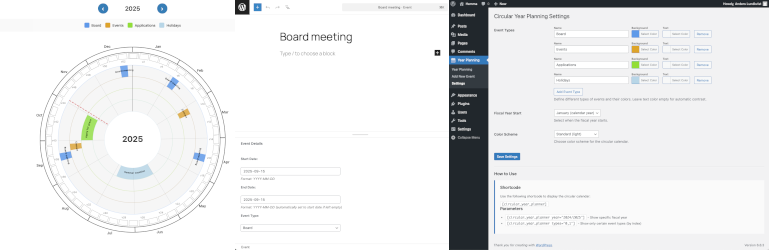
Planly 是一款 WordPress 外掛,能以圓形日曆的形式視覺化財政年度及活動,適合希望以吸引人的方式規劃及傳達活動的組織和企業。
【主要功能】
• 圓形日曆視圖:以同心圓顯示月份、週及活動
• 彈性事件管理:可自訂事件類型及顏色
• 行政設定:管理事件類型及財政年度
• 簡易整合:使用短碼顯示日曆
• REST API:支援外部整合
• 響應式設計:適用於所有裝置
外掛標籤
開發者團隊
原文外掛簡介
Circular Year Planner is a WordPress plugin that visualizes fiscal years and events in a circular calendar. Perfect for organizations and businesses that want to plan and communicate their activities in a visually appealing way.
Features
Circular Calendar View – Year’s months, weeks and events in concentric rings
Flexible Event Management – Customizable event types with individual colors
Administrative Settings – Manage event types and fiscal years
Easy Integration – Use shortcode to display the calendar
REST API – For external integrations
Responsive Design – Works on all devices
Dynamic Scaling – Rings automatically adjust for 6+ event types
Month Dividers – Visual guide lines for better readability
Usage
Use shortcode in any page or post:
[planly]
Parameters:
year – Display specific fiscal year, e.g. [planly year="2024/2025"]
types – Display only certain event types (index), e.g. [planly types="0,1"]
width and height – Customize size, e.g. [planly width="1000" height="1000"]
Technical Information
Uses WordPress built-in jQuery
SVG-based rendering for sharp graphics
REST API endpoints for external integrations
Follows WordPress Coding Standards
Additional Info
For support and questions, visit the plugin page on GitHub: https://github.com/andlun57/year-planning