內容簡介
檢查前台(Checkfront)是一個為您的導覽、活動、租賃或住宿業務設計的網上預訂系統,有助於簡化預訂過程和增加您的業務量,讓您管理可用性和庫存、了解您的顧客、自動化通訊、獲取有價值的洞見,以及計劃您的日常業務。
您的客人可以從他們方便的時間直接在您的 WordPress 網站上查看可用性和預訂。他們可以輕鬆地提交他們的詳細信息、簽署數碼豁免書和文件、查看他們的預訂記錄、並通過桌面或手機裝置進行在線支付。
此外掛程式為您的現有 WordPress 主題提供強大的實時預訂界面,通過將您的 Checkfront 帳戶連接到您的 WordPress 網站。
主要功能包括:
在您的網站內實時顯示可用性,線上接受預訂和付款處理
自動向客戶、員工和合作夥伴發送確認信、提醒、發票和定制跟進
使用 Guest Form 收集每個參與者的信息,並通過 Daily Agenda 預先計劃您的日常業務
超過50種額外的集成包括MailChimp、Zoho、Google Apps、Xero和Twilio SMS等
創建客戶帳戶,使客戶能夠查看預訂歷史記錄、存儲自動填充詳細信息和(可選地)修改未來預訂
與 Viator、Expedia 和 TripAdvisor 等 OTA 同步您的可用性
詳細的分析和報告
使用 Partner 帳戶跟踪第三方推薦和佣金
支援多種語言和國際貨幣
多閘道付款處理,包括 Stripe、Square、Paypal、Authorize.net、SagePay 等幾十種
支援 SSL,使客戶在付款時保持在您的網站上
支援 WordPress 中的短代碼或自定義主題頁面。
定制的啟動會議和全天候的支援團隊
不收取佣金!
Checkfront 與 WordPress 無縫集成,不會強制客戶離開外部網站進行預訂或查看可用性。Checkfront 會使消費者數據保持安全並與 WordPress 分離。
WordPress 的 CMS 功能與 Checkfront 後端的威力、靈活性和安全性相結合,成為了一個行業領先的預訂管理系統。
安裝:
通過「插件/添加新項目」進入您的WordPress管理頁面,在搜尋欄中輸入「Checkfront」,安裝 Checkfront 預訂程式外掛程式(或)如果您進行手動安裝,請下載外掛程式,並解壓縮到您的 /wp-content/plugins/ 目錄之下
在 WordPress 中啟用該外掛程式:
配置:
建立您的 Checkfront 帳戶
設置您在 Checkfront 上的庫存並進行配置
啟用 WordPress 中的 Checkfront 預訂查詢小工具
創建一篇 WordPress 文章,使用短代碼:[checkfront] 嵌入 Checkfront 預訂系統(參見 p
外掛標籤
開發者團隊
② 後台搜尋「Checkfront Online Booking System」→ 直接安裝(推薦)
原文外掛簡介
Checkfront is an Online Booking System designed for your tour, activity, rental or accommodation business. Checkfront helps streamline the reservation process and grow your business by allowing you to manage availability and inventory, learn about your customers, automate communications, access valuable insights, and plan your day to day operations.
Your guests can view your availability and book directly from your WordPress website at whatever time suits them. They can easily submit their details, sign digital waivers and documents, review their booking history, and make an online payment — all from a desktop or mobile device.
This plugin provides a powerful real-time booking interface that blends in with your existing WordPress theme by connecting your Checkfront account to your WordPress site.
Features include
Display real time availability, take reservations, bookings and process payments online within your website
Automatically send confirmations, alerts, invoices, and customized follow-up to customers, staff and partners
Collect information for each participant with Guest Form and plan your day in advance with the Daily Agenda
Over 50 additional integrations including MailChimp, Zoho, Google Apps, Xero, and Twilio SMS
Create Customer Accounts for customers to review booking history, store autofill details and (optionally) modify future bookings from a personal login
Sync your availability with OTAs like Viator, Expedia and TripAdvisor
Detailed analytics and reporting
Track third-party referrals and commissions with Partner Accounts
Responsive, mobile-friendly booking process and back-end
Support for multiple languages and international currencies
Multi-gateway payment processing including Stripe, Square, Paypal, Authorize.net, SagePay & dozens more
SSL support keeps the customer on your website while making payment
Support for shortcodes, or custom theme pages in WordPress.
Tailored onboarding session and a 24/7 support team
No commissions!
Checkfront integrates seamlessly into WordPress and does not force customers off to an external website to process bookings or view availability. Checkfront keeps consumer data secure and separate from WordPress.
The combined CMS features of WordPress with the power, flexibility and security of the Checkfront back-end make for an industry leading booking management system.
See Checkfront and WordPress in action here.
Installation
Install the Checkfront Booking plugin in your WordPress admin by going to ‘Plugins / Add New’ and searching for ‘Checkfront’, (or) If doing a manual install, download the plugin and unzip into your /wp-content/plugins/ directory
Activate the the plugin through the ‘Plugins’ menu in WordPress
Configuration
Create your Checkfront account
Setup you inventory and configure your account on Checkfront
Enable the Checkfront booking search widget in WordPress
Create a WordPress Post and embed the Checkfront booking system by using the shortcode: [checkfront] (see the plugin for more options to pass to the shortcode)
If you wish to use a theme template instead of a shortcode, see the checkfront-custom-temp late-sample.php provided with the plugin
Frequently Asked Questions
Checkfront WordPress FAQ
General Checkfront FAQ
Additional Support and Documenation
Screenshots
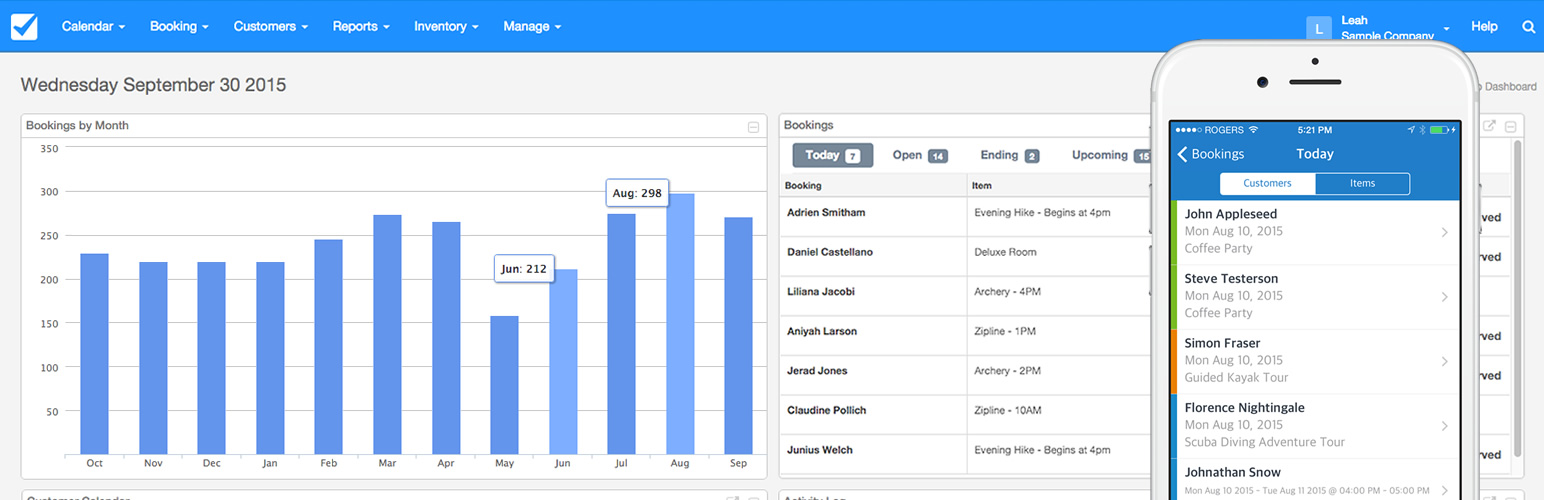
Checkfront Dashboard
WordPress code generator within Checkfront
Booking Interface integrated into WordPress
Booking Interface within Checkfront
Checkfront Guest Form