
前言介紹
- 這款 WordPress 外掛「ChatLink for WooCommerce」是 2026-02-08 上架。
- 目前尚無安裝啟用數,是個很新的外掛。如有要安裝使用,建議多測試確保功能沒問題!
- 上一次更新是 2026-02-09,距離現在已有 17 天。
- 外掛最低要求 WordPress 5.8 以上版本才可以安裝。
- 外掛要求網站主機運作至少需要 PHP 版本 7.4 以上。
- 尚未有人給過這款外掛評分。
- 還沒有人在論壇上發問,可能目前使用數不多,還沒有什麼大問題。
外掛協作開發者
外掛標籤
chat | contact | inquiry | whatsapp | woocommerce |
內容簡介
**總結:**
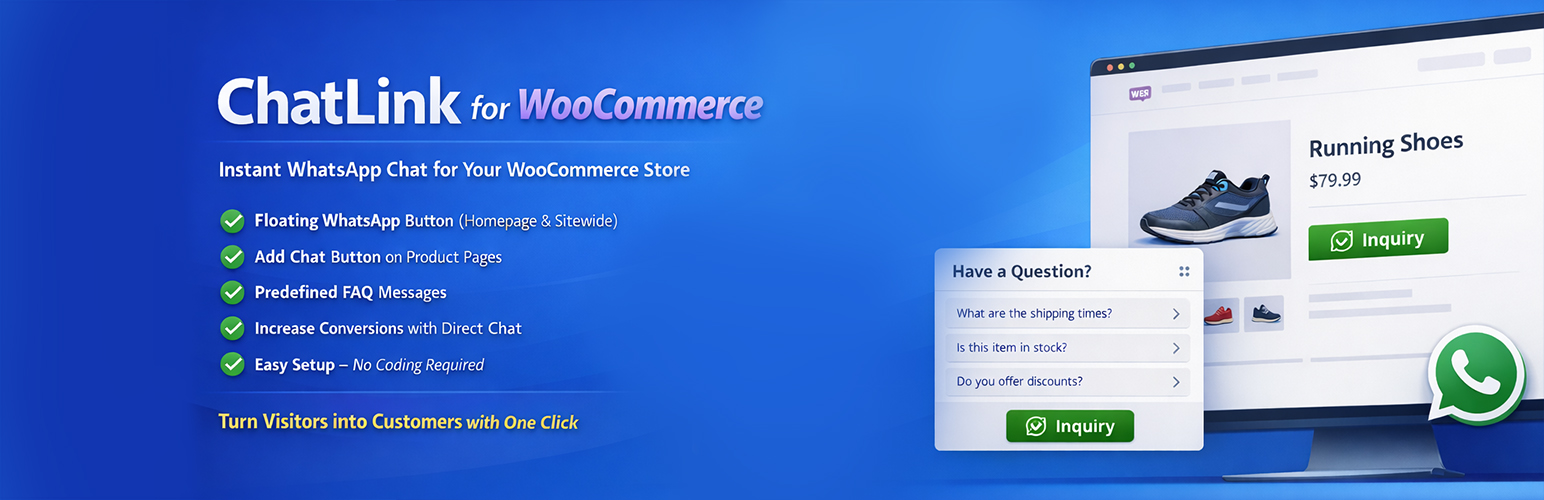
ChatLink for WooCommerce 將可自訂的 WhatsApp 浮動按鈕添加到您的網站,讓訪客可以在一次點擊中開始聊天。
這個按鈕可以直接開啟 WhatsApp ,或者顯示一個帶有歡迎信息和快速常見問題解答的小型聊天彈出窗口。
對於 WooCommerce 商店,ChatLink 可以將產品轉變為 「通過 WhatsApp查詢」 項目而不是使用普通的購物車流程。
您可以選擇隱藏加入購物車按鈕、價格,甚至重定向購物車/結帳頁,使一切都轉為基於對話的查詢。
包含短代碼,使您可以在內容、落地頁或小部件中放置 WhatsApp 按鈕。
該插件輕巧,使用標準的 WordPress API,並設計為與大多數主題兼容。
**詳細功能:**
1. 浮動按鈕和聊天彈出窗口
- 選擇按鈕位置(底部右側,底部左側,頂部右側,頂部左側)。
- 調整 X/Y 偏移和按鈕尺寸以便與您的版面匹配。
- 配置主要顏色、工具提示文字和入場動畫(無、彈跳、脈脈)。
- 啟用帶有:
- 頁眉標題和副標題
- 歡迎信息
- 「開始聊天」按鈕文本
- 可選的FAQ部分在彈出窗口中有無限問題/答案對。
2. 可視性控件
- “在所有頁面上顯示” 模式—在整個網站上顯示按鈕。
- “僅在特定頁面上顯示” 模式—選擇要顯示按鈕的具體頁面。
- 設備篩選器以僅在桌面、僅在移動設備或兩者上顯示。
3. WooCommerce查詢模式
- 在產品頁面上啟用 WhatsApp 查詢按鈕。
- 使用標籤自定義按鈕標籤和 WhatsApp 消息模板:
- {product}、{price}、{quantity}、{url}、{site}
- 額外選項:
- 隱藏加入購物車和立即購買按鈕
- 隱藏產品價格
- 隱藏/重定向購物車頁
- 隱藏/重定向結帳頁
- 在商店/分類存檔中隱藏加入購物車和/或價格
4. 短指令
- ChatLink 註冊了兩個相等的短碼:
- [chatlink]
- [whatsapp_button]
- 支持的屬性(全部可選):...
問題與答案:
1. ChatLink for WooCommerce 添加了什麼到您的網站上,使訪客可以在一次點擊中開始聊天?
- ChatLink for WooCommerce 添加了可自訂的 WhatsApp 浮動按鈕。
2. ChatLink 如何處理 WooCommerce 商店中的產品查詢?
- ChatLink 可將產品轉變為 「通過 WhatsApp查詢」 項目,與普通的購物車流程不同。
3. ChatLink 支援哪些定制選項以使一切轉為基於對話的查詢?
- 可選的隱藏加入購物車按鈕、價格,以及重定向購物車/結帳頁。
4. ChatLink 的短指令類型是什麼,這些短指令可以投放在哪些地方?
- ChatLink 的短指令分為兩種類型:[chatlink] 和 [whatsapp_button],可以放置在內容、落地頁或小部件中。
原文外掛簡介
ChatLink for WooCommerce adds a customizable WhatsApp floating button to your site so visitors can start a chat in a single click.
The button can open WhatsApp directly or display a small chat popup with a welcome message and quick FAQ replies.
For WooCommerce stores, ChatLink can turn products into “inquiry by WhatsApp” items instead of using the normal cart flow.
You can optionally hide add-to-cart buttons, prices, and even redirect cart/checkout to keep everything as conversation-based inquiries.
Shortcodes are included so you can drop WhatsApp buttons anywhere in your content, landing pages, or widgets.
The plugin is lightweight, uses standard WordPress APIs, and is designed to work with most themes.
Key Features
Floating WhatsApp button with position, size, color, tooltip, and animation options.
Optional chat popup with header, welcome message, and “Start Chat” button.
FAQ section inside the popup with clickable questions that pre-fill WhatsApp messages.
Device targeting: show on all devices, desktop only, or mobile only.
Visibility rules: show on all pages or only on selected pages.
WooCommerce product inquiry button with customizable label and message template.
Options to hide add-to-cart, buy-now, prices, cart page, and checkout page.
Separate controls for shop/archive pages (hide add-to-cart and/or prices).
Custom button styles for WooCommerce (background, text color, radius, solid/outline).
Shortcodes for inline WhatsApp buttons anywhere in posts, pages, or widgets.
Settings export/import and full reset to defaults.
Features in Detail
Floating Button & Chat Popup
Choose button position (bottom-right, bottom-left, top-right, top-left).
Adjust X/Y offsets and button size so it fits your layout.
Configure primary color, tooltip text, and entrance animation (none, bounce, pulse).
Enable a chat popup with:
Header title and subtitle
Welcome message
“Start chat” button text
Custom header background color
Optional FAQ section inside the popup with unlimited question/answer pairs.
Visibility Controls
Mode “Show on all pages” – display the button site-wide.
Mode “Show only on specific pages” – select individual pages where the button will appear.
Device filter to show on desktop only, mobile only, or both.
WooCommerce Inquiry Mode
Enable a WhatsApp inquiry button on product pages.
Customize the button label and WhatsApp message template using tags:
{product}, {price}, {quantity}, {url}, {site}
Optionally:
Hide add-to-cart and buy-now buttons
Hide product prices
Hide/redirect Cart page
Hide/redirect Checkout page
Hide add-to-cart and prices on shop/category archives
Choose where to place the inquiry button on the single product page:
Before add-to-cart
After add-to-cart
After price
After product summary
Optional custom quantity field for the WhatsApp inquiry when add-to-cart is hidden.
Shortcodes
ChatLink registers two equivalent shortcodes:
[chatlink]
[whatsapp_button]
Supported attributes (all optional):
phone – Override the global phone number.
message – Custom message text (tags like {product}, {url}, {site} are supported).
label – Button text. Default: Chat on WhatsApp.
style – button, link, or icon.
size – small, medium, or large.
align – left, center, right, or inline.
color – Button or link color (hex).
text_color – Text color (hex).
radius – Border radius in pixels.
icon – yes or no to show/hide the WhatsApp icon.
Examples:
[chatlink]
[chatlink label="Talk to Support" color="#000000" radius="30"]
[chatlink style="link" color="#25D366" label="Click here to chat"]
[whatsapp_button size="large" align="center" message="I need help with this page"]
各版本下載點
- 方法一:點下方版本號的連結下載 ZIP 檔案後,登入網站後台左側選單「外掛」的「安裝外掛」,然後選擇上方的「上傳外掛」,把下載回去的 ZIP 外掛打包檔案上傳上去安裝與啟用。
- 方法二:透過「安裝外掛」的畫面右方搜尋功能,搜尋外掛名稱「ChatLink for WooCommerce」來進行安裝。
(建議使用方法二,確保安裝的版本符合當前運作的 WordPress 環境。
延伸相關外掛(你可能也想知道)
 Flamingo 》Flamingo 是一款訊息儲存外掛程式,最初是為了 Contact Form 7 設計,因為 Contact Form 7 並不會儲存提交的訊息。, 啟用該外掛後,您可以在 WordPress 管理...。
 Contact Form 7 add confirm 》“Contact Form 7 add confirm” 可以為 “Contact Form 7” 增加確認步驟。, “Contact Form 7 add confirm” 可以為 “...。
 WPZOOM Forms – Drag & Drop Contact Form Builder for WordPress 》網站 WordPress 的外掛 WPZOOM Forms,使用 Gutenberg 編輯器快速製作網站聯絡表單的最佳插件。它具有簡單易用的介面和豐富的自訂選項,適合初學者和高級使用...。
 Sticky Side Buttons 》這個簡單的按鈕創建工具讓您可以創建一個或多個浮動按鈕,當使用者滾動時,這些按鈕會固定在網站的側邊。, 它可以用來黏貼以下資訊:, , 電話號碼, 電子郵件...。
 Simple Basic Contact Form 》Simple Basic Contact Form 是一個乾淨、安全、可直接套用的 WordPress 聯絡表單外掛程式。 SBCF 精簡卻彈性十足,提供清晰的程式碼、穩定表現和易用性。沒有...。
 Contact Form Email 》Contact Form to Email的特色功能包括:, , ► 電子郵件發送和通知, ► 儲存訊息到資料庫中, ► 匯出到Excel/CSV檔案, ► 列印消息清單, ► 可視化拖放表單生成器,...。
 Rich Contact Widget 》這個聯絡小工具附帶有微資料和微格式的標記,以便搜尋引擎可以在他們的搜尋結果中使用它。它可以幫助在搜尋結果中顯示您的業務或個人聯絡資訊,甚至包含您的...。
 Contact Form Clean and Simple 》一個簡潔明瞭的 AJAX 聯絡表單,搭配 Google reCAPTCHA、Twitter Bootstrap 標記和 Akismet 垃圾郵件篩選功能。, , , 簡潔:所有使用者輸入均被剝離,以避免...。
 VS Contact Form 》關於, 這個外掛程式是一個輕量級的自訂聯絡表單生成器。, 在頁面中加入縮略碼 [contact] 或使用小工具來顯示您的表單。, 表單包含姓名、電子郵件、主旨和訊息...。
 Pojo Forms 》請注意:本外掛僅適用於Pojo Framework的使用者。, Pojo Forms是針對使用Pojo Framework的WordPress網站最終表單創建解決方案。它允許您通過拖放界面輕鬆快速...。
 Database for Contact Form 7 》Contact Form 7 數據庫外掛是一個生產力附加元件,可將所有表單提交保存到您的數據庫中。, DEMO, , 前端演示, 填寫提交詳情進行測試, 後端演示, 登入 WordPre...。
 Call Now Icon Animate 》這個外掛可以做什麼?, 這個外掛會在手機螢幕右下角放置一個 Call Now Icon Animate 圖示,只會顯示給您的手機訪客。因為手機訪客已經拿著手機,他們只需要輕...。
 Awesome Contact Form7 for Elementor 》這個 WordPress 外掛為 Elementor 專用設計,可與 Contact Form7 一起使用,提供了靚麗的聯絡表單模板。, 影片教學連結:, , 只需 5 分鐘,使用 Awesome Cont...。
 Form Builder | Create Responsive Contact Forms 》Form Builder 是一款響應式的簡單易用的外掛程式,可創建具有高級功能的表單。支援與其他服務的整合,並允許您存儲表單提交。, 使用簡單的拖放表單編輯器創建...。
 Confirm Plus Contact Form 7 》“Confirm Plus Contact Form 7” 是針對 “Contact Form 7” 的一個外掛擴充,允許添加確認畫面。, 在大多數情況下,不需要進行複雜的...。