
內容簡介
**總結:**
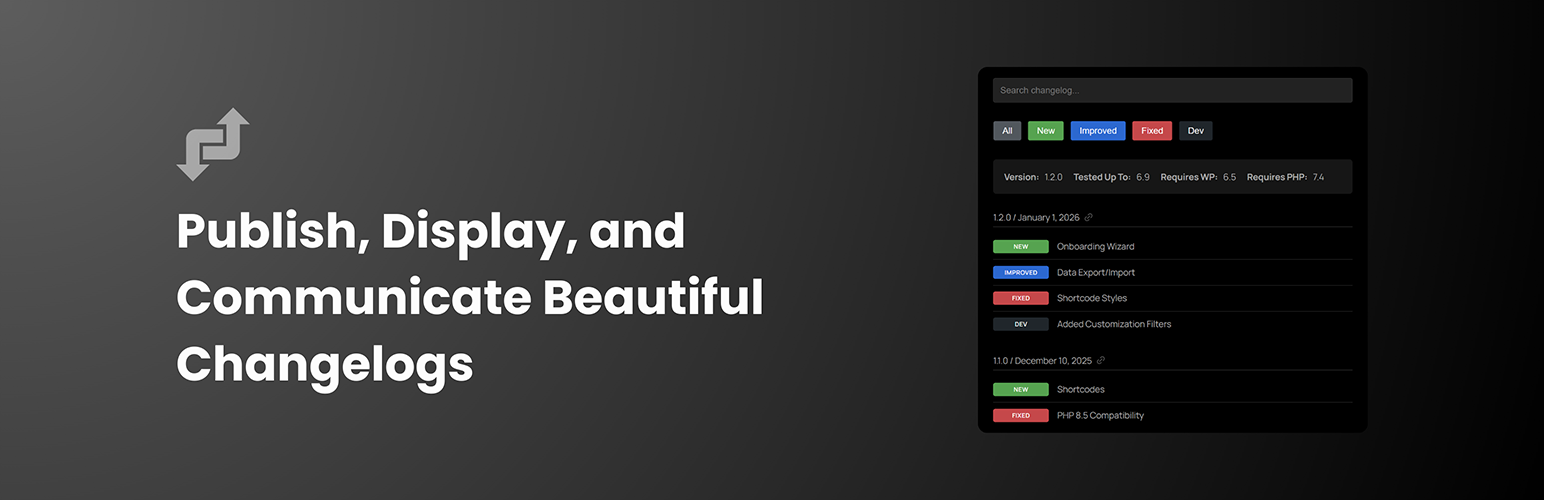
ChangelogWP為你的WordPress產品的變更日誌創建和顯示提供新方法,讓你輕鬆展示新功能、修復以及改進之處,同時通過美麗的、色彩編碼的徽章使你的更新更加突出。
**問題與答案:**
1. 為什麼需要專業的變更日誌外掛?
- 解答:對於插件開發人員、主題創作者或管理多個WordPress產品的機構,維護清晰、視覺上吸引人的變更日誌是至關重要的,可建立用戶信任、降低支援請求、提高用戶參與度以及提供REST API端點以進行自動化和交互操作。
2. 這款變更日誌外掛如何解決專業變更日誌顯示的問題?
- 解答:通過提供專用的文章類型、美麗的徽章系統和靈活的顯示選項,這款變更日誌外掛解決了不專業變更日誌顯示的問題,同時還使用你已經熟悉的WordPress readme.txt格式。
3. ChangelogWP.com是什麼?
- 解答:ChangelogWP.com是一個集中式變更日誌服務,可以增強你的變更日誌工作流程。產品擁有者可以使用本外掛將他們的變更日誌提交到ChangelogWP.com,在那裡用戶可以發現並訂閱你的產品更新。對於網站所有者,他們可以在ChangelogWP.com上訂閱任何產品的變更日誌,當新版本發布時會收到電子郵件通知,保持對於所有喜愛的WordPress插件和主題的更新、新功能、錯誤修復和安全補丁的瞭解,所有資訊都在一個地方。
外掛標籤
開發者團隊
② 後台搜尋「Changelog as a Service – Publish, Display, and Communicate Beautiful Changelogs」→ 直接安裝(推薦)
原文外掛簡介
Are you tired of managing changelogs manually or using plain text that looks unprofessional? ChangelogWP transforms how you create and display changelogs for your WordPress products, making it easy to show users what’s new, what’s fixed, and what’s improved—all with beautiful, color-coded badges that make your updates stand out.
Why You Need a Professional Changelog Plugin
Whether you’re a plugin developer, theme creator, or agency managing multiple WordPress products, maintaining clear, visually appealing changelogs is essential for:
* Building user trust by transparently showing what’s changed
* Reducing support requests with clear update documentation
* Increasing user engagement with searchable, filterable changelogs
* Providing REST API endpoints for automation and syndication
Our changelog plugin solves the problem of unprofessional changelog displays by giving you a dedicated post type, beautiful badge system, and flexible display options—all while using the familiar WordPress readme.txt format you already know.
🌐 Optional: ChangelogWP.com – Centralized Changelog Service & Email Notifications
This plugin works perfectly on its own, but you can also optionally use it with ChangelogWP.com—a centralized changelog service that enhances your changelog workflow:
For Product Owners: Submit your changelogs to ChangelogWP.com using this plugin. Your changelogs will be available in a centralized directory where users can discover and subscribe to your product updates. Add a “Get notified of updates” signup link to your embedded changelogs so visitors can easily subscribe.
For Site Owners: Subscribe to any product’s changelog on ChangelogWP.com to receive email notifications whenever new versions are released. Stay informed about updates, new features, bug fixes, and security patches for all your favorite WordPress plugins and themes—all in one place.
Whether you use ChangelogWP.com or not, this plugin provides everything you need to create and display beautiful changelogs on your WordPress site.
What Makes This Changelog Plugin Different
Unlike basic changelog solutions or manual HTML, our changelog plugin provides:
Professional Display with Color-Coded Badges
Automatically detect and display badges for Added (green), Fixed (orange), Improved (blue), Security (red), and more. Each badge is color-coded and customizable, making your changelog visually appealing and easy to scan.
Flexible Display Options
Display your changelog anywhere using shortcodes or the Gutenberg block. Customize heading levels, order (newest/oldest first), enable search and filtering, and control which versions to show—all without touching code.
Easy Content Creation
Use the familiar WordPress readme.txt format you already know. No HTML required, just simple text with version headers and bullet points. The plugin automatically formats everything beautifully.
Developer-Friendly
Full REST API support for automation and syndication. Integrates with Easy Digital Downloads for seamless product changelog management. Extensive filter and action hooks for complete customization.
Key Features
Dedicated Changelog Post Type – Manage all your changelogs in one place
Color-Coded Badge System – Automatic badges for Added, Fixed, Improved, Security, Dev, Deprecated, Removed, and Tweak
Fully Customizable Badges – Customize colors, labels, emojis, and create unlimited custom badge types
Shortcode & Gutenberg Block – Display changelogs anywhere with [changelog_service] or use the modern block editor
WordPress.org Plugin Support – Display changelogs from any WordPress.org plugin by specifying its slug, with automatic daily caching
Search & Filter Functionality – Let users search changelog content and filter by badge type
REST API Endpoints – JSON endpoints for changelog syndication and automation
EDD Integration – Works seamlessly with Easy Digital Downloads products
Version Control Meta Fields – Track version, tested up to, requires WordPress/PHP, and homepage
Copy Link Buttons – One-click copy links to specific versions (always enabled on hover)
Signup Links – Let users subscribe to changelog updates via ChangelogWP.com with one click
Responsive & Accessible – Full keyboard navigation, ARIA labels, and screen reader support
Who Is This Plugin For?
WordPress Plugin Developers
Maintain professional changelogs for your free and premium plugins. Display updates on your website with beautiful badges that build user trust.
WordPress Theme Developers
Show your theme updates clearly with searchable, filterable changelogs. Let users see exactly what changed in each version.
Product Managers
Keep users informed about updates, new features, bug fixes, and security patches with transparent, professional changelog displays.
Credits
Badge system inspired by EDD Changelog Badges by Very Good Plugins.
Emoji picker powered by emoji-picker-element by Nolan Lawson (Apache-2.0 license).