內容簡介
Business Essentials for Contact Form 7 將您的 Contact Form 7 轉變為完整的商業解決方案,提供專業功能以接受付款、抵擋垃圾郵件、捕捉潛在客戶、安排約會及創建精美表單,簡化多個外掛的複雜性。
【主要功能】
• 支援 PayPal 和 Stripe 付款
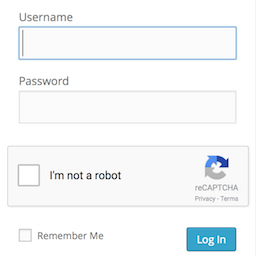
• 防止垃圾郵件的 Google reCAPTCHA
• 儲存表單提交資料至資料庫
• 安排約會的日期和時間選擇器
• 自訂感謝頁面和 URL 轉向
• 美觀的 Material Design 樣式
外掛標籤
開發者團隊
② 後台搜尋「Business Essentials for Contact Form 7」→ 直接安裝(推薦)
原文外掛簡介
Overview
Transform your Contact Form 7 into a complete business solution. Business Essentials adds the professional features you need to accept payments, fight spam, capture leads, schedule appointments, and create stunning forms – all without the complexity of multiple plugins.
The all-in-one toolkit designed for growing businesses. Choose from seven powerful modules and activate only what you need. No bloat, no confusion – just the features that matter to your business, working seamlessly with Contact Form 7.
Whether you’re taking online payments, protecting against spam bots, storing customer submissions, or booking appointments, Business Essentials gives you enterprise-level functionality with the simplicity Contact Form 7 users love.
Available Modules
Redirect & Thank You Page – Redirect users to a URL or display a custom thank you message after form submission
PayPal & Stripe Payments – Accept payments through your forms using PayPal or Stripe payment gateways
Google reCAPTCHA v2 – Protect your forms from spam with Google reCAPTCHA verification
Country & Phone Fields – Add country dropdowns and international phone number fields with dial codes
Database Submissions – Store all form submissions in your database and export to CSV
Bookings & Appointments – Add date and time picker fields for appointment scheduling
Material Design – Apply beautiful Material Design styling to your Contact Form 7 forms
Each Contact Form 7 contact form has its own settings for each enabled module.
Thank You Page Feature
When a contact form is set to use the Thank You Page and the user submits the form, it will send the Contact Form 7 email as usual, then redirect the user to the Thank You Page. This Thank You Page is not an actual “page” on your site, meaning form-specific data can be shown on this page without being visible to other users or indexed by search engines.
URL Redirect Feature
When a contact form is set to redirect to a URL and the user submits the form, it will send the Contact Form 7 email as usual, then redirect the user to the specified URL.
PayPal & Stripe Payments
Accept one-time payments through PayPal or Stripe directly from your contact forms. When a user submits a form with payments enabled, the email is sent as usual, then the user is redirected to complete payment. All payments are tracked in a dedicated admin area where you can view transaction status, amounts, and payment details.
Google reCAPTCHA v2
Protect your forms from spam with Google reCAPTCHA v2 verification. When enabled for a form, users must complete the reCAPTCHA challenge before submitting. Configure your site key and secret key in the settings, then enable reCAPTCHA on individual forms. Customize the theme (light or dark) and position (above or below submit button).
Country & Phone Fields
Add country dropdown and international phone number fields to your forms. The country field displays a searchable dropdown with country flags. The phone field includes a dial code selector that automatically formats phone numbers with the correct international prefix. Configure default countries, include/exclude specific countries, and set preferred countries to appear at the top of the list.
Database Submissions
Store all form submissions in your WordPress database for easy access and management. View submissions organized by form, search through entries, and export data to CSV. Each submission captures all form fields along with the submission date. Delete individual entries or export entire datasets for reporting.
Bookings & Appointments
Add date and time picker fields to your forms for appointment scheduling. Configure available days and hours, set slot durations, and define minimum advance booking time. The system prevents double-bookings by tracking confirmed appointments. Set unavailable dates for holidays or closures.
Material Design Theme
Apply beautiful Material Design styling to your Contact Form 7 forms. Enable per-form and customize the primary color, background color, and vertical spacing. Optional floating labels provide a modern input experience. The styling is applied via CSS classes so it won’t conflict with your theme.
List of Features
Modular system – enable only the features you need
Each Contact Form can redirect to its own URL
Each Contact Form can redirect to a Thank You Page
Accept PayPal and Stripe payments
Google reCAPTCHA v2 spam protection
Country dropdown and international phone fields
Database storage with CSV export
Booking date and time pickers
Material Design form styling
Support
If you have any problems, questions, or issues about this plugin then please create a support request and we will get back to you quickly.
WPPlugin LLC is based in Boulder, Colorado. You can visit WP Plugin’s website at wpplugin.org. Various trademarks held by their respective owners.